Posted 14 January 2019, 1:04 am EST
Hi,
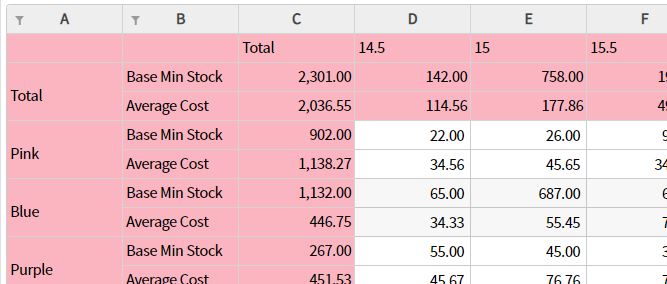
You may achieve the required functionality in the following steps:
• Hide the column header by setting ‘headersVisibility’ property to ‘wijmo.grid.HeadersVisibility.Row’
• Use formatItem event to add filter icons in the required row.
// format filter icons in 1st row
flexSheet.formatItem.addHandler((s,e)=>{
  let html = `<button class="wj-btn wj-btn-glyph wj-right wj-elem-filter" type="button" tabindex="-1">
      <span class="wj-glyph-filter"></span>
    </button>`;
  if(e.panel.cellType != wijmo.grid.CellType.Cell || e.row != 0){
    return;
  }
  e.cell.innerHTML = '';
  e.cell.innerText = e.panel.columns[e.col].header;
  //  left align
  wijmo.addClass(e.cell, 'left-align-text');
  wijmo.createElement(html, e.cell);

  // is filter applied
  let sheetFilter = flexSheet.filter;
  let colFilter = sheetFilter.getColumnFilter(e.panel.columns[e.col]);
  if(colFilter.isActive){
    wijmo.addClass(e.cell, 'wj-filter-on');
  }
});
• Add click handler to detect if our filter icon were clicked and call flexSheet.filter.editColumnFilter() method to display the filter editor.
// handle click and open filter dialog
flexSheet.hostElement.addEventListener('click', (e)=>{
  if(!wijmo.hasClass(e.target, 'wj-elem-filter') && !wijmo.hasClass(e.target.parentElement, 'wj-elem-filter')){
    // filter button not clicked
    return;
  }

  let htInfo = flexSheet.hitTest(e);
  let sheetFilter = flexSheet.filter;
  // show filter editor for column
  sheetFilter.editColumnFilter(htInfo.panel.columns[htInfo.col], htInfo);
});
You may also refer to the following sample demonstrating the same: https://stackblitz.com/edit/js-cmaffm?file=index.js
~Sharad