
How to prevent FlexGrid from ending cell edit on click outside input field

Posted by: kayvanbree on 18 May 2018, 10:48 am EST

    • Post Options:
    • Link

    Posted 18 May 2018, 10:48 am EST - Updated 3 October 2022, 8:30 pm EST

    Hello, I tried to create a pretty complicated search/selection dropdown within a FlexGrid cell with another FlexGrid inside. We stumbled upon trouble when clicks were registered in the capturing fase, causing the FlexGrid underneath our dropdown to get a row selected and our SearchGrid not getting any click events.

    Now, after a day of re-creating the Search dropdown in Angular Material CDK, I can’t click on it without FlexGrid ending edit mode for the cell. This means that if I double click a row in the SearchGrid, cell edit ends before the SearchGrid can do anything with the result. The dropdown closes and Wijmo does nothing.
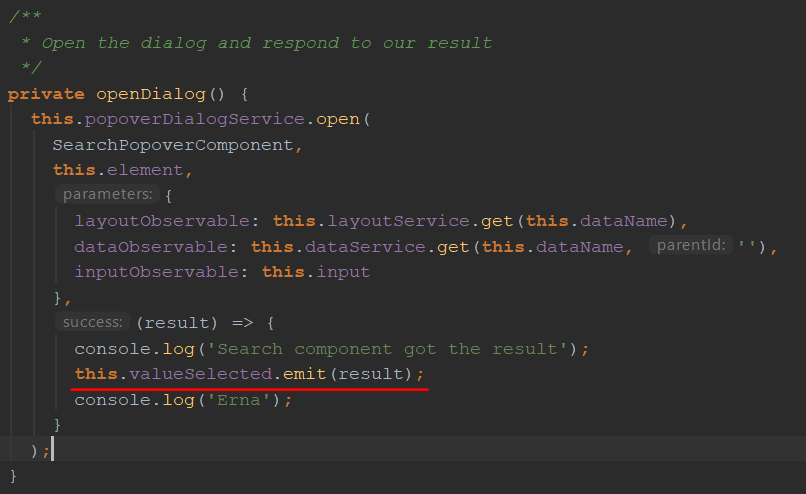
    In the code above, you can see a method in our component. This component is placed within the cell like this:

    The console logs within the success callback in openDialog actually still work, but the valueSelected event never reaches our grid-view class (which contains the flex-grid).

    Is there anything we can do to prevent Wijmo from ending cell edit when the user clicks on a certain HTML element?

    Note: Angular Material CDK overlays are not placed within the cell (that’s actually the root of the problem here)

  • Posted 21 May 2018, 5:55 am EST

    Hi,

    You may handle cellEditEnding event and cancel it if condition is not fulfilled. And set stayInEditMode property to true.

    Please use the following code:

    cellEditEnding(e: wjGrid.CellEditEndingEventArgs){
    	if(condition){
    		e.cancel=true;
    		e.stayInEditMode=true;
    	}
    }
    

    It should work!

    ~Manish

  • Posted 23 May 2018, 4:03 am EST

    This works, but now I stay in edit mode after I close my dialog (expected behaviour). Is there a way to trigger onCellEditEnding when I close my dialog?

  • Posted 24 May 2018, 9:56 am EST

    Hi,

    You may trigger cellEditEnding event by calling onCellEditEnding method.

    You may also use finishEditing method to complete editing.

    Please refer to the following code snippet:

    grid.onCellEditEnding(cellRange);
    /* or */
    grid.finishEditing(true);
    

    ~Manish

Need extra support?

Upgrade your support plan and get personal unlimited phone support with our customer engagement team

Learn More

Forum Channels