Posted 25 October 2018, 12:36 pm EST
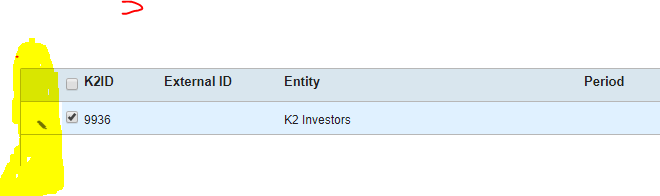
The first column on the wijmo grid has nothing in it and I would like to hide it. How can I do this?
Forums Home / Wijmo / General Discussion
Posted by: dharric on 25 October 2018, 12:36 pm EST

dharric
Posted 25 October 2018, 12:36 pm EST
The first column on the wijmo grid has nothing in it and I would like to hide it. How can I do this?
dharric
Posted 25 October 2018, 12:39 pm EST - Updated 3 October 2022, 8:19 pm EST

sharad.tomer

Posted 26 October 2018, 2:28 am EST
You may set the value of headersVisibility property to ‘wjcGrid.HeadersVisibilty.Column’ to show only column headers.
import * as WjGrid from 'wijmo/wijmo.react.grid';
import * as wjcGrid from 'wijmo/wijmo.grid';
//in render()
<WjGrid.FlexGrid
          itemsSource={this.state.data}
          headersVisibility={wjcGrid.HeadersVisibility.Column}>
 </WjGrid.FlexGrid>
You may also refer to the following sample: https://stackblitz.com/edit/react-aa2zk6?file=index.js
A list of available value for headersVisibility can be found here: https://demos.wijmo.com/5/Angular/WijmoHelp/WijmoHelp/topic/wijmo.grid.HeadersVisibility.Enum.html
~Sharad