Flexsheet: Hierarchical Data/ Tree View structure

Posted by: sasmita-swain2014 on 14 September 2017, 12:01 pm EST

    • Post Options:
    • Link

    Posted 14 September 2017, 12:01 pm EST

    Hi,

    We are using Flexsheet with angular 2 and need to render Hierarchical structure of Data from service. I have came across this below fiddle example using child-items-path property. Is it possible to render this below nested array structure in flexsheet Angular 2:

    the ‘engine’ subsection has different properties than parent section.

    { name: ‘car’, price: 25445, qty: 1,items: [

    { name: ‘wheel’, price: 342, qty: 4 },

    { name: ‘engine’,items: [

    {col1:‘’,col2:‘’,col3,‘’,col4:‘’ },

    { col1:‘’,col2:‘’,col3,‘’,col4:‘’ },

    ] },

    { name: ‘seat’, price: 542, qty: 4 },

    { name: ‘chassis’, price: 4342, qty: 1 }

    ] }

    http://fiddle.jshell.net/Wijmo5/n3715avm/

    A Sample code of Flexsheet(Angular 2) using above array structure will be helpful.

    Thanks,

    Sasmita

  • Posted 14 September 2017, 12:01 pm EST

    Hello Sasmita,

    Since a column can bind to single property, you need to show data in different column.

    For showing hierarchical data in FlexSheet, set childItemsPath property at FlexSheet level.

    As per sample data, you have different property in child object, you need to add column in grid by passing grid instance to sheet object.

    For your reference, please see the attached sample that implements the same.

    *Please download required packages before running the sample using npm install command.

    Thanks,

    Manish Kumar Gupta

    2017/05/FlexSheet_hierarchical.zip

  • Posted 14 September 2017, 12:01 pm EST

    Hi Manish,

    Thanks for the sample. Is it always read only or is it possible to make it editable?

    and one more requirement: is there any way to make column headers in subsection/child level different from the main section headers.

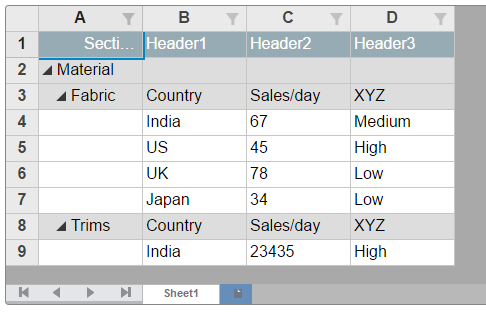
    i have modified the sample and in the fabric subsection row, can we put different column headers?

    Please find the attached modified app component file.

    Regards,

    Sasmita

  • Posted 14 September 2017, 12:01 pm EST

  • Posted 14 September 2017, 12:01 pm EST

    Hi Manish,

    Any update on this?

    Thanks,

    Sasmita

  • Posted 14 September 2017, 12:01 pm EST

    Hello Sasmita,

    We can make any row editable by setting isReadOnly property to false for the row. For your reference, please see the attached ts file.

    Regarding different column headers:

    According to data structure provided by you, FlexSheet same as attached screenshot(flexSheet.png). But if you would like to show FlexSheet same as attached screen shot(flexSheet_differentColumnHeader.png, you can use setCellData() method for the same.

    If not, please elaborate your requirement so that we can assist you accordingly.

    Thanks,

    Manish Kumar Gupta

    2017/05/app.component-1.zip

  • Posted 14 September 2017, 12:01 pm EST

    Its working as per our requirement. Thanks for the help.

    Regards,

    Sasmita

  • Posted 14 September 2017, 12:01 pm EST

    Hi Manish,

    I have one modified requirement in the above example:

    The parent and child columns binding properties are different so i am hiding parent bounded columns, on clicking of child nodes and showing child bounded columns and vice versa(please refer the attached code)

    Is there any better way to bind different parent and child properties to the columns?

    and also i am using this below code on click of child node cell:

    self.flexSheet.hostElement.addEventListener(‘click’,function(e){

    //hide/show columns

    });

    is there any way to make click event for the collapse button to hide/show columns.

    I have attached my modified code, Please give your insight.

    Thanks,

    Sasmita

    2017/05/app.component-2.zip

  • Posted 14 September 2017, 12:01 pm EST

    Hi Manish,

    could you provide any update for the above requirement?

    Thanks,

    Sasmita

  • Posted 14 September 2017, 12:01 pm EST

    Hello Sasmita,

    We are working on your query. We will update you soon.

    Thanks,

    Manish Kumar Gupta

  • Posted 14 September 2017, 12:01 pm EST

    Hello Sasmita,

    You need to handle groupCollapsedChanging event of FlexSheet to handle collapse/expand of groups.

    You can also visible column while you initialize FlexSheet in grid object reference.

    For your reference, please see the attached sample that implements the same.

    Thanks,

    Manish Kumar Gupta

    2017/05/FlexSheet_hierarchical_updated.zip

  • Posted 14 September 2017, 12:01 pm EST

    Thanks for getting back.

    Actually hiding/showing columns is not flexible and not looking good.

    is there any way to render this below json structure to the flexsheet(angular 2)?

    public data = [{

    section: “Material”,

    items: [

    {

    section: “Fabric”,

    items: [

                    { fieldMaterial1: "India", fieldMaterial2: 67, fieldMaterial3: "Medium"},
    				{ fieldMaterial1: "US", fieldMaterial2: 45, fieldMaterial3: "High"}					 
                ]				
            },
    		{
    			section: "Trims",
                items: [
                    { fieldMaterial1: "India", fieldMaterial2: 23435, fieldMaterial3: "High"}                   
                ]
    		}
            
        ]
    },
    {
        section: "Packging", 			
        items: [           
            {
                section: "box",               
                items: [
                
                    { fieldPackaging1: "dfggh", fieldPackaging2: 67, fieldPackaging3: "ghgfh"},					
                ]				
            },
    

    {

    section: “plastic”,

    items: [

                    { fieldPackaging1: "dgfdhdh", fieldPackaging2: 67, fieldPackaging3: "gjnhfjh"},					
                ]				
            }			
        ]
    }];
    

    As we can see the above json has 2 section with different properties so is it possible to bind different properties to same columns?

    Regards,

    Sasmita

  • Posted 14 September 2017, 12:01 pm EST

    Hello Sasmita,

    We are looking into this issue and update you by tomorrow.

    Thanks,

    Manish Kumar Gupta

  • Posted 14 September 2017, 12:01 pm EST

    Hi Manish,

    Any progress on the above?

    Thanks,

    Sasmita

  • Posted 14 September 2017, 12:01 pm EST

    Hello Sasmita,

    We are sorry, hiding/showing columns is the only way. Since a column can be bound to only one property.

    However, we have requested the development team for further investigation in this with tracking id 257124. We will let you know as soon as we get any update on this issue.

    Thanks,

    Manish Kumar Gupta

  • Posted 14 September 2017, 12:01 pm EST

    Hi Manish,

    I have tried hide/show columns with the above json structure but it was not coming well. can you give me a sample of flexsheet with the above json structure using hide/show method?

    Thanks,

    Sasmita

  • Posted 14 September 2017, 12:01 pm EST

    Hello,

    You need to make changes in app.component.ts at the following places:

    FlexGrid’s column definition

    Click event handle for rows

    groupCollapsedChanging event

    Please find the attached modified app.component.ts file.

    Thanks,

    Manish Kumar Gupta

  • Posted 14 September 2017, 12:01 pm EST

    Hi Manish,

    There is no attached file in your previous reply. could you please check again and attach the modified file?

    Thanks,

    Sasmita

  • Posted 14 September 2017, 12:01 pm EST

    Hello Sasmita,

    Sorry for the inconvenience and delayed response.

    Here are the attached files. Please find and replace in previously attached sample.

    Thanks,

    Manish Kumar Gupta

  • Posted 27 February 2018, 7:37 am EST

    Hi,

    There is no clean/direct way to do this.

    But you could use the formatItem event to change the content of cells to whatever you want, depending on row level or dataItem for example.

    ~Manish

Need extra support?

Upgrade your support plan and get personal unlimited phone support with our customer engagement team

Learn More

Forum Channels