Posted 26 September 2018, 2:54 pm EST - Updated 3 October 2022, 8:22 pm EST
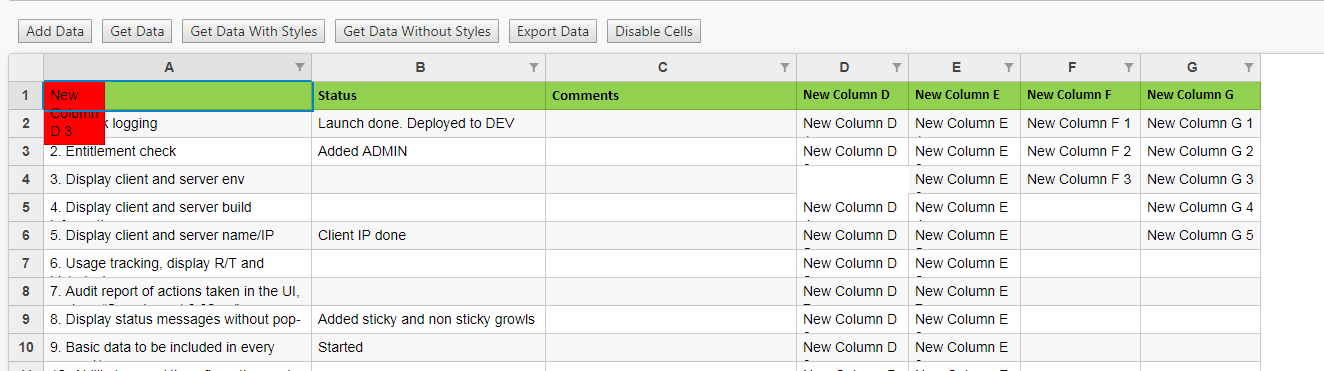
I am able to disable cell edit but when I change background color it is not working. Please see attached image.
I am dynamically creating sheets and adding data. JSON will tell me which cells are editable and which are not.
<wj-flex-sheet #flexSheet [selectedSheetIndex]="0" (initialized)="flexSheetInitialize(flexSheet)" (dragover)="dragOverFile($event)" (drop)="dropFile($event, flexSheet)" >
    <wj-sheet name="Country" [itemsSource]="countryFlexSheetData"></wj-sheet>
    <wj-sheet name="Number" [rowCount]="20" [columnCount]="8"></wj-sheet>
    <wj-sheet name="Date" [rowCount]="20" [columnCount]="8"></wj-sheet>
</wj-flex-sheet>
Code to add new columns to my sheet.
public addNewData() {
        this.commonService.getSheetData().subscribe(
            (columnsCollection: ISheetColumnCollection) => {
                console.log(columnsCollection)           ;
                if (columnsCollection !== null && columnsCollection !== undefined &&
                    columnsCollection.columns !== null && columnsCollection.columns !== undefined &&
                    columnsCollection.columns.length > 0) {
                        columnsCollection.columns.map(
                            (column: ISheetColum) => {
                                this.flexSheet.columns.push(new wjcGrid.Column({ header: column.header, width: column.width}));
                                if (column.cells !== null && column.cells !== undefined &&
                                   column.cells.length > 0) {
                                       let rowIndex = 1;
                                       const columnIndex = this.flexSheet.columns.length - 1;
                                       for (let i = 0; i <  column.cells.length; i++) {
                                           const cell = column.cells[i];
                                           if (cell.isHeadingCell !== undefined && cell.isHeadingCell !== null &&
                                            cell.isHeadingCell === true) {
                                                // header cell
                                                this.flexSheet.setCellData(0, columnIndex, cell.value);
                                                headerColumnStyle = <wjcGridSheet.ICellStyle>{};
                                                headerColumnStyle.backgroundColor = cell.style.backgroundColor;
                                                headerColumnStyle.fontWeight = cell.style.fontWeight;
                                                headerColumnStyle.fontFamily = cell.style.fontFamily;

                                                const newHeaderCells: wjcGrid.CellRange[] = [];
                                                newHeaderCells.push(
                                                    new wjcGrid.CellRange(
                                                        0, this.flexSheet.columns.length - 1,
                                                        0, this.flexSheet.columns.length - 1));
                                                this.flexSheet.applyCellsStyle(headerColumnStyle, newHeaderCells);
                                                this.disableRowsColumns.push(
                                                    {
                                                        row: 0,
                                                        col: columnIndex,
                                                        changeBackground: false
                                                    });
                                            } else {
                                                this.flexSheet.setCellData(rowIndex, columnIndex, cell.value);
                                                rowIndex = rowIndex + 1;
                                                if(cell.disabled !== null && cell.disabled !== undefined &&
                                                    cell.disabled === true) {
                                                        this.disableRowsColumns.push(
                                                            {
                                                                row: rowIndex,
                                                                col: columnIndex,
                                                                changeBackground: true
                                                            });
                                                    }
                                            }
                                       }
                                   }
                            }
                        );
                    }
            },
            (error: any) => {
                console.log(error);
            }
        );
    }
Code to disable the cell and change backgorund. I want to know when to call this code
  public disableFlexSheetCells() {
        this.flexSheet.beginningEdit.addHandler(
            function(sender, e: any) {
                if (e.row === 3 && e.col === 3) {
                    e.cancel = true;
                }
            }
        );
        const element: HTMLElement = this.flexSheet.cells.getCellElement(3, 3);
        if (element !== null && element !== undefined) {
            element.setAttribute("style", "background-color: red;");
        }
    }