Posted 25 September 2018, 9:18 am EST
Hi,
We are using Angular2 with flexsheet.
Please provide any solution to make a Date field with Calendar date picker dynamically inside Flexsheet Cell.
Thanks,
Sasmita
Forums Home / Wijmo / General Discussion
Posted by: sasmita.swain2014 on 25 September 2018, 9:18 am EST

sasmita.swain2014
Posted 25 September 2018, 9:18 am EST
Hi,
We are using Angular2 with flexsheet.
Please provide any solution to make a Date field with Calendar date picker dynamically inside Flexsheet Cell.
Thanks,
Sasmita

sharad.tomer

Posted 26 September 2018, 12:28 am EST
Hi,
For an angular application, you may use wjFlexGridCellTemplate to customize cells.
Please refer to the following code snippet:
<wj-flex-grid #grid [itemsSource]="data" (initialized)="init(grid)">
  ...other columns
  <wj-flex-grid-column [binding]="'date'" [header]="'Date'" [width]="150">
    <ng-template wjFlexGridCellTemplate [cellType]="'CellEdit'" let-cell="cell">
      <wj-input-date [(value)]="cell.value"></wj-input-date>
    </ng-template>
  </wj-flex-grid-column>
</wj-flex-grid>
You may also refer to the following sample for the full implementation: https://stackblitz.com/edit/angular-cozgb7?file=app%2Fapp.component.html
Please refer to the following doc for more info on wjFlexGridCellTemplate:
https://demos.wijmo.com/5/Angular/WijmoHelp/WijmoHelp/topic/wijmo-wijmo.angular2.grid.WjFlexGridCellTemplate.Class.html
~Sharad
sasmita.swain2014
Posted 26 September 2018, 6:09 am EST
Actually i have asked for Flexsheet and that too dynamically in component file not in HTML file.
Thanks,
Sasmita
sharad.tomer
Posted 27 September 2018, 1:20 am EST
Hi Sasmita,
We apologize for the mistake in the previous answer.
For FlexSheet you may handle the prepareCellForEdit event and attach the custom editor as required.
Please refer to the following sample: https://stackblitz.com/edit/angular-7lo9lf?file=app%2Fapp.component.ts
Best regards
Sharad
sasmita.swain2014
Posted 30 October 2018, 2:39 am EST
hi Sharad,
I have applied the above code and the date field is coming but there are 2 issues:
Thanks,
Sasmita

manish.gupta
Posted 30 October 2018, 5:09 am EST
Hello Sasmita,
The InputDate is placed as CustomEditor which required the double-click to enter in edit mode.
To close calendar, handle lostFocus event for InputDate and close the dropDown. Please refer to the demos sample:
https://stackblitz.com/edit/angular-dbxeys?file=app/app.component.ts
Hope it clears!
~Manish
sasmita.swain2014
Posted 30 October 2018, 6:31 am EST
Hi,
Thanks for getting back. if we select a date, the format is coming as 10/10/2018 but in itemsource value is coming as date object
Wed Oct 10 2018 00:00:00 GMT+0530 (India Standard Time).
i have tried to change it using flexsheet.setCelldata(). but it is not working.
Thanks,
Sasmita
manish.gupta
Posted 31 October 2018, 12:28 am EST
Hi Sasmita,
In the provided sample before:
The itemsSource contains the date object while the Data is bind to the FlexGrid, the date field format is set to “m/d/yyyy”.
Also, the InputDate editor required the Date object as value.
Hope it clears!
~Manish
sasmita.swain2014
Posted 31 October 2018, 5:09 am EST - Updated 3 October 2022, 8:17 pm EST
sasmita.swain2014
Posted 31 October 2018, 5:47 am EST
Hi Manish,
so in this way can’t we change the format?
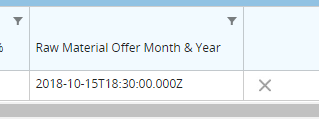
Because it is saving as Date object and next time when it is loading, the saved date is showing as Date object. Please find the image showing the same.
we have to manually double click on the cell to make it a formatted date().
some other issues are:
Thanks,
Sasmita
sharad.tomer
Posted 1 November 2018, 12:36 am EST
so in this way can’t we change the format?
<<<<<<<<<<<<<<
We can change the format by setting format property of the column.
Please refer to the following code snippet:
flexSheet.columns[1].format = 'yyyy-MM-dd';
let dateEditor = new wjcInput.InputDate(document.createElement('div'), {
      isRequired: false
    });
Because it is saving as Date object and next time when it is loading, the saved date is showing as Date object. Please find the image showing the same.
<<<<<<<<<<<<<<
We are unable to replicate the issue at our end, please have a look at the following and let us know if are missing something to replicate issue at our end:
https://stackblitz.com/edit/angular-7mkwzy?file=app%2Fapp.component.ts
Also from the snapshot you provided, it looks like somewhere in your code date is parsed as the string instead of the actual date object. Please make sure that dates are instances of Date object and not just string representation.
~Sharad
sasmita.swain2014
Posted 2 November 2018, 6:43 am EST - Updated 3 October 2022, 8:17 pm EST
Hi Sharad,
Thanks for the updates. But there is another issue i got.
When the flexsheet loads for the first time you click on the Date cell containing a Date value, then it automatically takes the today’s date.
This is happening once after loading the screen. I am able to recreate the scenario in the above demo and attached the screenshot for the same.
Thanks,
Sasmita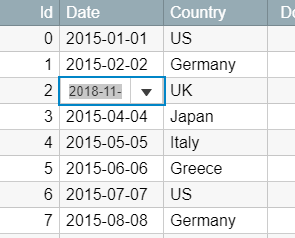
sasmita.swain2014
Posted 2 November 2018, 7:23 am EST - Updated 3 October 2022, 8:17 pm EST
Hi,
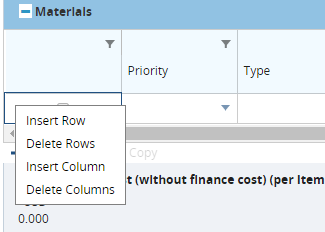
There is another doubt i have. After upgrading to latest wijmo. In flexsheet if i right click on the row then 4 option comes to add/delete etc. Can you please tell me how to remove that?
I have attached the screenshot for the same.
Thanks,
Sasmita
sasmita.swain2014
Posted 5 November 2018, 7:37 am EST
Hi,
Any update on the above issues.
thanks,
Sasmita
sharad.tomer
Posted 6 November 2018, 12:15 am EST
Hi Sasmita,
We apologize for the late response.
When the flexsheet loads for the first time you click on the Date cell containing a Date value, then it automatically takes the today’s date.
<<<<<<<<<<<<<<
I have updated the sample accordingly, please refer to the following modified sample:
https://stackblitz.com/edit/angular-re2sjd?file=styles.css
After upgrading to latest wijmo. In flexsheet if i right click on the row then 4 option comes to add/delete etc. Can you please tell me how to remove that?
<<<<<<<<<<<
You may use CSS to remove some of the options from the contextMenu.
.wj-flexsheet-context-menu [wj-part="insert-rows"]{
  display: none;
}
If you want to completely remove the contextMenu then you may handle the contextmenu event and call preventDefault() in the handler.
You may also refer to the above sample.
Regards
Sharad
sasmita.swain2014
Posted 27 November 2018, 7:13 am EST
Hi,
How to add a small calendar icon with float left in the calender cell?
Thanks,
Sasmita
sharad.tomer
Posted 28 November 2018, 5:08 am EST
You may use formatItem event add icons in the FlexSheet cell.
Please refer to the following code snippet and sample:
flexSheet.formatItem.addHandler((s,e)=>{
      if(flexSheet.selectedSheetIndex != sheetIndex || e.panel.cellType != wjcGrid.CellType.Cell){
        return;
      }

      // return if column is not desired col
      if(e.panel.columns[e.col].binding != colBind || e.row == 0){
        return;
      }

      // do not attach icon if cell is in edit mode
      if(flexSheet.editRange && flexSheet.editRange.row == e.row && flexSheet.editRange.col == e.col){
        return;
      }

      let cIcon = wjcCore.createElement('<span class="wj-glyph-calendar" style="margin-right: 4px"></span>');
      e.cell.insertBefore(cIcon, e.cell.firstChild);
    });
https://stackblitz.com/edit/angular-vsec3q?file=app%2Fapp.component.ts
~Sharad