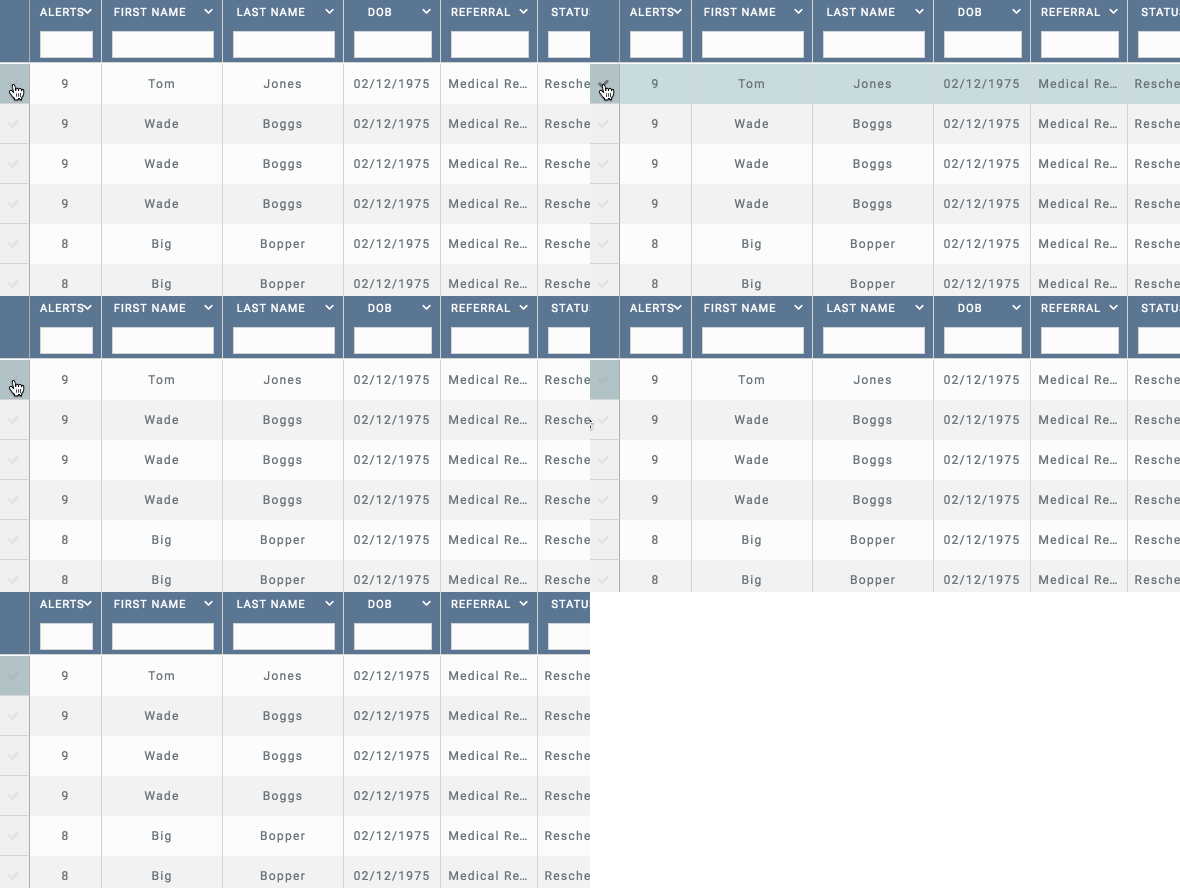
FlexGrid Selected Row Check Column

Posted by: jason.brandt on 25 October 2018, 6:34 pm EST

    • Post Options:
    • Link

    Posted 25 October 2018, 6:34 pm EST - Updated 3 October 2022, 8:19 pm EST

    Is there at feature in FlexGrid to turn on a (in this case) left justified column with checkboxes that select the row and add that row to the ‘selectedrows’ grid object? (along with that row’s data)

  • Posted 26 October 2018, 2:55 am EST

    ‘selectedRows’ property can only be set if the selectionMode of the grid is set to SelectionMode.ListBox, for other selection modes you may write a function which would iterate over rows and return them if ‘isSelected’ property is set to true.

    Please refer to the following sample which implements the same: https://stackblitz.com/edit/angular-dxyqlj?file=app%2Fapp.component.ts

    ~Sharad

  • Posted 26 October 2018, 1:30 pm EST

    I do not see that left checkbox column show up on my grid…

    here is an example…

    https://stackblitz.com/edit/angular-ia8to9?file=app%2Fapp.component.html

    I tried to set grid.selectionMode to both “row” and to “3”, neither worked.

    In your example I do not see where you are setting the SelectionMode to Listbox anywhere…

    Also, I am using Angular6 Reactive Forms, so I can’t use [(ngModel)]=“row.isSelected”…

  • Posted 29 October 2018, 1:44 am EST

    I do not see that left checkbox column show up on my grid…

    <<<<<<<<<<<<<<<<

    checkboxes were added using the cell-templates in ‘RowHeader’.

    Please refer to the following code snippet:

    <ng-template wjFlexGridCellTemplate [cellType]="'RowHeader'" let-row="row">
                    <input #cb type="checkBox" [checked]="row.isSelected" (change)="row.isSelected = cb.checked"/>
                  </ng-template>
    

    I tried to set grid.selectionMode to both “row” and to “3”, neither worked.

    <<<<<<<<<<<<<

    As mentioned previously, you need to set selectionMode property to ‘SelectionMode.ListBox’ to modify the value of grid.selectedRows object.

    In your example I do not see where you are setting the SelectionMode to Listbox anywhere…

    <<<<<<<<<<<<<<

    Actually, the selectionMode was never set to ‘ListBox’ in the sample, the sample was meant to demonstrate the same functionality even without the selectionMode being set to ListBox.

    Also, I am using Angular6 Reactive Forms, so I can’t use [(ngModel)]=“row.isSelected”…

    <<<<<<<<<<<<<<<

    We have updated the sample to not use [(ngModel)]. Please refer to the following updated samples:

    https://stackblitz.com/edit/angular-wyp3yb?file=app%2Fapp.component.html

    https://stackblitz.com/edit/angular-qscvqy?file=app%2Fapp.component.ts

    ~Sharad

  • Posted 29 October 2018, 12:19 pm EST

    The reason I was not seeing the check box column was due to this line of code =

    [headersVisibility]="'Column'"
    

    I removed that and it showed up


    I set my ```

    grid.selectionMode = 5;

    
    ****
    
    Your example of angular racttive form format worked for me
    

    <input #cb type=“checkBox” [checked]=“row.isSelected” (change)=“row.isSelected = cb.checked” />

  • Posted 29 October 2018, 12:29 pm EST

    Thank you very much, this is now working for me, great answers!

  • Posted 29 October 2018, 2:37 pm EST

    Is there a way to do this and have the text of each cell still be able to be highlighted and selected?

    Can this be done without the first row defaulting to being selected?

  • Posted 30 October 2018, 1:54 am EST

    Hi,

    This can be done by setting the CurrentItem to null for FlexGrid collectionView.

    flex.collectionView.currentItem=null// to prevent default selection
    

    Please refer to the following demo sample for reference:

    https://stackblitz.com/edit/angular-v9zttw?file=app/app.component.ts

    ~Manish

  • Posted 30 October 2018, 11:55 am EST

    Yes that worked great, thanks!

Need extra support?

Upgrade your support plan and get personal unlimited phone support with our customer engagement team

Learn More

Forum Channels