FlexGrid RowDetail is not working properly with Tree data

Posted by: selvamsekar91 on 14 September 2017, 11:43 am EST

    • Post Options:
    • Link

    Posted 14 September 2017, 11:43 am EST

    Hi Wijmo Team,

    I am trying to use row details option for a table which has children. But it is not working as expected. when i am clicking ‘+’ icon it is showing the details, at the same time if i am clicking the triangle button my details are getting collapsed. Is there any way to avoid this.


  • Posted 14 September 2017, 11:43 am EST

    Hello,

    This is the design behaviour of FlexGrid. When tree view is collapsed, grid detail also hides. You can prevent hiding detail using FlexGrid’s groupCollapsedChanged event. Here u can decide if detail should be hidden or not.

    For reference, kindly see the attached sample, which prevent hiding detail on tree view click, which have child.

    Hope it helps.In case, you have some different scenario please let us know so that we can help you accordingly

    2016/09/rowdetail-tree-data.zip

  • Posted 14 September 2017, 11:43 am EST

    Hi Manish,

    Thanks for your reply. I have few more questions here.

    1. When am clicking
      +
      it is showing my row details but at the same time it is showing
      >
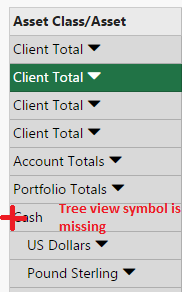
      (triangle) symbol as well for the row that doesn’t have any child. How can i avoid this? (Screenshot 1)

      2.When i am trying to merge row details in single column using
      wjFlexGridCellTemplate
      , tree view symbol (Here
      +
      in my case) is not appearing for columns that have children (Screenshot 2,3)

    It would be helpful if you provide some clarification on this.

  • Posted 14 September 2017, 11:43 am EST

    Hello,

    Sorry, for getting back late here. On clicking ‘+’, triangle’>’ shows because row detail is adding a row as a child row in this case.However, we have escalated this issue to our development team with tracking id 208816. We will let you know as we get any update.

    When you use ‘wjFlexGridCellTemplate’, cell renders according to content inside ‘wjFlexGridCellTemplate’ component if content is not null. Further, you can also avoid triangle for those rows, which do not have any child using cell template.

    For reference, kindly see the attached sample that implements the same.

    Hope it helps.

    Thanks,

    Manish Kumar Gupta

    2016/09/rowdetail-tree-data-1.zip

  • Posted 14 September 2017, 11:43 am EST

    Hi Manish,

    Thank you very much for your valuable reply. Finally i got what i expected.

    But still there is little change in the requirement. PFB requirement

    1. Any row details opened in a hierarchy, on clicking “Collapse on a parent” the row detail opened will be closed and hierarchy will get collapsed. And If User clicks on “Expand on a parent” the previously opened drawer should not be opened.

    I am able to achieve this partially. When

    groupCollapsedChanged
    event triggered, i am using
    this.dp.hideDetail()
    method. This method hides row detail if anything opened inside and outside of that particular parent blindly. I want to hide row details with in the same parent hierarchy. Is it possible to achieve what i am expecting?

    Thanks,

    Dhanasekar

  • Posted 14 September 2017, 11:43 am EST

    Hello Dhanasekar,

    You can hide row details within the same parent hierarchy by getting row index of row, which do not have level property. Replace groupCollapsedChanged event handler function with the following code snippet in sample attached in previous reply:

    
    $scope.groupCollapsedChanged = function (s, e) {
                    for (var j = 0; j < $scope.flex.rows.length; j++) {                
                        if ($scope.flex.rows[j].level == undefined) {                       
                            $scope.dp.hideDetail(j);
                        }
                    }
                };
    

    Hope it helps.

    Thanks,

    Manish Kumar Gupta

  • Posted 14 September 2017, 11:43 am EST

    Hi Manish,

    Thanks a lot. Finally i got it. :slight_smile:

    Thanks,

    Dhanasekar

  • Posted 3 December 2018, 1:43 am EST

    PFA the sample which is replicating this issue.

    rowdetail-tree-data (1).zip

  • Posted 3 December 2018, 1:45 am EST

    Hi Manish,

    For the latest wijmo@5.20182.524, the row-details is not working when child-items-path= property is provided. PFA the sample which is replicating this issue.

    Also, it works fine(both hierarchical and row-details) on wijmo@5.20162.198.

    Please advise.

    Thank you.

  • Posted 3 December 2018, 11:59 am EST

    Following this post.

Need extra support?

Upgrade your support plan and get personal unlimited phone support with our customer engagement team

Learn More

Forum Channels