FlexGrid Pdf export is not working with wijmo-amd-min

Posted by: pradeep-raj on 14 September 2017, 12:06 pm EST

    • Post Options:
    • Link

    Posted 14 September 2017, 12:06 pm EST

    While trying to use FlexGrid pdf exporting, the following warning encountered and not able to use FlexGridPdfConverter.export method.

    Error:

    ./~/wijmo/wijmo.pdf.js

    13:3879-3880 Critical dependency: require function is used in a way in which dependencies cannot be statically extracted.

    This is the issue with wijmo-amd-min. And this is fixed in commonjs-min. I am using latest wijmo package.

    Can you please provide a solution to resolve the issue with AMD?

  • Posted 14 September 2017, 12:06 pm EST

    Hello Pradeep,

    This issue requires further investigation. Hence, this issue has been escalated to the concerned team for further investigation with tracking id 268504. We will let you know as soon as we get any update on this.

    Thanks,

    Manish Kumar Gupta

  • Posted 14 September 2017, 12:06 pm EST

    Please use CommonJS modules whenever possible. Unless you use RequireJS, there is no benefit in AMD over CommonJS. Because the reported problem is WebPack specific, I suppose that you use WebPack, where Wijmo CommonJS modules will work just fine.

    Thanks,

    Alex

  • Posted 14 September 2017, 12:06 pm EST

    Thanks Manish & Alex.

    I have 2 more doubts. Is there any option to export selected columns of flex grid to pdf?

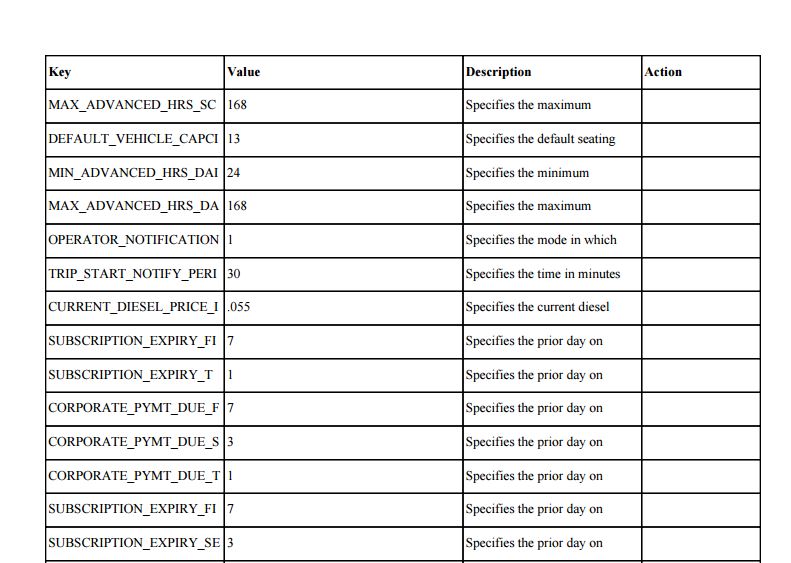
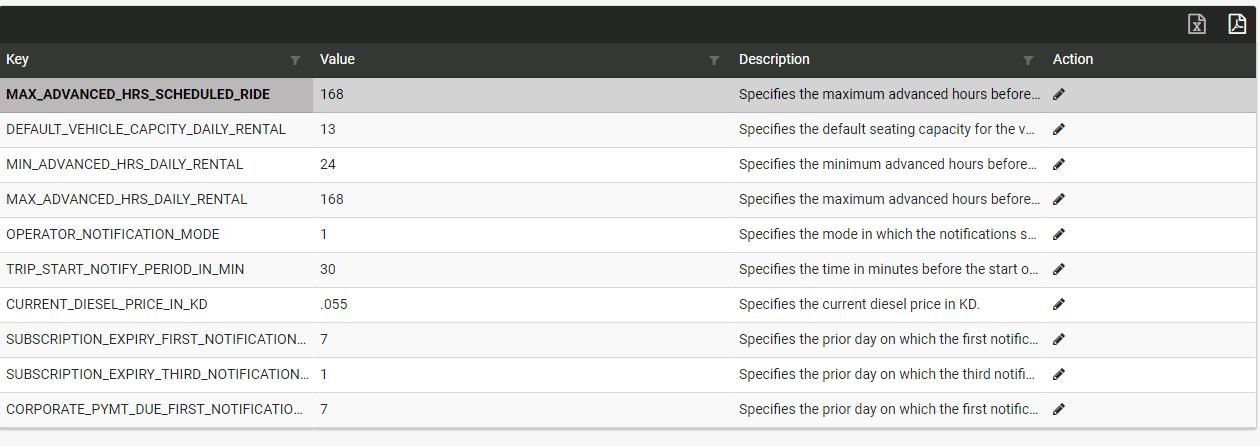
    While I exporting the grid to pdf, it is not exporting the entire content in the grid column. Column data is in a trimmed form.

  • Posted 14 September 2017, 12:06 pm EST

    Hello Pradeep

    We have no an option to export columns selectively, we’ll consider its addition for v3 release.

    But there is a simple workaround. You can hide unnecessary columns (Column.visible=false) before export, and restore their visibility after export has completed. Invisible columns are not exported to pdf.

    Regarding trimmed data, I appreciate a simple example demonstrating this issue.

    Thanks,

    Alex

  • Posted 14 September 2017, 12:06 pm EST

    Hi Alex,

    I will check with the workaround.

    Regarding trimmed data issue,

    Following is the code to generate grid:

    		<wj-flex-grid class="wj-flexgrid-custom" style="height: auto" #appGrid [itemsSource]="applicationSettingsData" [isReadOnly]="true"
    		 [selectionMode]="3" [headersVisibility]="'Column'">
    			<wj-flex-grid-filter [filterColumns]="['key', 'value', 'description']"></wj-flex-grid-filter>
    			<wj-flex-grid-column header="{{'Page.Labels.KEY'| translate}} " tooltip="Key" binding="key" width="3*">
    			</wj-flex-grid-column>
    			<wj-flex-grid-column header="{{'Page.Labels.VALUE'| translate}} " tooltip="Value" binding="value" width="4*">
    			</wj-flex-grid-column>
    			<wj-flex-grid-column header="{{'Page.Labels.DESCRIPTION'| translate}} " tooltip="Description" binding="description" width="3*">
    			</wj-flex-grid-column>
    			<wj-flex-grid-column header="{{'Page.Labels.ACTION'| translate}} " [allowSorting]="false" tooltip="Action" binding="Action"
    			 width="2*" [visible]="true">
    				<ng-template class="u-text-center" wjFlexGridCellTemplate [cellType]="'Cell'" let-cell="cell" let-item="item">
    					<a> &lt;i class="fa fa-pencil" aria-hidden="true" (click)="editApplicationSettings(item.id)"&gt;&lt;/i&gt;</a>
    				&lt;/ng-template&gt;
    			&lt;/wj-flex-grid-column&gt;
    		&lt;/wj-flex-grid&gt;
    

    Following is the export code:

    exportToPdf() {

    this.appGrid.itemsSource.pageSize = this.applicationSettingsData.totalItemCount;

    wjcGridPdf.FlexGridPdfConverter.export(this.appGrid, ‘Applicationsettings.pdf’);

    this.appGrid.itemsSource.pageSize = this.appConstants.GridPageSize;

    }

    I am attaching the images of grid and pdf generated.
  • Posted 14 September 2017, 12:06 pm EST

    Hello Pradeep

    Try to set the scaleMode export option to ActualSize:

    wjcGridPdf.FlexGridPdfConverter.export(this.appGrid, ‘Applicationsettings.pdf’, {scaleMode: wjcGridPdf.ScaleMode.ActualSize});

    This may cause horizontal page breaks if grid will not fit in page width, so you may want to enlarge a page width or export in landscape mode (use the documentOptions.pageSettings property for this).

    Thanks,

    Alex

  • Posted 14 September 2017, 12:06 pm EST

    Thanks Alex.

    I have used landscape. But still, the issue is not completely solved. A text wrapping facility is needed. Is there any scope for text wrapping property?

  • Posted 14 September 2017, 12:06 pm EST

    Hi Alex,

    Is there any solution for the previous query?

  • Posted 14 September 2017, 12:06 pm EST

    Hi Alex,

    Its been more than 2 months since I posted my query. Can you please let me know, if there is any progress / work around for handling this issue.

    Our project is about to deliver to the customer in a week’s time.

    Can you please help us?

  • Posted 14 September 2017, 12:06 pm EST

    Hi Pradeep,

    This issue has been logged as an enhancement with internal tracking id 271466. The team is working on this request but we can not provide any ETA on this. Please try to increase column width to show content in a line before exporting to PDF.

    Thanks,

    Manish Kumar Gupta

  • Posted 14 September 2017, 12:06 pm EST

    Hi Manish,

    It is really sad that such basic things are missing in the control. We cannot go ahead with your proposed solution as we are having dynamic length texts and the width of the controls cannot be fixed. Some options like wrapping the text would have been very helpful.

    Thanks

    Pradeep

  • Posted 14 September 2017, 12:06 pm EST

    Hi Pradeep,

    We are sorry for the inconvenience caused.

    We have a workaround for this.

    You may export complete text in a line by increasing column Width dynamically using autoSizeColumn method. As per the previous discussion, it seems that above-proposed solution might not work for you.

    Hence, we have escalated this issue to the team with priorities. This issue is complex for the control. Hence, it requires some research on this that is going on. The team is looking forward to a solution for this issue but we can not any ETA for this.

    Thanks,

    Manish Kumar Gupta

    2017/09/FlexGrid_PDFExport.zip

  • Posted 22 January 2018, 2:49 am EST

    HI Pradeep,

    We are sorry for the late reply on this forum post.

    The Multi line support has been added to the PDF export in 5.20173.380. For this, you need to set wordWrap to true for FlexGrid and resize rows to show the complete text in multiple line to the exported PDF file.

    Please refer to the attached sample for the same.

    ~Manish

    FlexGrid_PDFExport_MultiLine.zip

Need extra support?

Upgrade your support plan and get personal unlimited phone support with our customer engagement team

Learn More

Forum Channels