DatePicker within Flexgrid Cell issue

Posted by: cirruschris on 14 September 2017, 11:25 am EST

    • Post Options:
    • Link

    Posted 14 September 2017, 11:25 am EST

    I am trying to create a datepicker in a flexgrid cell. You have an example of how to do it here: http://jsfiddle.net/qwctfo4y/

    I copied your code and it works great. However, my flexgrid is in a Jquery modal dialog pop-up. As soon as I move the grid to the pop-up, the datepicker doesn’t work anymore. The calendar opens up for about a half a second then closes immediately. What do I need to do to make this work in a JQuery modal dialog popup?


  • Posted 14 September 2017, 11:25 am EST

    Hi,

    We are sorry to mention but we could not replicate the issue at our end using the latest build of Wijmo5 i.e. 5.20152.90

    You can download the same by referring to the following link:

    http://wijmo.com/products/wijmo-5/

    Kindly, check your sample application with the latest build. If issue persists, then we would request you to please share the small stripped down sample application or modify the attached sample application replicating the issue so that we can try our level best to provide you an appropriate solution for the same.

    Please refer to the following link to download the sample application:

    http://supportftp.componentone.com/FlexGrid_PopUp.zip

    Regards,

    Raunak Ladha

  • Posted 14 September 2017, 11:25 am EST

    OK, I have the DatePicker working within the Flexgrid. Is there a way to blank out the Date? If I try to clear it out within the Calendar input, it will not let me.

  • Posted 14 September 2017, 11:25 am EST

    Hello,

    You can set the “required” property of InputDate to false, so as to clear out the Date value in the InputDate control. This property gets or sets a value indicating whether the control value must be a Date or whether it can be set to null (by deleting the content of the control).

    Hope it helps.

    Thanks,

    Manpreet Kaur

  • Posted 14 September 2017, 11:25 am EST

    Hi,

    I need a angular 2 code for dynamic datepicker in wijmo grid .I refered the below link

    http://jsfiddle.net/4mzvsp29/

    In this columns are static. So this is working fine. But I am using dynamic wijmo grid.Can you please help me to solve this issue.

    Thanks,

    Aarthi

  • Posted 14 September 2017, 11:25 am EST

    Hi Aarthi,

    You need to use wjFlexGridCellTemplate with Dynamic Columns.

    Please find the attached sample for the same.

    Thanks,

    Manish Kumar Gupta

    2017/08/FlexGrid_columnLayout_with_template-1.zip

  • Posted 14 September 2017, 11:25 am EST

    Hi Manish,

    Thanks for your reply. But I don’t want a code in HTML. I wrote a dynamic wijmo grid coding in ts file, so I need a datapicker code in ts file and that should work fine in dynamic grid also.

    Thanks,

    Aarthi

  • Posted 14 September 2017, 11:25 am EST

    Hello Aarthi,

    For this, you need to create a method in the Class for creating Custom editor in FlexGrid.

    Please refer to the attached sample that implements the same.

    Thanks,

    Manish Kumar Gupta

    2017/08/FlexGrid_customEditor_TS.zip

  • Posted 14 September 2017, 11:25 am EST

    Hi Manish,

    Thanks for your reply. I integrated your code with my application, its working fine. But I have one question. I need the date format as “DD-MMM-YYYY” instead of “MM/DD/YYYY”. How can I change the format with the same code. Is it possible?. It’s urgent. Can you please reply me as soon as possible.

    Thanks,

    Aarthi

  • Posted 14 September 2017, 11:25 am EST

    Hi Manish,

    In dynamic grid , I want to specify the min and max date in calendar.Is it possible in same code?

    Thanks,

    Aarthi

  • Posted 14 September 2017, 11:25 am EST

    Hi manish,

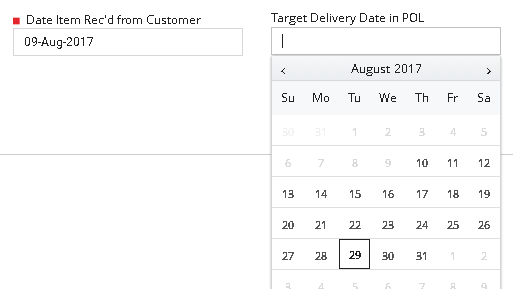
    I have attached the screenshot. In that after selecting first date field , second date field’s calendar automatically blocks the previous dates. In this functionality I need in dynamic wijmo grid.Can you please reply me fast?

    Thanks,

    Aarthi

  • Posted 14 September 2017, 11:25 am EST

    Hi Aarthi,

    You can format using format property. You can assign min and max property dynamically using beginningEdit event. For your reference, please refer to the code snippet:

    // Update code
    beginningEdit=(s:wjGrid.FlexGrid,args:wjGrid.CellRangeEventArgs)=>{
                setTimeout(()=> {
                   let inpt=wjInput.InputDate.getControl('#'+s.columns[args.col].binding);
                   if(s.columns.[args.col].binding=="endDate"){
                        inpt.min= s.getCellData(args.row,args.col-1,false);
                   }
                }, 100);
            }
    _createEditor(editColumn){
    // code
     var editRoot = document.createElement('div');
                    editRoot.id=editColumn.binding;//<--- Updated code
    // code
    if(column.dataType==wjCore.DataType.Date){
                        inpt= new wjInput.InputDate(editRoot);
                        inpt.value = grid.getCellData(e.row, e.col);
                        inpt.format="dd-MMM-yyyy";
                    }
    
    }

    Hope it helps !

    Thanks,

    Manish Kumar Gupta

  • Posted 14 September 2017, 11:25 am EST

    Hi Manish,

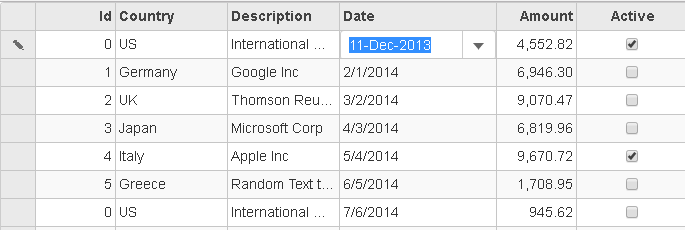
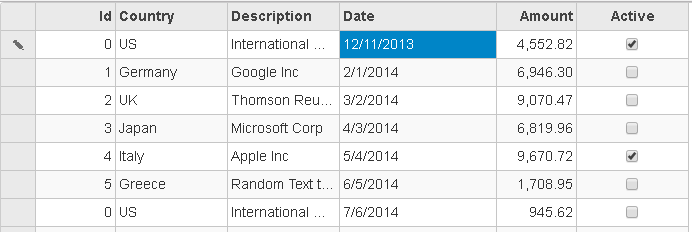
    I implemented your code in my module. The date format thing is working fine whenever you select a value. Once it is selected and pointer focus losted means its again changing to their old format. I attached two screenshots here.In first screenshot onselect of date field, the date format is working. In second screenshot, once its lost the focus , it is again changing the format to mm/dd/yyyy. I need “DD-MMM-YYYY” format for entire calendar field. Can you please help me.

    Thanks,

    Aarthi

  • Posted 14 September 2017, 11:25 am EST

    Hello Aarthi,

    You need to set the same format for the column. Please refer to the following code snippet:

    initGrid(s,e){
       grid.columns.getColumn("date").format="DD-MMM-YYYY";
    }

    Thanks,

    Manish Kumar Gupta

  • Posted 14 September 2017, 11:25 am EST

    Hi Manish,

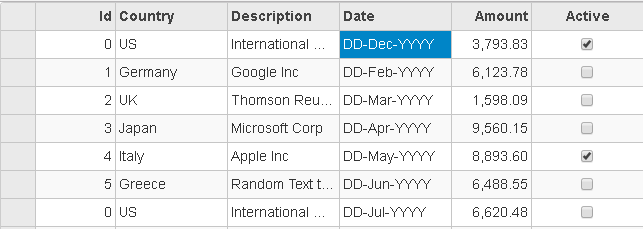
    Already I tried to set this format. But that is not working properly.I have attached the screenshot for your reference.In this month value is taking properly, but date and year field are not changing.It remains same as format.

    Thanks,

    Aarthi

  • Posted 14 September 2017, 11:25 am EST

    Hi Aarthi,

    We are sorry, the format provided for Month and Year is not supported. The correct format is “dd-MMM-yyyy”. For more information, you can refer to the following link.

    https://docs.microsoft.com/en-us/dotnet/standard/base-types/custom-date-and-time-format-strings

    Thanks,

    Manish Kumar Gupta

  • Posted 14 September 2017, 11:25 am EST

    Hi Manish,

    Thanks for your reply.Its working fine now.I have another one doubt. In our application,initially the date field maybe empty and after sometime I try to edit means its giving “ERROR ** Assertion failed in Wijmo: Date expected.” and also the calendar is not showing up. Is there any way to solve the problem?

    Thanks,

    Aarthi

  • Posted 14 September 2017, 11:25 am EST

    Hi Aarthi,

    In this case, we need to set isRequired property to false for allowing empty or null value in control.

    Thanks,

    Manish Kumar Gupta

  • Posted 6 October 2017, 5:46 am EST

    Hi Manish,

    I am trying to set a min date for one date field . That time I tired with your code . Its giving error as “Property min does not exist on type ‘Control’”.I attached the zip file containing entire code. Can you please help me to resolve this issue.

    Thanks ,

    Aarthi

    Flexgrid.zip

  • Posted 11 October 2017, 4:19 am EST

    Hi Aarthi,

    The getControl method returns Control type object. Hence , you need to cast control to InputDate. Please refer to the attached code snippet for the same.

     let inpt=<wjInput.InputDate>wjInput.InputDate.getControl('#'+s.columns[args.col].binding);
    

    ~Manish Kr Gupta

Need extra support?

Upgrade your support plan and get personal unlimited phone support with our customer engagement team

Learn More

Forum Channels