
Posted 27 June 2018, 5:00 pm EST - Updated 3 October 2022, 8:28 pm EST
Hi,
I need to know after search and selection the text comes from itemformatter. But I need only the name in selection.
Example:
Inventory.InventoryItemName = new wijmo.input.AutoComplete(“#nameSearchField”, {
itemsSource: new wijmo.collections.CollectionView(Inventory.InventoryList),
displayMemberPath: “name”,
maxDropDownHeight: 300,
placeholder: ‘-- Select Item --’,
maxItems: App.AutoComplete.MaxSize,
isDroppedDownChanged: function (e) {
//some text here
},
selectedIndexChanged: function () {
//some text here
},
itemFormatter: function (index, content) {
var item = Inventory.InventoryList[index]; if (item != null) { //var html = "<div>" + item.Name + "</div>" + item.Name2; var html = ""; var _itemidcaption = "Item ID :"; if (Inventory.Company == 5) _itemidcaption = "SKU :" //if (!_supplieritemsearch) { html = "<div class='ITEMContainer' >"; html += "<div style='width:100%;height:25px;' >" if (item.dropped == "1") { html += "<div style='float:left; margin-top: 5px; font-size: 13px;color:red;font-style:italic;'><b>" + item.name + " / " + item.name2 + "</b> Discontinued</div>"; } else { html += "<div style='float:left;margin-top: 5px; font-size: 13px;'><b>" + item.name + " / " + item.name2 + "</b></div>"; } if (item.isPrestige) { html += "<div style='float:right; margin-top: 5px; '><img class='PMLOGO' src='images/PMlogo.png' alt='Prestige X-Ref' /></div>"; } html += "</div>" html += "<div style='margin-top: 5px; font-size: 13px;'>" + _itemidcaption + " <b>" + item.itemid.substr(0, 3) + '-' + item.itemid.substr(3, 4) + '-' + item.itemid.substr(7, 9) + "</b></div>"; html += "<div style='margin-top: 5px; font-size: 13px;'>Pattern : <b>" + item.pattern + "</b></div>"; html += "<div style='margin-top: 5px; font-size: 13px;'>Color : <b>" + item.colorDE + "</b></div>"; html += "</div>"; return html; } return ""; } });
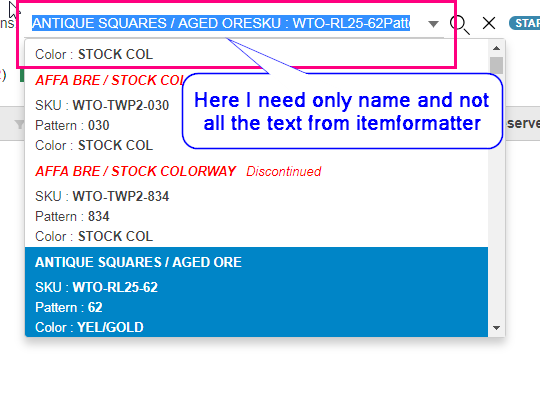
Thanks
Ankita

