[Angular2] Issues with WjPopup dynamiquely injected

Posted by: fpouyez on 14 September 2017, 12:08 pm EST

  • Posted 14 September 2017, 12:08 pm EST

    Hi,

    I’m trying to develop a modal service which displays modals when called.

    I have created a modal component, using a wjpopup. Here is it’s template :

    <wj-popup #modal id="modal" [modal]="true" [hideTrigger]="'None'" [ngClass]="{'modal-error': isError, 'modal-warning': isWarning}">
    …
    </wj-popup>

    This component is injected in the application dynamiquely (like this).

    My service creates the component, injects it, and calls the component’s show method, which will call the show on wjpopup.

    It works, and the style is applied.

    My popup is placed at the bottom of the body, outside of the Angular Root component.

    1) When I call the hide() on wjpopup, I got this error : “Cannot read property ‘style’ of undefined”. It seems to come from wijmo.hidePopup(…), where popup is undefined.

    2) Plus, Popup._showBackdrop() has no effect or was not called. I can click behind my modal, and there is no grey background.

    How can I correct these 2 issues ?

    Thanks.

    F.Pouyez

  • Posted 14 September 2017, 12:08 pm EST

    Hi,

    The code snippet is correct and it should show popup as a modal with the grey background.

    We recommend you to put Wijmo popup within Angular Root component so that Wijmo popup reference will never be undefined.

    It would be great if you can share a sample application depicting your issue so that our team can debug and assist you accordingly.

    Thanks,

    Manish Kumar Gupta

  • Posted 14 September 2017, 12:08 pm EST

    Hi,

    I thought you might say that. I’ll try to put the popup within Angular Root component and I’ll get back to you.

    Thanks,

    F. Pouyez

  • Posted 14 September 2017, 12:08 pm EST

    Hello,

    Please verify and share your observation with us. We are waiting for your observation.

    If the issue persists, it would be great if you can share a sample application depicting your issue so that our team can debug and assist you accordingly.

    Thanks,

    Manish Kumar Gupta

  • Posted 14 September 2017, 12:08 pm EST

    Hello,

    I’ve checked some points :

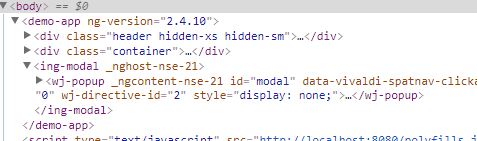
    1. My component is well injected into the root component’s template. It has a WjPopup in its template (see WjPopup1.JPG)
    2. When I call show() on the wjpopup, with modal = true and hideTrigger = None, the WjPopup is moved into the body (see WjPopup2.JPG)
    3. In the dev tools, I see the popup’s properties modal and hideTrigger correctly setted.
    4. There is no background.
    5. The hideTrigger has no effect
    6. I have a style undefined error on the first hide().

    I tried to defined the wjpopup directly in the RootComponent template and faced the same issues.

    I will create a sample application soon.

  • Posted 14 September 2017, 12:08 pm EST

    Hi,

    We are waiting for your sample application depicting your issue.

    Thanks,

    Manish Kumar Gupta

  • Posted 4 October 2017, 11:40 am EST

    Hi,

    I did not have time to realize a sample, but we found a solution ! It seems that the [modal]=“true” definition in HTML template has no effect. I suppose it’s because we create the component outside of the DOM/VisualTree, and inject it after :

        let componentFactory = this.componentFactoryResolver.resolveComponentFactory(componentClass);
        let componentRef = componentFactory.create(this.injector);
        let componentRootNode = this.getComponentRootNode(componentRef);
    
        // project the options passed to the component instance
        this.projectComponentInputs(componentRef, options);
    
        this.applicationRef.attachView(componentRef.hostView);
    
        componentRef.onDestroy(() => {
          this.applicationRef.detachView(componentRef.hostView);
        });
    
       [b] location.appendChild(componentRootNode);[/b]
    

    If we define this property after injection, it works :

    this.modalElement.modal = true;
                this.modalElement.show();
    
  • Posted 9 October 2017, 1:52 am EST

    Hi,

    We are glad to know that you have resolved your issue and thank you for sharing here.

    ~Manish Kr Gupta

Need extra support?

Upgrade your support plan and get personal unlimited phone support with our customer engagement team

Learn More

Forum Channels