
Adding a row to a flex grid creates a selection bug

Posted by: philip.johnson on 11 April 2018, 12:42 pm EST

    • Post Options:
    • Link

    Posted 11 April 2018, 12:42 pm EST

    Hi!

    I am manually adding a row to the top of a Flex Grid by the same method detailed at this post: https://www.grapecity.com/en/forums/wijmo/adding-new-row-in-flexgrid

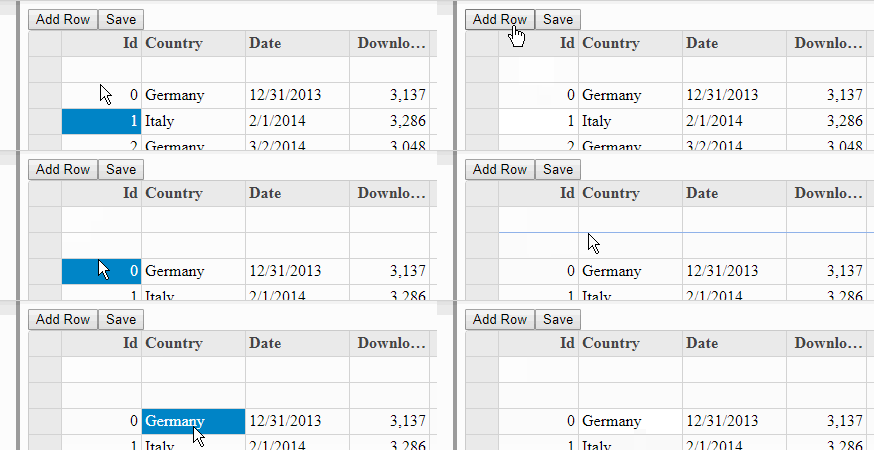
    That’s working fine. However, the new row doesn’t seem to register with the grid’s selection mechanism. The new row takes two clicks to select (actually, it looks like perhaps an empty cell behind the new row is selected on the first click). Similarly, pressing the ‘up’ key from the second row does not bring the selection the new first row; the selection seems to be lost somewhere. This can be observed in the example code provided at the post above. Look at http://plnkr.co/edit/4tVvwx?p=preview

    Is there any way to avoid/fix this?

    Thanks,

    Philip
  • Posted 11 April 2018, 12:46 pm EST - Updated 3 October 2022, 8:31 pm EST

  • Posted 12 April 2018, 10:01 am EST

    Hi,

    This was because you were adding an empty object with Row. Instead of this:

    new wjGrid.Row({});
    

    Use

    new wjGrid.Row();
    

    Please refer to the updated plunk and let us know if you still face any issues:-

    http://plnkr.co/edit/TMTa4uScaDNMhgtRhY9y?p=preview

    ~nilay

  • Posted 12 April 2018, 12:33 pm EST

    I see–so adding a dataItem to the row is the problem. I see that from doing this:

      let row=new wjGrid.Row();
      this.flex.rows.splice(0,0,row);
      this.flex.rows[0].dataItem = {};
    

    We need the custom row to have a dataItem (for informational rows about global rather than user data). It strikes me that a better approach is to modify the collection instead of manually adding rows. We can do this, but the new rows need to be read-only, while the user rows need to be editable. How can we ensure this happens?

    Thanks,

    Philip

  • Posted 13 April 2018, 2:39 am EST

    Please refer to following plunk that adds 2 types of rows:-

    ->User rows(editable)

    ->Info rows(non editable)

    http://plnkr.co/edit/G319KoOhBvMGJm5SYc05?p=preview

    Hope this helps, if it doesn’t meet your requirement please elaborate your use case so that we can suggest you accordingly.

Need extra support?

Upgrade your support plan and get personal unlimited phone support with our customer engagement team

Learn More

Forum Channels
