Expòrt to XLSX, XLS, and PDF C1ReportViewer 2025v2 399

Posted by: enrique.pv-ext on 27 January 2026, 11:53 am EST

  • Posted 27 January 2026, 11:53 am EST - Updated 28 January 2026, 11:46 am EST

    Hi,

    Migrate from 2010v1 to 2025v2 399 in ASP.NET WebForms NET Framework 4.8.1.

    Using C1ReportViewer from C1.Web.Wijmo.Controls.48.dll

    Changes C1WebReport to C1ReportViewer control

                            <asp:LinkButton ID="btnExport" Visible="true" runat="server" OnClick="btnExport_Click">
                                <asp:Label ID="lblExport" runat="server" CssClass="XLS"></asp:Label>
                            </asp:LinkButton>
                              <asp:LinkButton ID="btnExportPDF" Visible="true" runat="server" OnClick="btnExportPDF_Click">
                                <asp:Label ID="lblExportPDF" runat="server" CssClass="PDF"></asp:Label>
                            </asp:LinkButton>
    <cc9:C1WebReport ID="C1WebReport" runat="server"
                        Visible="False" Height="287px"
                        NavigationBar-HasExportButton="True"
                        ImageRenderMethod="HttpHandler">
                        <NavigationBar Style-BackColor="Control"></NavigationBar>
                    </cc9:C1WebReport>

    Alternatives ?

    NavigationBar-HasExportButton="True"
     ImageRenderMethod="HttpHandler"
    

      <NavigationBar Style-BackColor="Control"></NavigationBar>

    				if (!exportsXls)
    C1WebReport.Export(C1.Web.C1WebReport.ExportFormatsEnum.PDF);
    				else
    C1WebReport.Export(C1.Web.C1WebReport.ExportFormatsEnum.XLS);
    

    How-to export report to XLSX, XLS, and PDF?

    Now, not method Export.
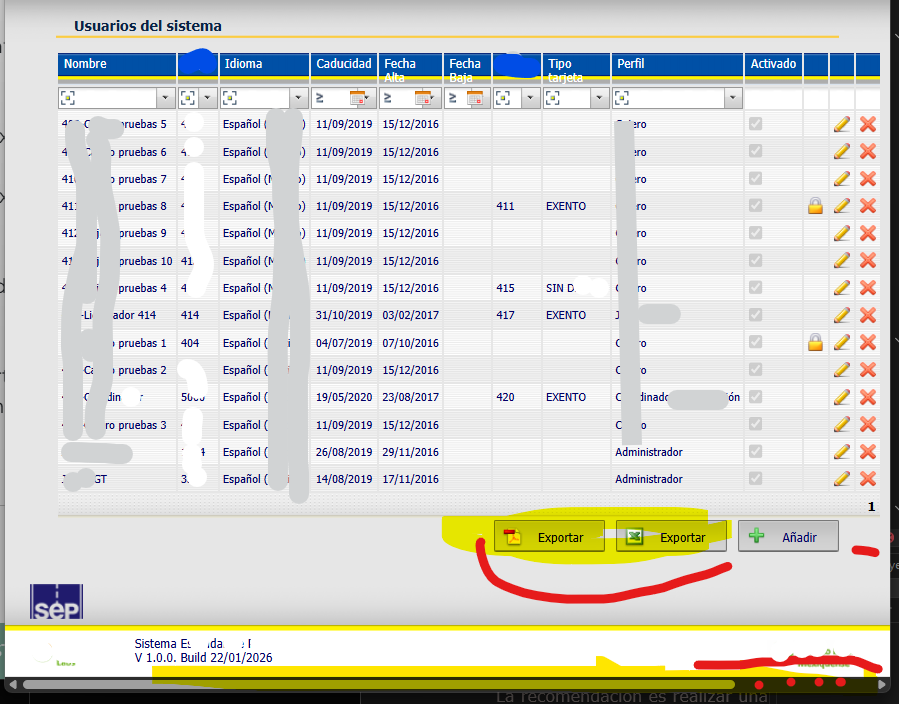
    I have see your C1ReportViewerChangeExportButtonBehavior product sample located at .\Documents\ComponentOne Samples\ASP.NET Web Forms\WebForms\CS\HowTo

    Now, it’s very more complex.

    using iframe:

     <iframe id="customsaveframe" style="width:1px;height:1px;"></iframe>

    using HttpHandler.ashx

    What is IC1WebReportService ?

    what is reportService.ExportToFile using documentKey ?

    public void ProcessRequest(HttpContext context)
        {        
            IC1WebReportService reportService = C1WebReportServiceHelper.MakeHelper((string)context.Request.Params["documentKey"]);
            // Export report to a file:
    		string url = reportService.ExportToFile((string)context.Request.Params["documentKey"], context.Request.Params["exportFormat"]);
    
    		// Convert url to a file path:
    		string pathSource = url.Substring(url.IndexOf("tempReports"));
    		pathSource = context.Server.MapPath(pathSource);

    Javascript:

    what is

    var docStatus = $(viewerSelector).c1reportviewer("option", "documentStatus");

    what is docStatus.documentKey ?

      function exportToFile() {
                var viewerSelector = "#<%=C1ReportViewer1.ClientID%>";
                var docStatus = $(viewerSelector).c1reportviewer("option", "documentStatus");
                if (docStatus.isGenerating) {
                    alert("Can't export. Document is not yet generated.");
                }
                else {
                    document.getElementById("customsaveframe").src = "CustomSaveHttpHandler.ashx?documentKey=" + docStatus.documentKey + "&exportFormat=Open%20XML%20Excel&exportFormatExt=xlsx";
                }
                return false;
            }
    

    In aspx: Add own export button

    protected void Page_Load(object sender, EventArgs e)
    	{
    		C1ReportViewerToolbar toolBar = C1ReportViewer1.ToolBar;
    		((HtmlGenericControl)toolBar.Controls[1]).Style["display"] = "none"; // hide original save(export) button
    		// Add own export button
    		HtmlGenericControl saveButton = new HtmlGenericControl("button");
    		saveButton.Attributes["title"] = "Custom export";
    		saveButton.Attributes["class"] = "custom-export";
    		saveButton.InnerHtml = "Custom Save";
    		toolBar.Controls.AddAt(1, saveButton);
    	}

    not another alternative more simple ?

    I want only export to XLS-PDF. (XLS legacy) but I want NOT C1ReportViewer visible.

    My C1ReportViewer has

    Visible="False

    <cc1:C1ReportViewer ID="C1WebReport" runat="server" Visible="False" Height="287px"
      FileName="EncuestasReport" >
      </cc1:C1ReportViewer>

    legacy code for export report:

           C1WebReport.Visible = true;
    	C1WebReport.Width = 1;
    	C1WebReport.Height = 1;

    How-to start the export , how-to call exportToFile javascript ?

    Add own export button is required ?

    how-to start generating report, using

    .c1reportviewer("option", "documentStatus");
    ?

    added:

    I get System.ArgumentException: ‘La ruta de acceso relativa virtual ‘_Reports/Temp/’ no se permite aquí.’

    What is reportService.ashx in root WAP ? C1REport control code in execution time ?

    //ver:[120921]
    <%@ WebHandler Language="C#" Class="reportService" %>
    
    using C1.Web.Wijmo.Controls;
    using C1.Web.Wijmo.Controls.C1ReportViewer;
    using C1.Web.Wijmo.Controls.C1ReportViewer.ReportService;
    
    public class reportService : IHttpHandler, System.Web.SessionState.IRequiresSessionState
    		}
    		if (string.IsNullOrEmpty(reportsFolderPath))
    		{
    			reportsFolderPath = "~/tempReports";
    		}
    								
    		reportService = new C1WebReportServiceHelper(inMemoryDoc,
    			reportCache,
    			extraOptions,
    			ViewType.PageImages,
    			HttpContext.Current.Server.MapPath(reportsFolderPath), VirtualPathUtility.ToAbsolute(reportsFolderPath));

    Added 2:

    System.Web.HttpException: ‘‘C:/TFS/Dev/Upgrade/Solucion/Projects/Web/WebApp/_Reports/Files/CollectionReports/Survey.xml’ es una ruta de acceso física, pero se esperaba una ruta de acceso virtual.’

    		private C1ReportV48.C1Report GetReport()
    		{
    			//var report = new C1Report();
    			//see https://developer.mescius.com/componentone/docs/webforms/online-reportviewer/NoteonC1ReportC1PrintDocumentLicensing.html
    			var report = C1ReportViewer.CreateC1Report();
    
    			var reportPath = string.Format("{0}/{1}/CollectionReports/Survey.xml", HttpContext.Current.Request.PhysicalApplicationPath, GenericService.Instance.GetConfigurationParameter(ConfigurationParamType.ReportsPath));
    			report.Load(Server.MapPath(reportPath), "EncuestasReport");

  • Posted 28 January 2026, 11:58 am EST

    Not applies Added 2:, cannot edit the post

  • Posted 28 January 2026, 1:08 pm EST

    Hello,

    We’re working on your requirement and will get back once we have more information.

    Regards,

    Uttkarsh.

  • Posted 29 January 2026, 5:48 am EST - Updated 29 January 2026, 5:56 am EST

    Added

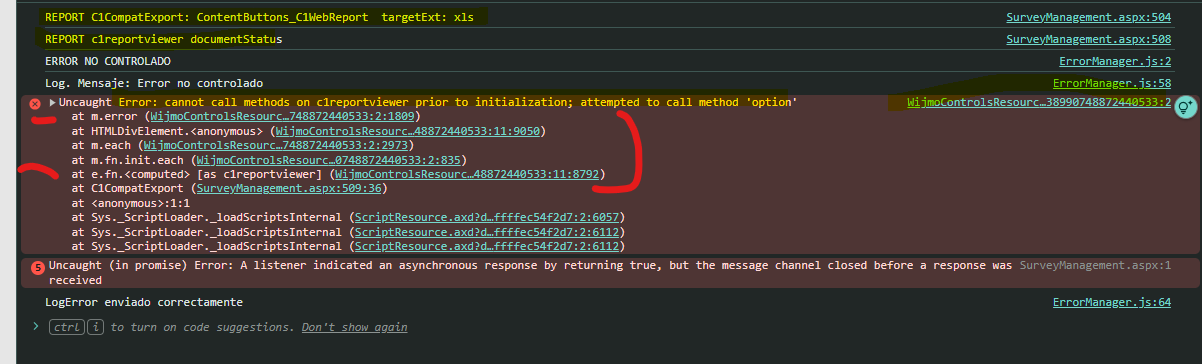
    I get in console error: Uncaught Error: cannot call methods on c1reportviewer prior to initialization; attempted to call method ‘option’

    aspx

    <asp:UpdatePanel ID="UpdatePanelReport" runat="server" UpdateMode="Conditional">
    		<ContentTemplate>
    		  	<script language="javascript" type="text/javascript">
    				  $(document).ready(function () {
    					  $(".custom-export").button({
    						  icons: {
    							  primary: "ui-icon-gear"
    						  },
    						  text: false
    					  }).click(function () {
    						  exportToFile();
    						  return false;
    					  });
    				  }); // omitted ...
    
    				  function C1CompatExport(viewerClientId, targetExt) {
    
    					  console.log("REPORT C1CompatExport: " + viewerClientId + "  targetExt: " + targetExt);
    					  var selector = '#' + viewerClientId;
    
    					  console.log("REPORT c1reportviewer documentStatus");
    					  var docStatus = $(selector).c1reportviewer('option', 'documentStatus');
    
    					  console.log("REPORT docStatus isGenerating");
    					  if (!docStatus || docStatus.isGenerating) {
    						  alert('No se puede exportar: el documento todavía se está generando.');
    						  return false;
    					  }
    
    					  console.log("REPORT exportFormats");
    					  var fmts = docStatus.exportFormats || [];
    					  var match = null;
    					  for (var i = 0; i < fmts.length; i += 2) {
    						  var desc = fmts[i], ext = fmts[i + 1];
    						  if (ext === targetExt) { match = { desc: desc, ext: ext }; break; }
    					  }
    					  if (!match) {
    						  alert('Formato no disponible: ' + targetExt);
    						  return false;
    					  }
    					  var url = 'Handlers/C1ReportExportHttpHandler.ashx?documentKey=' + encodeURIComponent(docStatus.documentKey) +
    						  '&formatDesc=' + encodeURIComponent(match.desc) +
    						  '&ext=' + encodeURIComponent(match.ext);
    					  console.log("REPORT URL: " + url);
    					  document.getElementById('customsaveframe').src = url;
    					  return false;
    				  } 
    			  </script>
    
      <cc1:C1ReportViewer ID="C1WebReport" runat="server" Visible="False" Height="287px">
      </cc1:C1ReportViewer>
      <iframe id="customsaveframe" style="width:1px;height:1px;"></iframe>
    		</ContentTemplate>
    	</asp:UpdatePanel>

    Page_load

    protected void Page_Load(object sender, EventArgs e)
    		{
    					C1ReportViewerToolbar toolBar = C1WebReport.ToolBar;
    					((HtmlGenericControl)toolBar.Controls[1]).Style["display"] = "none"; // hide original save(export) button
    																						 // Add own export button
    					var saveButton = new HtmlGenericControl("button");
    					saveButton.Attributes["title"] = "Custom export";
    					saveButton.Attributes["class"] = "custom-export";
    					saveButton.InnerHtml = "Custom Save";
    					toolBar.Controls.AddAt(1, saveButton);
    
    					C1ReportViewer.RegisterDocument("report", GetReport);

    button click for Export to XLS:

    		protected void btnExport_Click(object sender, EventArgs e)
    		{
    				//NEW   en Page_Load ?? C1ReportViewer.RegisterDocument("SampleReport", GetReport);
    				C1WebReport.Visible = true;
    				C1WebReport.Width = 1;
    				C1WebReport.Height = 1;
    
    				// new version 2025v2
    				var reportsTemp = GetConfigurationParameter(ConfigurationParamType.ReportsTemp);
    				var virtualPath = VirtualPathUtility.Combine("~/", reportsTemp); 
    				C1WebReport.ReportsFolderPath = virtualPath;
    
    			string script = $"C1CompatExport('{viewer.ClientID}', '{ext}');";
    			ScriptManager.RegisterStartupScript(page, viewer.GetType(),
    				"CompatExport_" + viewer.ClientID + "_" + ext, script, true);
    
    				UpdatePanelReport.Update();
    		}

    GetReport NEVER CALLED:

    private C1ReportV48.C1Report GetReport()
    		{
    			var report = C1ReportViewer.CreateC1Report();
    			var reportPath = string.Format("{0}/{1}/CollectionReports/Survey.xml", HttpContext.Current.Request.PhysicalApplicationPath, ReportsPath));
    			report.Load(reportPath, "report"); // "EncuestasReport");
    			report.ReportName = "report";
    			C1WebReport.FileName = reportPath; // ???
    
    			report.Fields["logo"].Picture = string.Format("{0}/{1}", HttpContext.Current.Request.PhysicalApplicationPath, SEP.GenericService.Instance.GetConfigurationParameter(ConfigurationParamType.LogoPath));
    			report.Fields["logo"].PictureScale = C1ReportV48.PictureScaleEnum.Scale;
    			report.Fields["lblLoggedUser"].Text = _loggedUser.Name;
    			report.DataSource.Recordset = (DataView)Session["SurveyLists"];
    			return report;
    		}

    console error: Uncaught Error: cannot call methods on c1reportviewer prior to initialization; attempted to call method ‘option’

    console.log is seen:

    REPORT C1CompatExport: ContentButtons_C1WebReport targetExt: xls

    REPORT c1reportviewer documentStatus

    later, after, it throw the error I guess.

    I think fails here:

    var docStatus = $(selector).c1reportviewer('option', 'documentStatus');

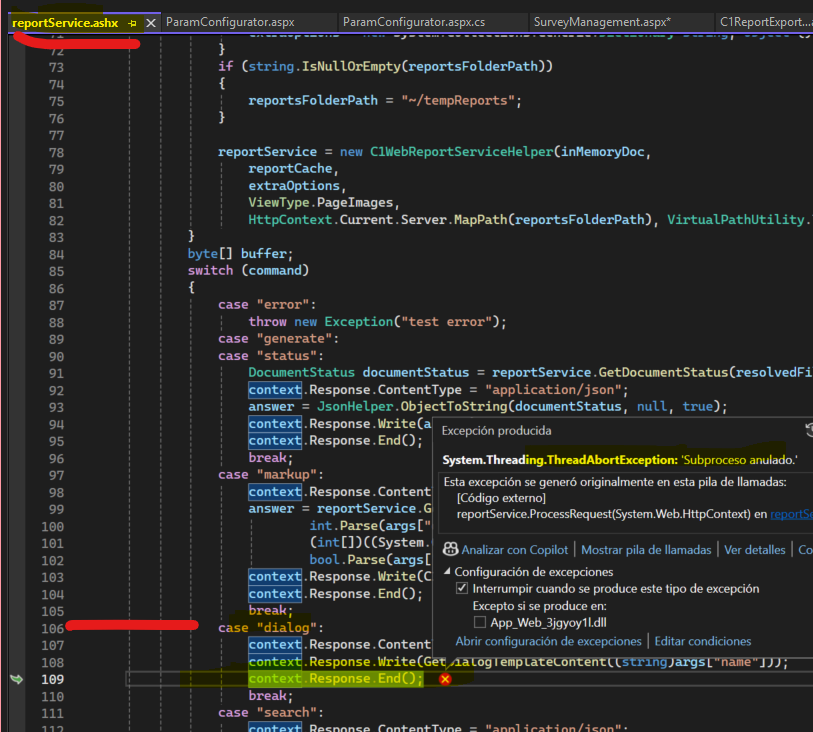
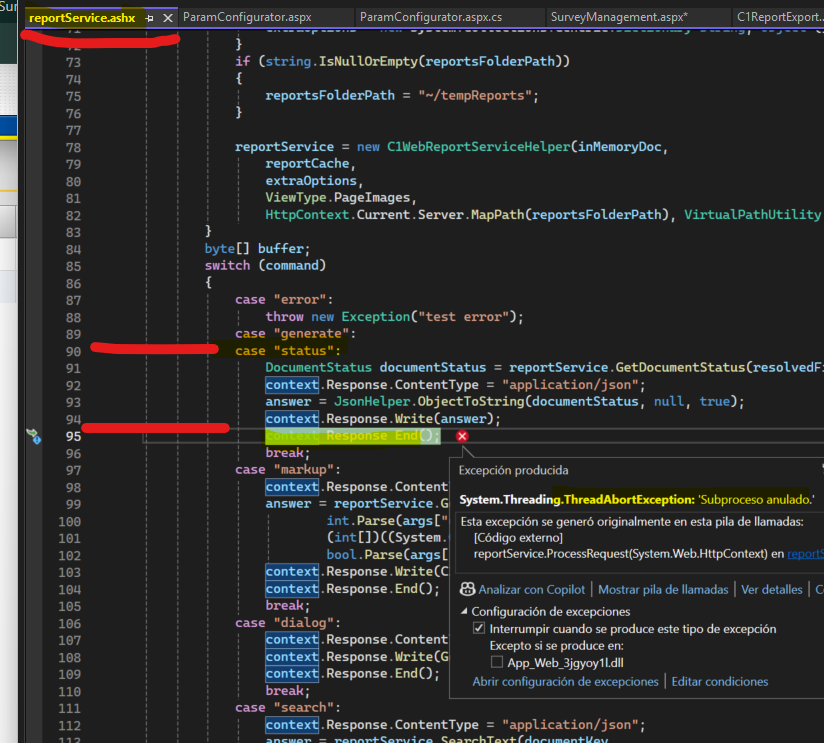
    reportService.ashx error Response.End

  • Posted 29 January 2026, 6:06 am EST

    Hi,

    >> How-to export report to XLSX, XLS, and PDF?

    It looks like you are already discussing this case with Uttkarsh over the following forum case: https://developer.mescius.com/forums/webforms-edition/c1webreport-2010v1-to-c1reportviewer-2025v2-399

    Unfortunately, there is no direct alternative for C1WebReport and NavigationBar in the new C1 WebForms DLL. You would have to C1ReportViewer.

    What is IC1WebReportService?

    IC1WebReportService is a server-side service interface used by the C1ReportViewer to work with a report after it has been generated.

    It allows you to:

    • Export the already rendered report
    • Access report output files (PDF, Excel, etc.)
    • Work with the report instance identified by a documentKey

    What is documentStatus?

    documentStatus is a client-side object exposed by the viewer that tells you:

    • Whether the report is still being generated
    • Whether it’s ready for export
    • The unique identifier of the report instance

    What is docStatus.documentKey

    documentKey is a unique ID generated by the viewer for the rendered report.

    What does ExportToFile(documentKey) do?

    This method finds the rendered report using documentKey(server-side) and then exports the file to the selected format and then it saves the exported file to Viewer’s tempReport’s Folder and returns a URL to the generated file.

    Please also see: https://developer.mescius.com/componentone/docs/webforms/online-reportviewer/C1.Web.Wijmo.Controls.45~C1.Web.Wijmo.Controls.C1ReportViewer.ReportService.C1WebReportServiceHelper~ExportToFile.html

    The custom handler(.ashx) is used to call the ExportToFile option and then streams it back with proper HTTP Headers. This also allows you to handle the functioning of the download behavior.

    Since the Viewer Nav bar by default does not have an export button, you must use the above approach to call the Viewer Export.

    If you do not want to use the Viewer export you can also export the report object independently by using the C1Report’s RenderToFile or RenderToStream method. For more details, please refer to the following pages of our documentation:

  • Posted 29 January 2026, 6:26 am EST - Updated 30 January 2026, 3:15 am EST

    C1Report’s RenderToFile or RenderToStream method documentation is for ComponentOne WinForms Edition

    https://developer.mescius.com/componentone/docs/win/online-report/exportingthereport.html

    https://developer.mescius.com/componentone/docs/win/online-report/C1.C1Report.4~C1.C1Report.C1Report~RenderToStream(Stream,FileFormatEnum).html

    Anyways, view below messages in this thread, I try the sample The custom handler(.ashx) and the ExportToFile option, but and I get Uncaught Error: cannot call methods on c1reportviewer prior to initialization; attempted to call method ‘option’. Never called custom ashx, the error throws in javascript before call to ashx handler.

    please, friend, I use ASP NET WebForms edition, do you have samples using C1Report’s RenderToFile in ASP NET WebForms page with button click for export ?

    Uttkarsh says me about samples:

    To see how to export report to XLSX or PDF file, please refer to our C1ReportViewerChangeExportButtonBehavior product sample located at .\Documents\ComponentOne Samples\ASP.NET Web Forms\WebForms\CS\HowTo on your machine.

    To see how to load reports dynamically, please refer to https://developer.mescius.com/componentone/docs/webforms/online-reportviewer/AddDynamicReports.html and our product sample: InMemoryDocuments.aspx in ControlExplorer located at .\Documents\ComponentOne Samples\ASP.NET Web Forms\WebForms\CS on your machine.

    None sample using button click to Export neither RenderFile sample in ASP NET WEBFORMS.

    please friends, can you help me with a full sample using button click to export, ReporViewer not visible and UpdatePanel?

    thanks a lot, regards. thanks for your help in the migration to 2025v2 399 version ASP NET WebForms edition

    Added: another try-test for export

    protected void btnExport_Click(object sender, EventArgs e)
    {
    C1WebReport.Visible = true;
    	C1WebReport.Width = 1;
    	C1WebReport.Height = 1;
    	C1WebReport.ReportsFolderPath = virtualPath;
    	var physicalPath = Server.MapPath(virtualPath);
    
    	Export(C1WebReport, "xls", this.Page);
    
    	var rpt = GetReport();
    	rpt.RenderToFile(physicalPath, C1ReportV48.FileFormatEnum.Excel);
    
    	UpdatePanelReport.Update();

    I try using RenderToFile but I get Se produjo una excepción en el inicializador de tipo de ‘GrapeCity.Documents.Q.aoa’.

    I dont understand anything: C1.C1Report and GrapeCity.Documents ? C1.Win in WebForms ??? C1.Win.Pdf and Xls ??

      en GrapeCity.Documents.Drawing.Image.d(Stream a, Int32 b)
       en GrapeCity.Documents.Drawing.Image.FromBytes(Byte[] bytes, Int32 frameIndex)
       en C1.Win.Pdf.C1PdfDocument.ToImage(Image img)
       en C1.C1Report.XlsFilter.a(Image a, Field b, Size c)
       en C1.C1Report.XlsFilter.RenderField(Field field, Rectangle rc, String text, Image img)
       en C1.C1Report.Field.ao(ExportFilter a, Layout b, RectangleD c, Image d, Double e)
       en C1.C1Report.Field.as(Layout a, Double b, Double c, Boolean d)
       en C1.C1Report.Section.j(Boolean a, Group b)
       en C1.C1Report.Layout.z(Section a)
       en C1.C1Report.Layout.t()
       en C1.C1Report.C1Report.ai(Boolean a)
       en C1.C1Report.C1Report.ak()
       en C1.C1Report.C1Report.ag(ExportFilter a, Boolean b)
       en C1.C1Report.C1Report.RenderToFile(String fileName, FileFormatEnum fmt)

    any help and code samples about it would be very appreciate

  • Posted 30 January 2026, 5:21 am EST

    Hi,

    I have created a sample application that demonstrates two approaches to exporting the report.

    1. Using the C1Reports API: This approach does not use the viewer to render the report, but it simply loads the selected report and exports it to the required format.

      Sample Code"
    // Default.aspx
    <asp:Button runat="server" Text="PDF" ID="PdfExportBtn" OnClick="PdfExportBtn_Click" Height="50px" Width="200px"/>
    
    //Default.aspx.cs
        protected void PdfExportBtn_Click(object sender, EventArgs e)
        {
            ExportReport(
                FileFormatEnum.PDF,
                "application/pdf",
                "SampleReport.pdf"
            );
        }
        private void ExportReport(
        FileFormatEnum format,
        string contentType,
        string fileName
    )
        {
            var report = new C1.C1Report.C1Report();
            report.Load(
                @"C:\Users\akshay.rajput\Documents\ComponentOne Samples\ASP.NET Web Forms\WebForms\CS\HowTo\C1ReportViewerChangeExportButtonBehavior\C1ReportXML\Report.xml",
                "SampleReport"
            );
    
            using (var stream = new MemoryStream())
            {
                report.RenderToStream(stream, format);
                stream.Position = 0;
    
                Response.Clear();
                Response.Buffer = true;
                Response.ContentType = contentType;
                Response.AddHeader(
                    "Content-Disposition",
                    $"attachment; filename={fileName}"
                );
    
                Response.BinaryWrite(stream.ToArray());
                Response.Flush();
    
                // safer than Response.End()
                HttpContext.Current.ApplicationInstance.CompleteRequest();
            }
        }
    

    As this is part of the internal API of ReportViewer. this will work with your WebForms License, too.

    1. Using the ReportViewer API: This approach hides the viewer from the user but keeps the viewer in the DOM. Once the report is loaded in the Viewer, we generate the export buttons, which, on click calls the Viewer Export Buttons click so it uses the same functionality as the viewer export options originally had.

      Sample Code:
    //Default.aspx
    	<script type="text/javascript">
            function buildCustomButtons() {
                var viewerId = "<%= C1ReportViewer1.ClientID %>";
                var viewer = document.getElementById(viewerId);
              
                if (!viewer) return;
    
                var spans = viewer.querySelectorAll("span.wijmo-wijmenu-text");
                var toolbar = document.getElementById("customToolbar");
    
                // Avoid duplicating buttons
                toolbar.innerHTML = "";
    
                spans.forEach(function (span) {
                    var text = span.innerText.trim();
                    if (!text) return;
    
                    var btn = document.createElement("button");
                    btn.type = "button";
                    btn.innerText = text; //or set text as per your liking
                    btn.style.marginRight = "8px";
                    btn.style.padding = "12px";
                    btn.className = "ui-button ui-widget ui-state-default ui-corner-all";
    
                    btn.onclick = function () {
                        span.click(); // trigger original menu action
                    };
    
                    toolbar.appendChild(btn);
                });
            }
            var reportViewerId = "<%= C1ReportViewer1.ClientID %>";
            $(function () {
                var viewer = $("#" + reportViewerId);
                console.log(viewer)
                viewer.c1reportviewer({
                    documentStatusChanged: function () {
                        var status = viewer.c1reportviewer("option", "documentStatus");
                       
                        // Only rebuild once generation is finished
                        if (!status.isGenerating) {
                            buildCustomButtons();
                        }
                    }
                });
            });
    </script>
    <div id="customToolbar" style="margin:10px 0;"></div>
    <cc1:C1ReportViewer ID="C1ReportViewer1" runat="server"  ReportsFolderPath="~/tempReports"
        Width="850px" Height="650px" 
        Zoom="100%"
        style="display:none"                     
        FileName="~/C1ReportXML/Report.xml" 
        />


    I hope this clears any confusion you had with the export.C1ReportViewerChangeExportButton.zip

  • Posted 30 January 2026, 6:40 am EST - Updated 30 January 2026, 7:00 am EST

    Added: I test this, EnableLogs activate.

    	<cc1:C1ReportViewer ID="C1WebReport" runat="server" ReportsFolderPath="~/_Reports/Temp"
        Width="850px" Height="650px" 
        Zoom="100%"
        FileName="~/_Reports/Files/CollectionReports/Survey.xml" ReportName="report" 
    	EnableLogs="true" CollapseToolsPanel="True" 
        />
    	<iframe id="customsaveframe" style="width: 400px; height: 400px;"></iframe>

    Page_Load

    C1ReportViewer.RegisterDocument("report", GetReport);
    // Asegura que el viewer apunte al documento registrado (no a un path físico)
    /C1WebReport.FileName = "report"; // ← CLAVE

    GetReport

    		private C1ReportV48.C1Report GetReport()
    		{
    			var report = C1ReportViewer.CreateC1Report();
    
    			var reportPath = string.Format("{0}/{1}/CollectionReports/Survey.xml", HttpContext.Current.Request.PhysicalApplicationPath, SEP.GenericService.Instance.GetConfigurationParameter(ConfigurationParamType.ReportsPath));
    			report.Load(reportPath, "report"); // "EncuestasReport");
    			report.ReportName = "report";
    
    			//debes establecer en el viewer FileName = "report"(el nombre del documento) y no un path físico.Ese es el mecanismo por el que el viewer solicita el documento 
    			//y el servidor invoca tu delegado GetReport.Ejemplo oficial: se registra un nombre(“InMemoryBasicTable”) y el control tiene FileName = "InMemoryBasicTable
    			//C1WebReport.FileName = reportPath; // ???
    			C1WebReport.FileName = "report";
    
    			report.Fields["logo"].Picture = string.Format("{0}/{1}", HttpContext.Current.Request.PhysicalApplicationPath, SEP.GenericService.Instance.GetConfigurationParameter(ConfigurationParamType.LogoPath));
    			report.Fields["logo"].PictureScale = C1ReportV48.PictureScaleEnum.Scale;
    			report.Fields["lblLoggedUser"].Text = _loggedUser.Name;
    
    			var data = (DataView)Session["SurveyLists"];
    			var filas = data.Count;
    			report.DataSource.Recordset = data;
    	
    			return report;
    		}

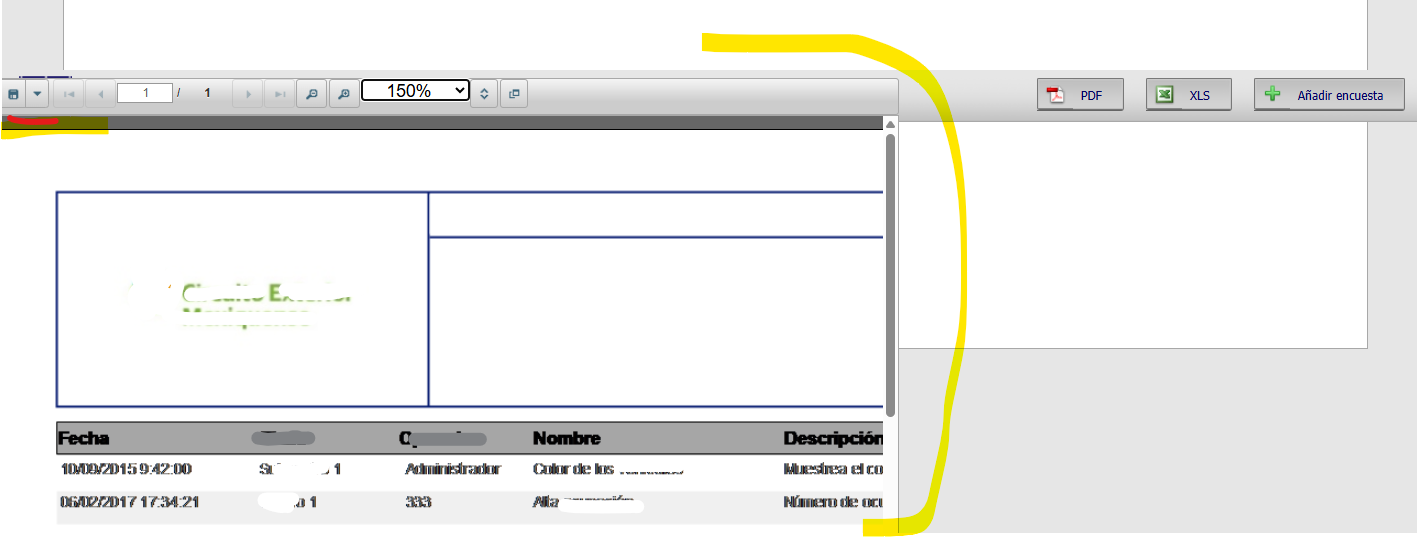
    I have the ReporViewer like Visible and I export to Excel using toolbar button default (NONE custom button).

    I get the error

    Se produjo una excepción en el inicializador de tipo de ‘GrapeCity.Documents.Q.aoa’.

    System.TypeInitializationException’ en DS.Documents.Imaging.dll

    ////Excepción producida: ‘System.Threading.ThreadAbortException’ en mscorlib.dll

    ////Excepción producida: ‘System.Threading.ThreadAbortException’ en mscorlib.dll

    ////Excepción producida: ‘System.TypeInitializationException’ en DS.Documents.Imaging.dll

    Report loaded


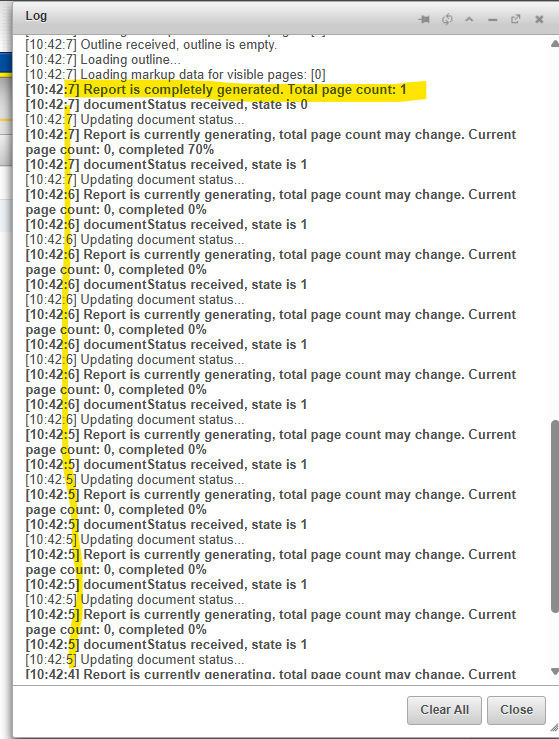
    Log

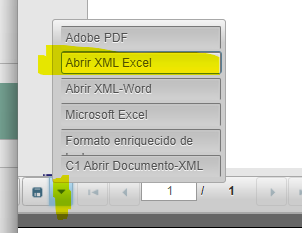
    Export to Microsoft Excel (sorry, image it appears for XML

    Log

    [11:49:5] Exporting to Microsoft Excel

    [11:48:57] Pages markup data received. Resolved zoom is 100, data.zoom is 100

    [11:48:57] Pages markup data received. Resolved zoom is 100, data.zoom is 100

    [11:48:57] Loading markup data for visible pages: [0]

    [11:48:57] Outline received, outline is empty.

    [11:48:57] Loading outline…

    [11:48:57] Loading markup data for visible pages: [0]

    [11:48:57] Report is completely generated. Total page count: 1

    when I was debugging VS 2022, I have seen this in reportService.ashx (does C1ReportViewer generates a ashx handler in root WAP ???)

    case "Export":
                   /*
                   Response.Buffer = false;
                   Response.AppendHeader("Content-Type", "octet-stream");
                   Response.AppendHeader("Content-Disposition", "attachment");
                   Response.Flush();
                   */
                   string exportFormat = args["exportFormat"];
                   System.Collections.Generic.Dictionary<string, object> extraOptions =
                       (System.Collections.Generic.Dictionary<string, object>)HttpContext.Current.Cache[clientId + "_ExtraOptions"];
                   string url = reportService.ExportToFile(args["documentKey"], exportFormat, args["exportedFileName"], extraOptions);
                   context.Response.ContentType = "text/html";

    url string has value: “error:Se produjo una excepción en el inicializador de tipo de ‘GrapeCity.Documents.Q.aoa’.”

    Debugging values

    url: "error:Se produjo una excepción en el inicializador de tipo de 'GrapeCity.Documents.Q.aoa'."
    exportFormat: "Microsoft Excel"
    args["exportedFileName"]: ""
    args["documentKey"]: "162A16FE_5E33CB67"
    extraOptions:
    Count = 2
        [0]: {[ShowParameterInputForm, true]}
        [1]: {[PdfSecurity, {C1.C1Preview.Export.PdfSecurity}]}
    

    Error Se produjo una excepción en el inicializador de tipo de ‘GrapeCity.Documents.Q.aoa’.

    Full log in ZIP

    logErrorReportViewerEncuestas.zip

    Whats about export error:

    Se produjo una excepción en el inicializador de tipo de ‘GrapeCity.Documents.Q.aoa’.

    System.TypeInitializationException’ en DS.Documents.Imaging.dll ?

    Thanks a lot, akshay , I’ll try your sample using the C1Reports API.

    Do I added messages and questions in this thread ? or you need separated questions ?

Need extra support?

Upgrade your support plan and get personal unlimited phone support with our customer engagement team

Learn More

Forum Channels