Update Percentage formatted cell gives unexpected output

Posted by: davide.vago on 6 March 2020, 6:04 am EST

    • Post Options:
    • Link

    Posted 6 March 2020, 6:04 am EST

    Good morning/afternoon.

    I’m currently experiencing an issue which has been flagged by our clients which is related to the behaviour of percentage formatted cells.

    Basically, given a range of cell with formatter set as 0.0% if the user changes the cell from 10% to 12 the output shows 1200% rather than 12%.

    I used my previous sandbox to showcase the issue: https://codesandbox.io/s/multi-instance-spreadjs-on-vue-ggk9q

    Go to Instance 1 and change a cell value within the column ComPct.

    Note, our implementation uses data injected with the fromJSON method (containing the formatter) so we don’t do any manual generation of cells.

    The expected behaviour is something you could check on any product like MS Excel or Google Sheets.

  • Posted 9 March 2020, 1:33 am EST - Updated 3 October 2022, 10:21 am EST

    Hi Davide,

    The issue is arising because in the case of percentage formats what happens is that the input value is multiplied by 100 to change it to the percentage but if we add a % sign in the input value then it means that we are inputting the value in the percentage and it does not need to be multiplied by 100.

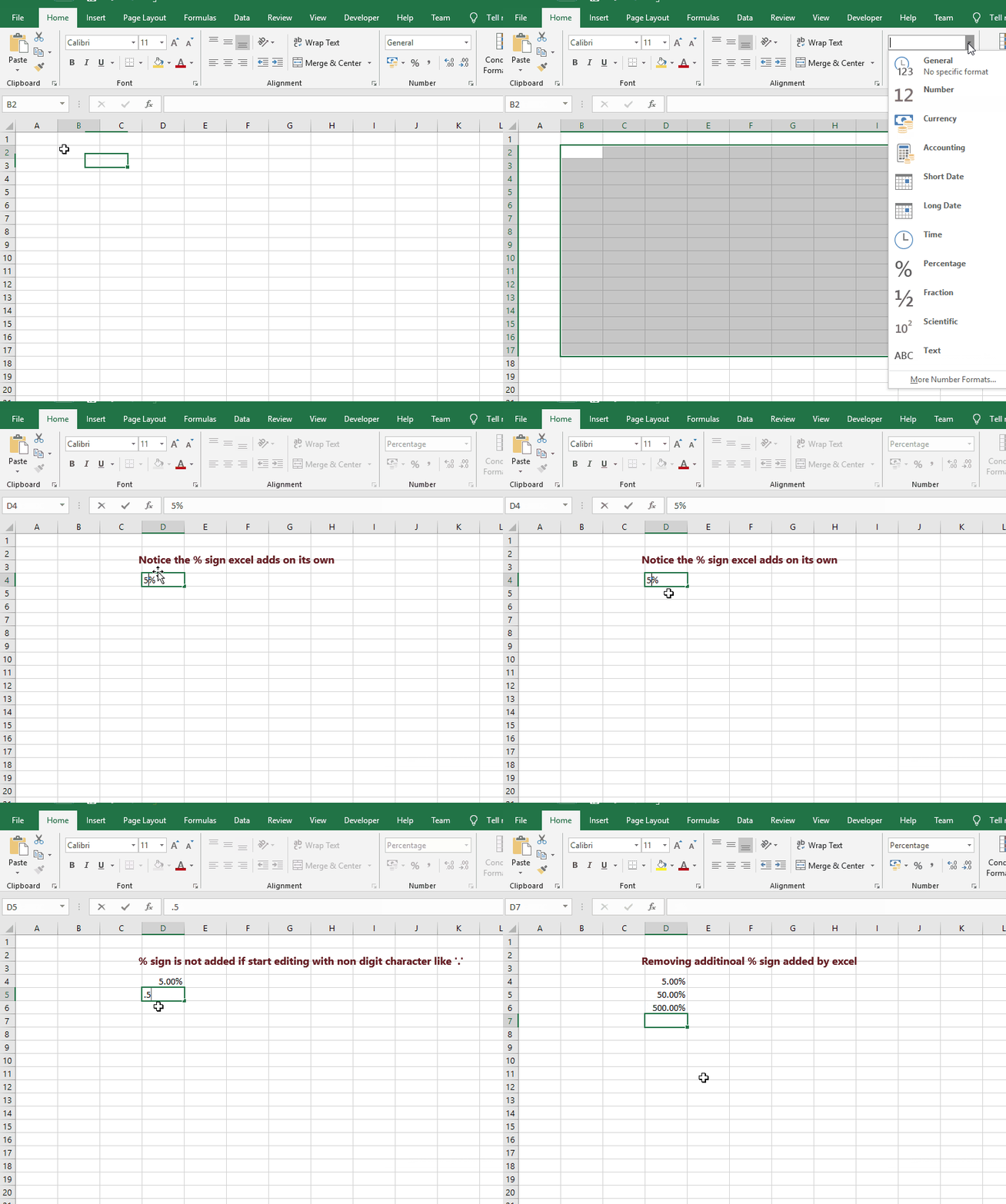
    Excel adds a percentage(%) sign to our input automatically if we start editing the cell with a digit(0-9) which effectively changes the input to 5% instead of just 5 meaning that the formatter won’t multiply the value by 100 whereas in case of spreadJS, if we don’t want the value to be multiplied by 100 then we need to add the % sign manually i.e. we need to input 5% instead of just 5.

    Please refer to the attached gif for a better understanding, gif demonstrates different excel behavior.

    It is already in our backlog(SJS-1560) to support excel-like percentage cell editing behavior and it is expected to released in SpreadJS V13 SP1. I’ve added you as correspondence for the case and will let you know once this feature is released.

    Regards

    Sharad

  • Posted 9 March 2020, 7:01 am EST

    Thanks for the update,

    I got the idea behind the formatter, however the common use case from professional excel users is that if the cell is already formatted as percentage (say 5%) when the user change the value from 5% to 7% just writing the number 7 (without the %) he expect to have as output 7% not 700%

    Do you have any ETA for the delivery of v13 SP1?

    It is a quite breaking experience in our App, we did use an hack in the past to solve the issue (overriding the Base CellType) but that’s not applicable anymore

    Thanks for your support

  • Posted 11 March 2020, 1:19 am EST

    Hi Davide,

    SJS v13 SP1 is expected to be released at the April end. I’ll update you if it changes.

    Regards

  • Posted 11 March 2020, 8:02 am EST

    Hi Sharad,

    Just wanted to help out with this. I managed to find a temporary solution to this issue.

    Basically I’m overriding the Text cellType prototype with this logic on load of the library and seems working fine:

    
    import GC from '@grapecity/spread-sheets'
    
    export default () => {
      const setEditorValueOldPrototype = GC.Spread.Sheets.CellTypes.Text.prototype.setEditorValue
      const getEditorValueOldPrototype = GC.Spread.Sheets.CellTypes.Text.prototype.getEditorValue
    
      GC.Spread.Sheets.CellTypes.Text.prototype.setEditorValue = function(editorContext, value, context) {
        var cellFormatter = context.sheet.getFormatter(context.row, context.col, context.sheetArea)
    
        if (cellFormatter && cellFormatter.formatCached && cellFormatter.formatCached.indexOf('%') != -1 && !isNaN(value)) {
          value = value * 100 + '%'
        }
    
        setEditorValueOldPrototype.apply(this, arguments)
      }
    
      GC.Spread.Sheets.CellTypes.Text.prototype.getEditorValue = function(editorContext, context) {
        if (!context) {
          return ''
        }
    
        var cellFormatter = context.sheet.getFormatter(context.row, context.col, context.sheetArea)
        var editorValue = getEditorValueOldPrototype.apply(this, arguments)
    
        if (
          cellFormatter &&
          cellFormatter.formatCached &&
          cellFormatter.formatCached.indexOf('%') != -1 &&
          editorValue !== null &&
          editorValue.indexOf('%') == -1
        ) {
          var metaValue = editorValue.replace(/%/g, '')
          if (!isNaN(metaValue)) {
            return metaValue / 100
          }
        }
        return editorValue
      }
    }
    
    
  • Posted 12 March 2020, 1:16 am EST

    Thank you for sharing the solution. :slight_smile:

  • Posted 12 March 2020, 3:55 pm EST

    Hi there, I’ve got an actual update on this,

    based on the previous code, there were few situations which were causing problems:

    
    GC.Spread.Sheets.CellTypes.Text.prototype.getEditorValue = function(editorContext, context) {
        if (!context) {
          return ''
        }
    
        const editorValue = getEditorValueOldPrototype.apply(this, arguments)
    
        if (editorValue === null || editorValue === undefined) {
          return
        }
    
        const cellFormatter = context.sheet.getFormatter(context.row, context.col, context.sheetArea)
        let cellFormatIsPercentage
    
        if (cellFormatter) {
          if (typeof cellFormatter === 'object') {
            cellFormatIsPercentage = cellFormatter?.formatCached.indexOf('%') > -1
          } else {
            cellFormatIsPercentage = cellFormatter.indexOf('%') > -1
          }
        }
    
        if (editorValue.indexOf('%') > -1) {
          if (!cellFormatIsPercentage) {
            context.sheet.setFormatter(context.row, context.col, '0.0%', context.sheetArea)
          }
    
          const metaValue = editorValue.replace(/%/g, '')
    
          if (!isNaN(metaValue)) {
            return metaValue / 100
          }
        }
    
        if (cellFormatIsPercentage) {
          if (!isNaN(editorValue)) {
            return editorValue / 100
          }
        }
    
        return editorValue
      }
    

    This permits the user to input 12% and get 12% but also gives the user the possibility to amend the value just inputting a number e.g. 5 → it translates into 5% and not 500%

  • Posted 21 April 2020, 7:08 am EST

    Hi there,

    Apologies for keeping this post open, my company’s users found a bug on the last code I posted which is related to this scenario:

    • the user clicks on a cell
    • without changing content leaves the cell pressing enter or via pointer (not ESC)
    • the value gets divided by 100

    Said so, I would like to understand if the SJS v13 SP1 still expected to be released at the end of the month or, given the pandemic crisis, you are expecting delays.

    Looking forward to hearing from you.

  • Posted 22 April 2020, 2:00 am EST

    Hi Davide,

    Yes, V13 SP1 is still expected to release in this month.

    Regards

  • Posted 24 April 2020, 9:58 am EST

    Hi Davide,

    Build 13.1.0 which included the support for adding percentage symbol automatically for percentage formatted cells is now available. You may get the latest build from npm or download using the following link:

    http://cdn.grapecity.com/spreadjs/13.1.0/Files/SpreadJS.Release.13.1.0.zip

    Please update to the latest version and let us know if you face any issues.

    For more information, you may refer to the following doc:

    https://www.grapecity.com/spreadjs/docs/v13/online/percentage-format-in-cells.html

    Regards

  • Posted 19 May 2020, 7:58 am EST

    Thanks for this, we reviewed the implementation and seems to be fixed.

Need extra support?

Upgrade your support plan and get personal unlimited phone support with our customer engagement team

Learn More

Forum Channels