Posted 20 October 2022, 12:03 am EST - Updated 20 October 2022, 12:08 am EST
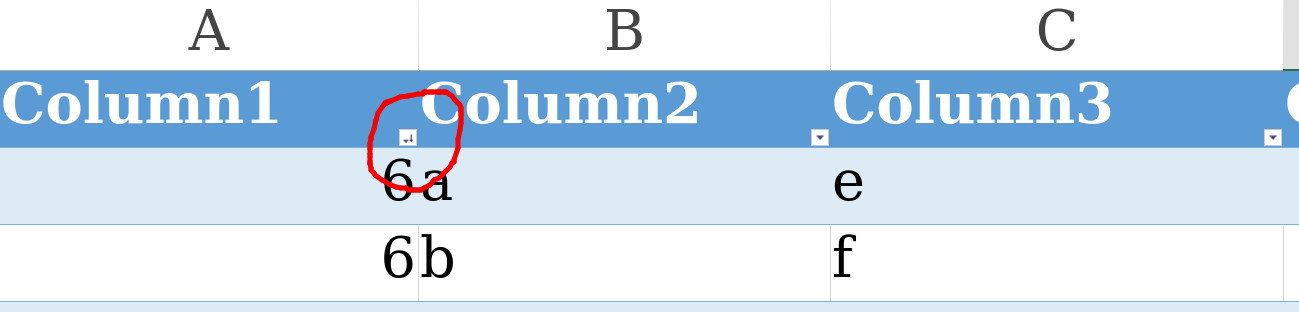
Set Sort/Filter Icon on the custom column header
Posted by: vamshikrishna.ext on 20 October 2022, 12:03 am EST
-

vamshikrishna.ext
-
vamshikrishna.ext
Posted 20 October 2022, 2:55 am EST
and also remove the filter/sort icons on the custom column header by code if exists
-

avinash.pathak
Posted 20 October 2022, 3:21 am EST
Hi,
We are sorry but this is not supported. We can not change the filer/sort icon without actually filtering/sorting the data. We are sorry for the inconvenience.
For Removing:
You can only remove the entire filter button from header. For removing the button you may refer to the following code snippet.
var filter = new spreadNS.Filter.HideRowFilter(new spreadNS.Range(-1, 0, -1, 2));
    sheet.rowFilter(filter);
    filter.filterButtonVisible(false);

/*for table filters*/

table.filterButtonVisible(false)
Regards, Avinash
-
vamshikrishna.ext
Posted 21 October 2022, 12:36 am EST
Hi ,
Thanks for the reply, can we customize styles for filter button in the header column. -
avinash.pathak
Posted 21 October 2022, 8:12 am EST
Hi,
We are sorry but the filter button is not customizable. We are sorry for the inconvenience.
Regards,
Avinash