Real-Time User State Sharing

Posted by: ichioka.yuji on 24 November 2025, 11:43 am EST

    • Post Options:
    • Link

    Posted 24 November 2025, 11:43 am EST

    Since my application uses Y.js as a collaboration framework, I want to enable real-time user state sharing as awareness specifically within the SpreadJS worksheet.

    Do you have a simple and minimum but complete example of real-time user state sharing in SpreadJS (v18.2.5)?

  • Posted 25 November 2025, 8:08 am EST

    Hi,

    There isn’t a sample available that demonstrates real-time user state using Y.js with SpreadJS, and it’s unclear whether SpreadJS fully supports this integration. You may try exploring it using the SpreadJS APIs: https://developer.mescius.com/spreadjs/api/modules/GC.

    However, SpreadJS already provides a built-in collaboration feature that supports real-time user state. You can refer to the following for presence and collaboration support:

    https://developer.mescius.com/spreadjs/docs/spreadjs-collaboration-server

    https://developer.mescius.com/spreadjs/docs/spreadjs-collaboration-server/spreadjs-sheets-collaboration/user/presence

    Please check the attached sample for reference: Collaboration.zip

    Regards,

    Priyam

  • Posted 5 January 2026, 4:15 am EST - Updated 5 January 2026, 4:16 am EST

    Hello,

    I created a simple demo (index-collaboration-presence.html) that only displays presence, based on the following article.

    *https://developer.mescius.com/spreadjs/docs/spreadjs-collaboration-server/spreadjs-sheets-collaboration/tutorial-real-time-collaborative-spreadjs-designer/tutorial-use-presence

    *https://developer.mescius.com/spreadjs/docs/spreadjs-collaboration-server/spreadjs-sheets-collaboration/user/presence

    However, it doesn’t work because the following error occurs.

    index.min.js:18  Uncaught ReferenceError: require is not defined
    index.min.js:18  Uncaught TypeError: Cannot read properties of undefined (reading 'LoggerManager')
    
    index-collabration-presence.zip

  • Posted 5 January 2026, 10:27 am EST

    Hi Yuji,

    We’ve reviewed your demo and identified the issue. The error occurs because the collaboration client libraries require a module bundler (such as Webpack/Vite) and cannot be loaded directly via a CDN.

    Solution

    We’ve attached a complete working implementation of the Server collaboration user presence feature with the following details:

    1. Server:
      • Node.js collaboration server with OT and Presence features
      • SQLite persistence for document state
      • WebSocket support for real-time sync
    2. Client:
      • Webpack-bundled application with proper module imports

        ​ * Real-time presence visualization with colored borders
      • Multi-user collaboration support

    Setup:

    1. Extract the zip file
    2. Server setup:
         cd server
         npm install
         npm run init-db
         npm start
    3. Client build:
         cd client
         npm install
         npm run build
    4. Open http://localhost:8080/index.html in multiple browsers to test

    The presence feature displays each user’s selection with colored borders and username labels as required.


    Please let us know if you encounter any further issues or require any further assistance.

    Best regards,

    Chirag

    Attachment: spreadjs-collaboration.zip

  • Posted 6 January 2026, 3:45 am EST

    My team currently possesses a collaboration platform based on Y.js, and we are in the process of developing an application that integrates SpreadJS into this existing environment. Consequently, we intend not to utilize the @mescius/js-collaboration server; rather, we aim to employ solely the user presence display functionality on SpreadJS client.

    According to the article linked below, it appears that the user presence can be configured via the setPresences() method:

    https://developer.mescius.com/spreadjs/docs/spreadjs-collaboration-server/spreadjs-sheets-collaboration/user/presence

    let presences = [{  
    	user: {  
    		id: '1',  
    		name: 'User1',  
    		color: '#FF0000'  
    	},  
    	status: {  
    		selections: {  
    			selections: [new GC.Spread.Sheets.Range(0, 0, 1, 1)],  
    			sheetId: 'sheet1'  
    		}  
    	}  
    }];  
    spread.collaboration.setPresences(presences);  

    However, I noticed that the sample demo code you kindly provided did not include any usage of the setPresences() method. I would be immensely grateful if you could furnish an example demonstrating how to properly utilize the setPresences() method within the context of SpreadJS collaboration.

  • Posted 7 January 2026, 8:23 am EST

    Hi Yuji,

    The earlier sample we shared demonstrated user presence using the bindPresence API. We have now updated the code to use the setPresences API instead of bindPresence.

    However, with setPresences, the presence information is only stored internally in the presence objects and does not render presence highlights in the SpreadJS UI.

    We have escalated this behavior to the development team for further investigation and will keep you informed as soon as we receive an update.

    Internal Tracking ID: SJS-33303

    Kind regards,

    Chirag

  • Posted 9 January 2026, 6:57 am EST

    Hi Yuji,

    After discussion with our development and product teams, we’d like to confirm that SpreadJS collaboration and presence features are supported only when used with the official SpreadJS Collaboration Server.

    While the setPresences() API can accept presence data, it does not render visual presence (remote selections, highlights, labels) when used independently or with a third-party collaboration framework such as Y.js. The UI rendering and internal collaboration state required for presence visualization are handled by the SpreadJS Collaboration Server and its binding mechanisms (for example, bindPresence).

    At this time:

    If you plan to use Y.js exclusively, any user-state or selection rendering would need to be implemented outside of SpreadJS collaboration APIs.

    Kind regards,

    Chirag

  • Posted 12 January 2026, 5:44 am EST

    To address this based on your response, I am creating an SVG layer over the worksheet to render user presences.

    Using the following code, I obtain the size of the SVG layer, which includes only the corner, row header, and column header, excluding scroll bars and sheet tabs:

    height: activeSheet.getRowHeight(0, Sheets.SheetArea.colHeader) + activeSheet.getViewportHeight(1),
    width: activeSheet.getColumnWidth(0, Sheets.SheetArea.rowHeader) + activeSheet.getViewportWidth(1),

    However, when the zoom factor is greater or less than 100%, the calculated height and width do not match the actual rendered area.

    Please let me know how I can obtain the correct size regardless of the zoom factor.

  • Posted 13 January 2026, 12:41 am EST

    Hi Yuji,

    Thank you for the detailed explanation and for sharing your findings.

    In this scenario, the behavior you are observing is expected. SpreadJS APIs such as getRowHeight, getColumnWidth, and getViewportHeight/Width return logical sheet sizes, and the zoom factor is applied later at the rendering layer. Because of this, combining these APIs does not yield the exact rendered area when the zoom level is other than 100%.

    For cases like yours - where a custom SVG or canvas layer is required for rendering user presence, the recommended approach is to:

    1. Size the overlay using the SpreadJS host element (spread.getHost().getBoundingClientRect()), which already reflects zoom and DPI scaling.
    2. Use the sheet.getCellRect(row, col) to convert logical row/column ranges into accurate visual coordinates.
    3. Redraw the overlay in response to relevant events such as zoom, scroll, active sheet change, and window resize.

    This pattern ensures correct alignment regardless of the zoom factor and is suitable for custom presence rendering scenarios.

    We have shared a working sample and a detailed implementation below that demonstrates this overlay-based approach in another SpreadJS query. To avoid duplication, we recommend referring to that query and the attached code sample, which fully covers:

    • Zoom-independent sizing
    • High-DPI handling
    • Viewport clipping
    • Event-driven redraw logic

    Please follow the link to the query for the complete reference implementation: https://developer.mescius.com/forums/spreadjs/custom-spreadsheet-overlays.

    Please let us know if you require any further assistance.

    Kind regards,

    Chirag

    Attachment: https://jscodemine.mescius.io/share/rICrkv4ueka4MqLNAnhBpA

  • Posted 13 January 2026, 7:27 am EST - Updated 13 January 2026, 7:38 am EST

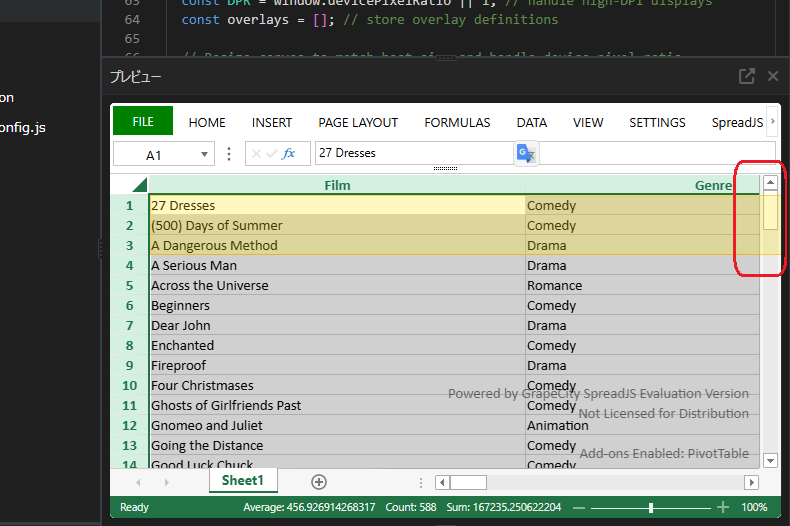
    Thank you for providing the example. It is very helpful for me. I would like to share a reson why I took my previous approach. With the example you kindly provided me, the rendering of selection on an overlay may overflow into scroll bar area.

    Now I take another approach for sizing an overlay correctly with the following cods. It has seemed to work well so far.

    requestAnimationFrame(
      () => {
        const canvas = workbook.getHost()
          .querySelector<HTMLCanvasElement>('canvas[gcuielement="gcWorksheetCanvas"]')!;
        const viewport = {
          topRow: activeSheet.getViewportTopRow(1),
          bottomRow: activeSheet.getViewportBottomRow(1),
          leftColumn: activeSheet.getViewportLeftColumn(1),
          rightColumn: activeSheet.getViewportRightColumn(1),
          height: canvas.height,
          width: canvas.width,
        };
      }
    );
  • Posted 13 January 2026, 7:48 am EST

    Hi Yuji,

    Thank you for the clarification and for sharing your updated approach.

    Your reasoning makes sense. Sizing the overlay using the internal worksheet canvas (canvas[gcuielement=“gcWorksheetCanvas”]) correctly limits the rendering area to the visible worksheet and avoids overflow into scroll bars or sheet tabs. Since this canvas already reflects zoom, scrolling, and clipping, using its width and height is a practical way to achieve accurate sizing.

    Please note that gcWorksheetCanvas is an internal DOM element and not part of the public SpreadJS API, so its structure may change in future versions. We recommend revalidating this approach when upgrading SpreadJS and keeping the overlay logic isolated for easier maintenance.

    Overall, this is a reasonable workaround for custom presence rendering outside the SpreadJS collaboration framework.

    Please let us know if you encounter any further issues or require further assistance.

    Kind regards,

    Chirag

Need extra support?

Upgrade your support plan and get personal unlimited phone support with our customer engagement team

Learn More

Forum Channels