PrintInfo options not showing any changes

Posted by: adisa.craig on 23 July 2021, 4:46 pm EST

    • Post Options:
    • Link

    Posted 23 July 2021, 4:46 pm EST - Updated 3 October 2022, 9:43 am EST

    Hi I was using the following code to update the printinfo

    
    printInfo.orientation(GC.Spread.Sheets.Print.PrintPageOrientation.portrait);
    printInfo.paperSize(new GC.Spread.Sheets.Print.PaperSize(GC.Spread.Sheets.Print.PaperKind.a2));


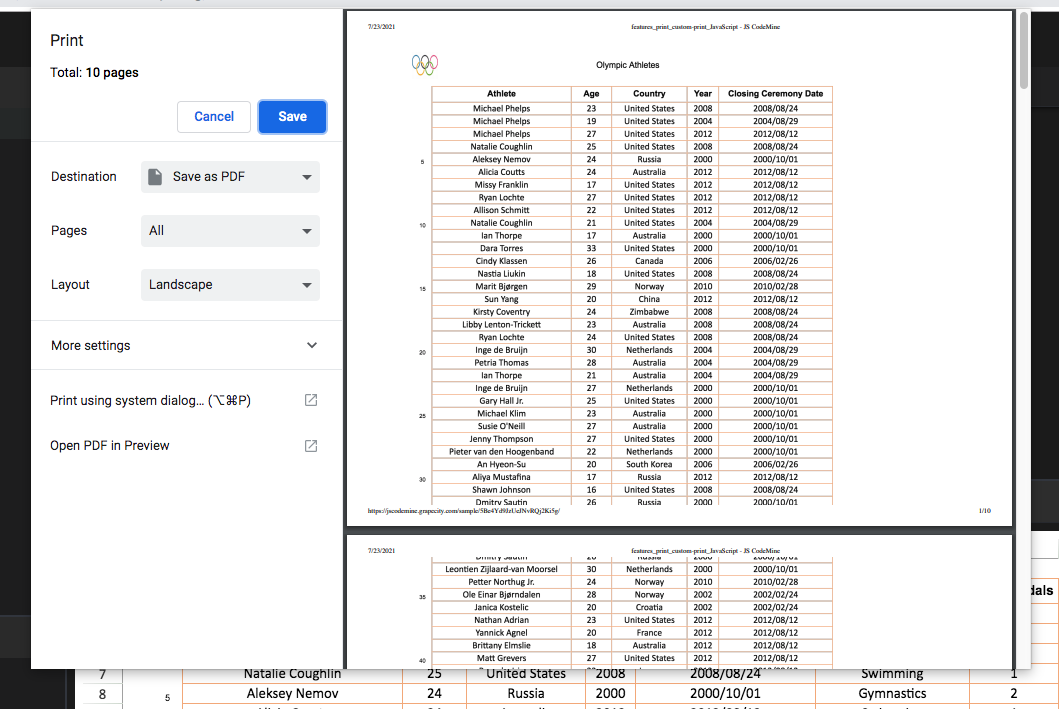
    However when the spread.print() function is run and the browser print dialog opens the above two values still need to be set manually. As seen in the picture even though I set it to portrait, the browser print dialog still shows layout as landscape,

    Am i setting the above incorrectly?

    Also ran some tests in this code instance https://jscodemine.grapecity.com/sample/5Be4Yd9JzUeJNvRQj2Ki5g/

  • Posted 26 July 2021, 2:10 am EST

    Hi Adisa,

    When using the print functionality, this is the expected behaviour because the print functionality is provided by the browsers and browsers do not allow the webapps to set the print settings, only the end-user is allowed to customize those settings.

    When we set the print settings, SJS adjusts the content such that the content itself will look fine on the page with the specified size, but choosing the correct page size is end user’s responsibility. If you do not let the end user set the page size, what you could do instead is use the PDF export functionailty, since PDF is created by the SJS, it has full control over its settings and all of the specified settings are correctly reflected in the exported PDF.

    Hope this clears

    Regards

    Sharad

Need extra support?

Upgrade your support plan and get personal unlimited phone support with our customer engagement team

Learn More

Forum Channels