Hi,
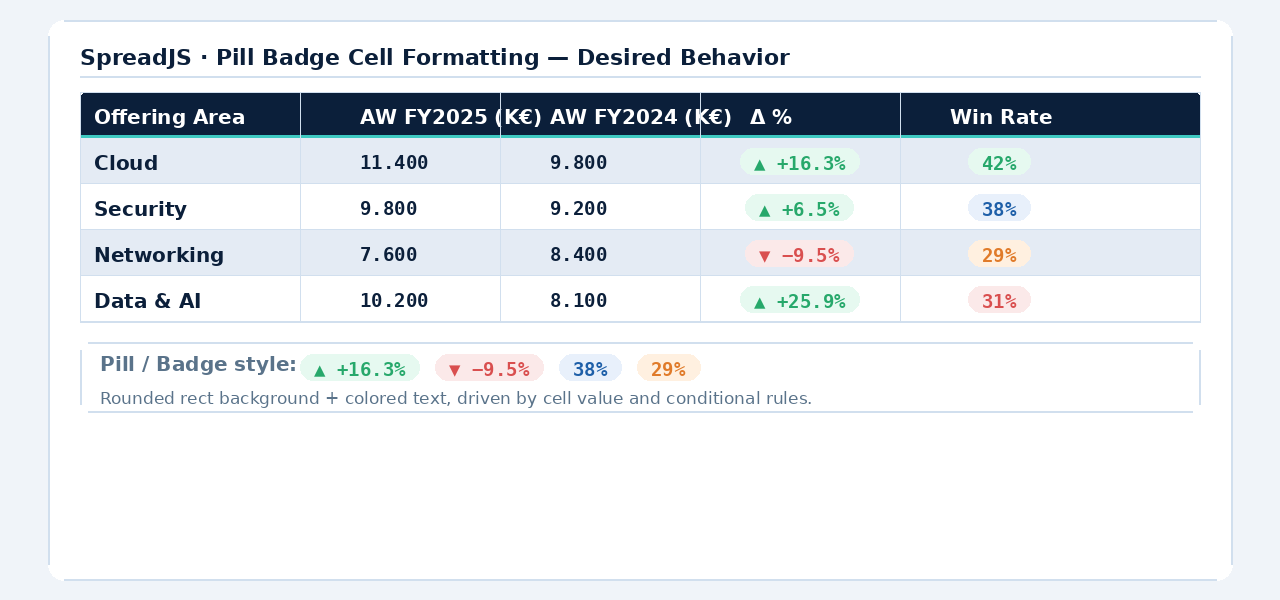
Regarding what you’re trying to build, just to confirm our understanding (as we could not find the image attachment), you would like the values in a Status column (such as Active, Pending, or At Risk) to be displayed inside a compact rounded rectangle (pill/badge) whose color changes based on the cell value.
For example:
| Deal Name |
Sales Rep |
Amount |
Status |
| Contoso Enterprise |
Alice Johnson |
$45,000 |
Green badge - Active |
| Fabrikam Renewal |
Bob Smith |
$12,000 |
Yellow badge - Pending |
| Tailspin Cloud |
David Lee |
$23,000 |
Red badge - At Risk |
Using standard cell styles (background color and font color) can achieve a similar appearance, but it cannot create the pill/badge shape with rounded corners and custom borders. For that, a custom rendering approach is required.
Q1 — Is there a built-in or officially supported alternative to
paint()
?
The short answer is no. As of the latest release (v19.1), SpreadJS does not provide a built-in pill/badge cell type.
The available built-in cell types include:
- ComboBox
- CheckBox
- CheckBoxList
- Button
- RadioButtonList
- Text
- Hyperlink
- DiagonalLine
None of these support rendering pill/badge-style content.
You can use Conditional Formatting to dynamically apply background and font colors based on cell values, but it is limited to rectangular cell styling and cannot create rounded shapes or custom badge rendering.
For scenarios like this, the officially supported approach is to create a Custom Cell Type by extending
GC.Spread.Sheets.CellTypes.Base
and overriding the
paint()
method. This is the recommended extensibility mechanism provided by SpreadJS for custom visual rendering.
A sample implementation of a custom
BadgeCellType
is provided below and demonstrates how to render colored pill-style badges based on the cell value:
// BadgeCellType implementation...
var spreadNS = GC.Spread.Sheets;

window.onload = function () {
    var spread = new GC.Spread.Sheets.Workbook(document.getElementById("ss"));
    initSpread(spread);
};

// Helper: converts "#22c55e" → "rgba(34,197,94,0.15)"
// Required because canvas fillStyle does NOT support 8-digit hex in all environments.
function hexToRgba(hex, alpha) {
    var r = parseInt(hex.slice(1, 3), 16);
    var g = parseInt(hex.slice(3, 5), 16);
    var b = parseInt(hex.slice(5, 7), 16);
    return "rgba(" + r + "," + g + "," + b + "," + alpha + ")";
}

// ── BadgeCellType ─────────────────────────────────────────────────────────────
function BadgeCellType(colorMap) {
    this.colorMap = colorMap || {};
}

// Prototype setup — identical pattern to FivePointedStarCellType in the official demo
BadgeCellType.prototype = new spreadNS.CellTypes.Base();

BadgeCellType.prototype.paint = function (ctx, value, x, y, w, h, style, context) {
    if (!ctx) {
        return;
    }

    ctx.save();

    // Step 1: clip to cell boundary
    ctx.rect(x, y, w, h);
    ctx.clip();

    // Step 2: clear path AFTER clip (prevents fill leaking into clip region)
    ctx.beginPath();

    var label    = (value !== null && value !== undefined) ? String(value) : "";
    var bgColor  = this.colorMap[label] || "#94a3b8";   // default: slate gray

    // Pill geometry
    var pillH = Math.min(h - 8, 24);                    // 4px top/bottom gap; max 24px
    var pillW = Math.max(pillH, Math.min(w - 10, 100)); // min width = circle; max = 100px
    var pillX = x + (w - pillW) / 2;
    var pillY = y + (h - pillH) / 2;
    var radius = pillH / 2;                             // radius = half-height = true pill

    // Step 3: draw pill with two arc() calls
    ctx.beginPath();
    ctx.arc(pillX + radius,         pillY + radius, radius, Math.PI / 2, Math.PI * 1.5);
    ctx.arc(pillX + pillW - radius, pillY + radius, radius, Math.PI * 1.5, Math.PI / 2);
    ctx.closePath();

    // Semi-transparent fill
    ctx.fillStyle = hexToRgba(bgColor, 0.15);
    ctx.fill();

    // Solid colored border
    ctx.strokeStyle = bgColor;
    ctx.lineWidth   = 1.5;
    ctx.stroke();

    // Label text — centered inside the pill
    ctx.fillStyle      = bgColor;
    ctx.font           = "bold 11px 'Segoe UI', Arial, sans-serif";
    ctx.textAlign      = "center";
    ctx.textBaseline   = "middle";
    ctx.fillText(label, pillX + pillW / 2, pillY + radius);

    ctx.restore();
};

// ── initSpread ────────────────────────────────────────────────────────────────
function initSpread(spread) {
    var sheet = spread.getSheet(0);
    sheet.suspendPaint();

    var colorMap = {
        "Active":  "#22c55e",   // green
        "Pending": "#f59e0b",   // amber
        "Won":     "#3b82f6",   // blue
        "At Risk": "#ef4444",   // red
        "Closed":  "#64748b"    // slate
    };

    var columnInfo = [
        { name: "deal",   displayName: "Deal Name",  size: 200 },
        { name: "rep",    displayName: "Sales Rep",   size: 150 },
        { name: "amount", displayName: "Amount ($)",  size: 110 },
        { name: "status", displayName: "Status",
          cellType: new BadgeCellType(colorMap),       size: 130 }
    ];

    var source = [
        { deal: "Contoso Enterprise",   rep: "Alice Johnson",  amount: 45000, status: "Active"  },
        { deal: "Fabrikam Renewal",     rep: "Bob Smith",      amount: 12000, status: "Pending" },
        { deal: "Northwind Expansion",  rep: "Carol White",    amount: 87000, status: "Won"     },
        { deal: "Tailspin Cloud",       rep: "David Lee",      amount: 23000, status: "At Risk" },
        { deal: "Woodgrove Networks",   rep: "Eve Martinez",   amount:  9500, status: "Closed"  },
        { deal: "Adventure Works",      rep: "Frank Brown",    amount: 61000, status: "Active"  },
        { deal: "Datum Corp",           rep: "Grace Kim",      amount: 34000, status: "Pending" },
        { deal: "Litware SaaS",         rep: "Henry Wilson",   amount: 18000, status: "Won"     }
    ];

    sheet.setDataSource(source);
    sheet.bindColumns(columnInfo);

    // Taller rows give the pill room to breathe
    for (var i = 0; i <= source.length; i++) {
        sheet.setRowHeight(i, 36);
    }

    sheet.resumePaint();
}
Q2 — Are there any plans for native Designer support?
As of the latest public release, there is currently no native pill/badge cell type available in the Designer.
However, we can discuss this requirement with the development team to determine whether such functionality could be considered for a future release. Before doing so, could you please share the image you mentioned (we were unable to find it in the case) and provide some additional details about the exact appearance and behavior you are looking for? This will help us better communicate the requirement to the development team and determine whether native support could be considered.
Regards,
Priyam