Number should not be rounded or add extra zero's after decimal

Posted by: jekin.desai on 1 March 2021, 4:28 am EST

    • Post Options:
    • Link

    Posted 1 March 2021, 4:28 am EST

    When ever number is entered for e.g. ‘5’ it is converted to ‘5.00’ or if ‘5.678’ is entered it is getting converted to ‘5.69’.

    I want to turn off auto number conversion/rounding. It should always display number which is entered for e.g.:

    ‘5’ should be ‘5’ ,

    ‘5.6789’ should be ‘5.6789’

  • Posted 1 March 2021, 6:53 am EST

    What should I set in formatter to make sure whatever number is enter it will not be modified

     this.sheet.getCell(rowNo, columnNo).formatter('WHAT SHOULD I PUT HERE')
    

    Note: Value can be ‘5.676767678899945678908’ long

  • Posted 2 March 2021, 12:51 am EST

    Hi Jekin,

    >>When ever number is entered for e.g. ‘5’ it is converted to ‘5.00’ or if ‘5.678’ is entered it is getting converted to ‘5.69’.

    We are unable to replicate the issue at our end make sure you haven’t set any formatter to cell and the column has enough width to show all digit.

    >>I want to turn off auto number conversion/rounding. It should always display the number which is entered for e.g.:

    By default, The SPreadJS shows the exact value that you defined in a cell until the value of the cell gets overflowed or you have set any formatter to the cell.

    >>Note: Value can be ‘5.676767678899945678908’ long

    This is the limitation of JavaScript. JavaScript numbers are always stored as double precision floating point numbers, following the international IEEE 754 standard. so it can only store the 16 digits after the decimal point.

    Further, if you just want to show the number you may format the digit using “@” formatter or adding “`” character before the number.

    IEEE745 standard http://irem.univ-reunion.fr/IMG/pdf/ieee-754-2008.pdf

    Regards

    Avinash

  • Posted 2 March 2021, 7:27 am EST

    Ok,You are right I am using formatter (‘#,#0.00’). But if i don’t apply formatter it is treated as text( not as a number) due to which ‘=SUM()’ doesn’t work for that cell

    So how to format a cell base on decimal separator.

    For e.g In the United States, this character is a period (.). In Germany, it is a comma (,). Thus one thousand twenty-five and seven tenths is displayed as 1,025.7 in the United States and 1.025,7 in Germany.

    How can I show any one of the number format in cell with ‘=SUM()’ formula working on it

  • Posted 3 March 2021, 4:33 am EST

    Hi, Any update?

  • Posted 3 March 2021, 6:21 am EST

    To support different period symbols in numbers, you need to set the CultureInfo accordingly. Please refer to the following demo demonstrating the use of culture:

    https://www.grapecity.com/spreadjs/demos/features/culture/globalization/purejs

  • Posted 4 March 2021, 2:06 am EST

    Hi

    CultureInfo is already set in code but then to if i enter ‘1234,56’ it is not converted in to ‘1.234,56’ and same for ‘1234.56’ is not converted into ‘1,234.56’ ( I think it is working correctly in demo code because of formatter ‘#,##0.00’ set to the cell which also round to 2 digit after decimal.)

       // 1.234,56
     ```
    

    culture.NumberFormat.numberDecimalSeparator = ‘,’;

    culture.NumberFormat.numberGroupSeparator = ‘.’;

          // 1,234.56
        ```
      culture.NumberFormat.numberDecimalSeparator = '.';
          culture.NumberFormat.numberGroupSeparator = ',';
    

    Also the above link that you gave to set the CultureInfo is also rounding to 2 digit after decimal(Which i don’t want to happen).

    Can you create sample code to handle decimal separator with ‘=sum()’ at the bottom and rounding should not happen(whatever number is entered it should not be changed except format i.e. ‘1234.56678’ to ‘1,234.56678’)

  • Posted 4 March 2021, 7:16 am EST

    Hi Jekin,

    This is the expected behavior from the SpreadJS. Excel Also does the same if You set the format of the cell will see the numbers according to the format if you don’t set the format then the number will not be formatted and you will not see the group separator symbol. What you could do is format the cell according to the largest number of digits that a cell can have. Please refer to the following code snippet.

    
      sheet.setFormatter(0, 3, "##,##.#################");


    Regards

    Avinash

  • Posted 4 March 2021, 8:41 am EST

    Hi, Above formatter is working as expected but issue is with whole number like ‘3’ it is showing ‘3.’(period separator (.)) and for (comma separator(,) ‘3’ is shown as ‘3,’)

  • Posted 5 March 2021, 1:02 am EST

    Hi Jekin,

    This is the default behavior of The SpreadJS. Excel also does the same. If you want to prevent this you need to create your own custom format but please note that this format will not be applied in excel since it is specific to SpreadJS. Please refer to the following code snippet and the attached sample that demonstrates the same.

    
    function CustomNumberFormat(formatString) {
        this.formatString = formatString ? formatString : "##,###.###############";
      }
    
      CustomNumberFormat.prototype = new GC.Spread.Formatter.FormatterBase();
      CustomNumberFormat.prototype.format = function (obj, formattedData) {
        if (typeof obj === "number") {
          let currentCultureName = GC.Spread.Common.CultureManager.culture();
          let defaultFormatter = new GC.Spread.Formatter.GeneralFormatter(
            this.formatString,
            currentCultureName
          );
          let formatString = defaultFormatter.format(obj);
          let decSeperator = GC.Spread.Common.CultureManager.getCultureInfo(
            currentCultureName
          ).NumberFormat.currencyDecimalSeparator;
         
          formatString =
            formatString[formatString.length - 1] === decSeperator
              ? obj
              : formatString;
          return formatString;
        }
        return obj;
      };
    
      CustomNumberFormat.prototype.parse = function (str) {
        return new GC.Spread.Formatter.GeneralFormatter().parse(str);
      };
      spread.getActiveSheet().setFormatter(0, 0, new CustomNumberFormat());


    sample: https://codesandbox.io/s/customformat-2v0fg

    API References

    customFormat: https://codesandbox.io/s/customformat-2v0fg

    custom Item Seriliazation:https://www.grapecity.com/spreadjs/demos/features/workbook/custom-item-serialization/purejs

    Regards

    Avinash

  • Posted 5 March 2021, 1:53 am EST

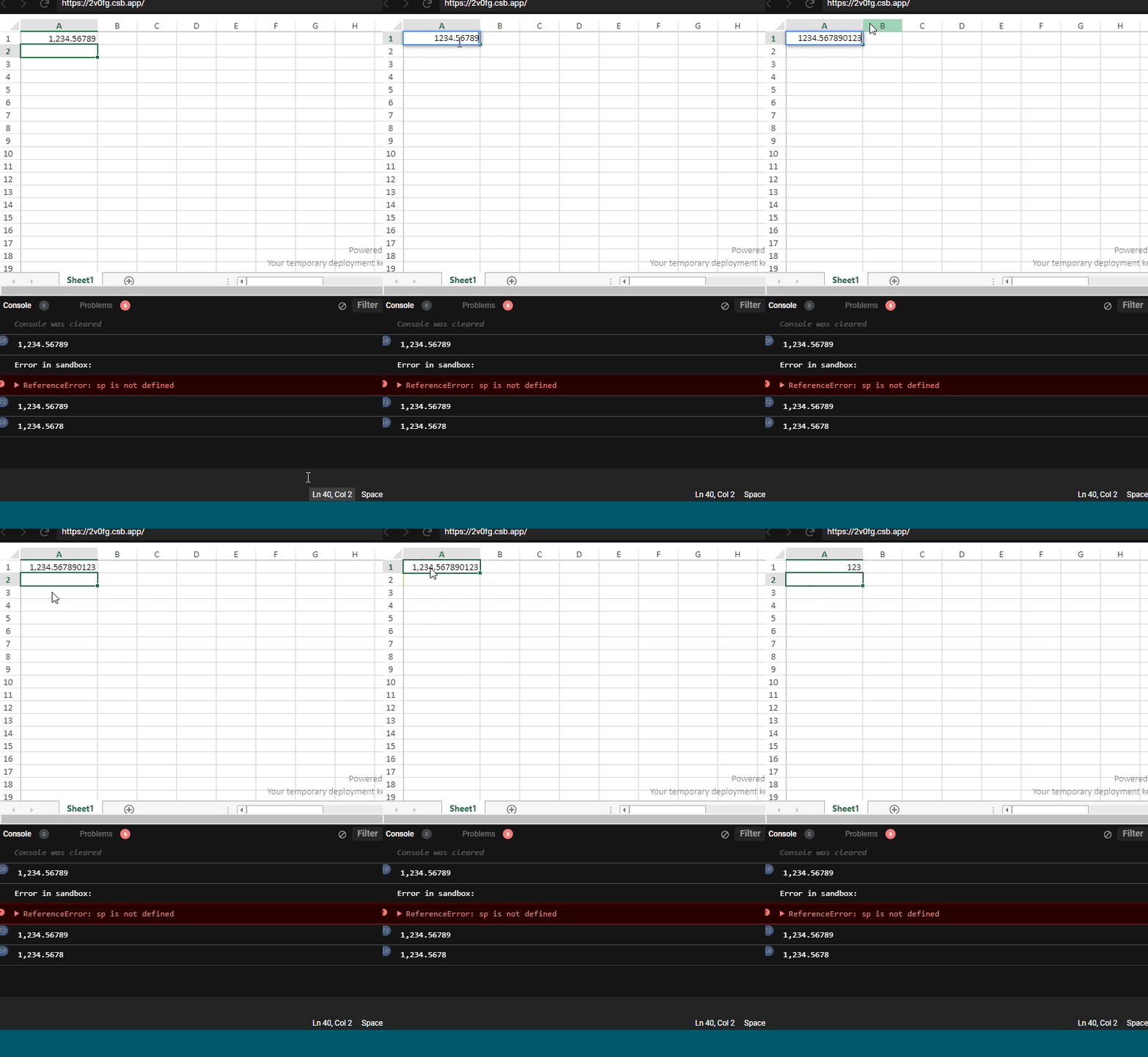
    In Sample link code, when i enter 1,234.5678 it is converted to 1,234.57 (rounding which i don’t want) and for 1234.5678 it is showing 1234.5678(which is fine just formatting doesn’t happen)

    I simply want solution/formatter which should work like ‘1,234.5678’ should be ‘1,234.5678’ ,‘1234.5678’ to ‘1,234.5678’ , ‘3’ to ‘3’ . i.e. format the number and don’t round off

  • Posted 5 March 2021, 3:20 am EST - Updated 3 October 2022, 9:55 am EST

    Hi Jekin,

    We are unable to replicate the issue at our end. Could you please refer to the following gif of our observation and let us know if we have missed any steps.

    sample:https://codesandbox.io/s/customformat-2v0fg?file=/src/index.js

    Regards

    Avinash

  • Posted 5 March 2021, 4:19 am EST

    Hi,

    Works fine for all scenario except when you enter ‘1234’ it is not showing as ‘1,234’(formatting is not getting applied) and for ‘1,234’ it is showing ‘1234’ instead of ‘1,234’ .I think formatter is not getting applied until it has ‘.’ in entered number

  • Posted 5 March 2021, 4:54 am EST

    Hi Jekin,

    Please refer to the updated sample and let us know if you face any issues.

    sample: https://codesandbox.io/s/customformat-forked-zkp3t

    Regards

    Avinash

  • Posted 5 March 2021, 7:03 am EST

    Hi, Working perfectly fine. But i am trying to write it in Angular Typescript language and above code is giving lot of error while using it. Can you help me with that.

    Angular v11,

    SpreadJS v13.2.3

  • Posted 8 March 2021, 12:28 am EST

    Hi Jekin,

    Please refer to the following sample that demonstrates the same functionality in angular and let us know If you face any issues.

    sample: https://codesandbox.io/s/mutable-sun-g2xcw

    Regards

    Avinash

  • Posted 8 March 2021, 7:46 am EST

    Hi Avinash,

    Thank you for the sample. There is one scenario where code is not working as expected.

    i.e. I have culture info set in my code to handle decimal separator

        if (this.decimalSeparatorId === commaSeparator) {
          // 1.234,56
          culture.NumberFormat.numberDecimalSeparator = ',';
          culture.NumberFormat.numberGroupSeparator = '.';
        } else {
          // 1,234.56
          culture.NumberFormat.numberDecimalSeparator = '.';
          culture.NumberFormat.numberGroupSeparator = ',';
        }
        GC.Spread.Common.CultureManager.addCultureInfo('culture', culture);
        GC.Spread.Common.CultureManager.culture('culture');
    

    So for numberDecimalSeparator as period(.)(1,234.56) code is working fine but for comma separator(,)(1.234,56) it is not working as expected. When i enter ‘1.234’ it showing ‘1,234’ instead of ‘1.234’. Also ‘1.234566’ is showing as ‘1,235’ instead of ‘1.234566’ text(since it is not a valid format). Working fine if number entered has ‘,’ i.e. ‘1.234,56789’ is shown as ‘1.234,56789’.

    Note: in your sample code at line number 21 in MyFormatter.ts file i have change .currencyDecimalSeparator to .numberDecimalSeparator as i am using numberDecimalSeparator in culture info.


  • Posted 8 March 2021, 11:49 pm EST - Updated 3 October 2022, 9:55 am EST

    Hi Jekin,

    We are sorry but we are unable to replicate the issue. Please refer to the following gif of our observations and let us if we have missed any steps. Also please note that if we enter a number with numberGroupSeperator no matter if it is ‘,’ or ‘.’ internally the whole number is formatted as a string.

    sample: https://codesandbox.io/s/customformat-forked-2kmpc?file=/src/index.js

    Regards

    Avinash

  • Posted 9 March 2021, 2:38 am EST

    Maybe because sample code is using spreadJS v14 and i’m using v13.2.3.

    Can you check the same code/logic with spreadJS v13.2.3 and with angular.

    Thanks,

  • Posted 9 March 2021, 4:35 am EST

    Hi Jekin,

    We have tested the same code in v13.2.3 but unable to replicate the issue. please refer to the following sample and let us know if we have missed any steps.

    sample; https://codesandbox.io/s/customformat-forked-u4vpv

    Further, I noticed that if we enter numbers like 1,1234567, 1,2359696, (basically numbers that have not properly separated with thousand separator symbol) the SJS is not formatting these numbers as excel hence we have escalated this issue to the Devs. I Will updated you once we have any information regarding the same. The internal ID for this issue will be SJS-7897.

    Regards

    Avinash

  • Posted 9 March 2021, 9:12 am EST

    Ok, Thank you.

    I’ll have a look into my code. Maybe something else is messing up with the format.

Need extra support?

Upgrade your support plan and get personal unlimited phone support with our customer engagement team

Learn More

Forum Channels