Issues setting backColor to rows to json converted using client converter 12

Posted by: ablsoft on 27 March 2019, 12:44 am EST

  • Posted 27 March 2019, 12:44 am EST

    Hi,

    We are trying the client conversion in SpreadJS 12, it converts the Excel document to json well and then, as we did before when we used the server conversion service (the IIS app), we set a background color to some rows, when using the json converted using the server conversion service, it properly set the background to the whole row, but, then using the json converted using the client conversion utility in SpreadJS 12 (and even 11.x), for some reason it only sets the background to some cells, not to the whole row, as follows:

    https://www.screencast.com/t/71dGXHkh

    We are using this method to set the background color to the whole row:

    sheetRef.getRange(rowNumber, -1, 1, -1).backColor("rgb(247,237,189)")
    

    How can we force the whole row coloring? We can not do any pre-processing to the documents prior to opening them, that is not an option, and, it works well when using the server conversion, but we do not want to use it anymore, of course, the client conversion is the way to go.

    Thanks

  • Posted 28 March 2019, 7:11 am EST

    Find attached one of the documents that can help to replicate the issue.

  • Posted 28 March 2019, 7:14 am EST

  • Posted 28 March 2019, 10:16 am EST

    Hello,

    It seems you are setting the backcolor of Sheet in SpreadJS and exporting it to JSON. Then you are loading this JSON server side and saving it back to open with SpreadJS. When you open this with SpreadJS, you see the row color is not applied correctly.

    Are you using GCExcel for server side conversion in an ASP.NET application?

    Thanks,

    Deepak Sharma

  • Posted 29 March 2019, 10:46 am EST

    Hi, not at all.

    We are only using client conversion.

    The overall process is: we convert an excel doc using the client conversion, and we set the background color on that spreadjs json, there is when the issue happens.

    Before, we did the same with server side conversion and set the color on the resulting spreadjs json worked without issues.

  • Posted 31 March 2019, 10:35 am EST - Updated 3 October 2022, 10:54 am EST

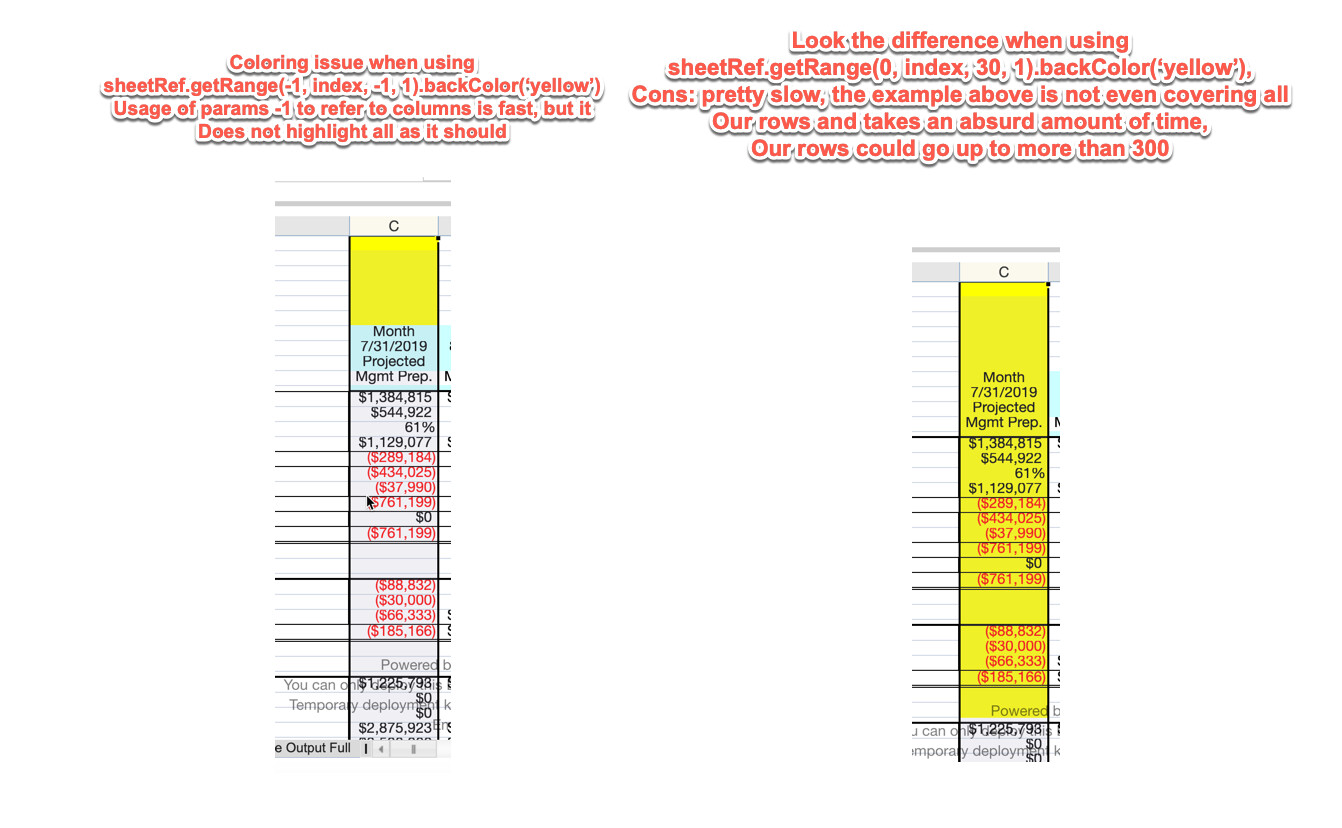
    Hi, I am adding here more findings that could help to track the issue down.

    See my image:

    It is pretty much the issue I am reporting, it seems to happen with either: rows or columns.

    Can you please suggest what to do? We are looking forward to finishing a production level functionality for a customer, this is becoming urgent and a deal breaker, your prompt help is appreciated.

    Reminder: the spread on the screenshots were converted using client conversion in SpreadJS 12.

    Thanks

  • Posted 1 April 2019, 9:47 am EST

    Hello,

    I am not able to replicate this issue at my end. Please refer to the attached sample application where I have set the backcolor using both approaches and exported the Spread.Sheets to JSON too.

    It works fine at my end with latest Spread.Sheets version.

    Please refer to the attached app.

    Thanks,

    Deepak Sharma

  • Posted 3 April 2019, 8:06 am EST

    Hello,

    I do not see the attached sample app, can you re-attach it?

    Thanks

  • Posted 4 April 2019, 9:22 am EST

    Hello,

    Any update on the sample application? we are interested in comparing it to what we have and see what could be done better, thanks!

  • Posted 5 April 2019, 5:22 am EST

    Hello,

    Here is the attachment.

    Thanks,

    Deepak SharmaSpreadJSRangeBackColor.zip

  • Posted 7 April 2019, 8:51 am EST

    Hello,

    Thanks for providing the attachment.

    However, as per my notes, the issue happens when you convert a document using client conversion. In your sample application, you use a pure and clean SpreadJS object, I would not expect those issues to happen there either.

    To help you understand my problem, I have put together another sample application: coloring issues sample app.zip

    Please use the Choose file option and select the excel spreadsheet attached in the zip file.

    Notice the difference in time and outcome when using both methods: set backcolor with row count and set backcolor with -1.

    Set backColor with rowCount works well but takes an insane amount of time and it is just less than 500 rows.

    Set backColor with -1 is fast but does not highlight well the column, this is very critical and important for us.

    Can you provide a fix or workaround? We can not do any pre-processing prior to opening the document.

    Thanks

  • Posted 8 April 2019, 10:26 am EST

    Hello,

    Thank you for providing me the sample application. I modified your code as follows and it now works with no issues for both rowCount and -1.

     $("#button1").click(function () {
                activeSheet.suspendPaint();
                activeSheet.getRange(-1, 8, -1, 1, GC.Spread.Sheets.SheetArea.viewport).backColor("Yellow");
                activeSheet.resumePaint();
            });
    
            $("#button2").click(function () {
    
                activeSheet.suspendPaint();
                activeSheet.getRange(0, 7, 500, 1, GC.Spread.Sheets.SheetArea.viewport).backColor("lightblue");
                activeSheet.resumePaint();
            });


    Thanks,

    Deepak Sharma

  • Posted 8 April 2019, 11:09 am EST

    Hi Deepak,

    Thanks much for your feedback.

    I see your suggested approach makes the rowCount method works faster, which also helps us a lot.

    But the coloring issue with -1 is still present, are you sure it worked well on your end?

    Thanks,

    David R

  • Posted 10 April 2019, 9:34 am EST

    Hello,

    I have submitted it as a bug to the development team. I will let you know as soon as I get an update on it.

    The tracking id for this issue is #271508

    Thanks,

    Deepak Sharma

  • Posted 11 April 2019, 11:31 pm EST

    Thanks much!

  • Posted 12 April 2019, 1:55 am EST

    Hello,

    As per the development team, this is design the design behavior.

    As SpreadJS style inherit strategy, cell style have the highest priority, once cell has background color, the row or column will not take effect.

    Hence, you may see, after import attached excel, Cell H1~H3 don’t has background color, once you change the column style back color to yellow, the cell will inherit that color and show yellow.

    But for other cell in that column, they all has its own cell level back color, change column level back color will not affect the cell level.

    So, you could do the same as click button2 in the sample. (add suspend to optimize performance)

        $("#button1").click(function () {
            activeSheet.suspendPaint();
            activeSheet.getRange(0, 8, activeSheet.getRowCount(), 1).backColor("Yellow");
            activeSheet.resumePaint();
        });
    
        $("#button2").click(function () {
            activeSheet.suspendPaint();
            activeSheet.getRange(0, 7, 500, 1, GC.Spread.Sheets.SheetArea.viewport).backColor("lightblue");
            activeSheet.resumePaint();
        });
    

    Thanks,

    Deepak Sharma

Need extra support?

Upgrade your support plan and get personal unlimited phone support with our customer engagement team

Learn More

Forum Channels