Posted 6 February 2023, 1:29 pm EST
- Updated 6 February 2023, 1:34 pm EST
Hello Can,
The SUM function in SpreadJS (same as Microsoft Excel) only allows for up to 255 arguments. Instead of referencing individual cells, you can use a range to reference multiple cells.
In the example below, cells A1, A2, A3,…A10 can be referenced using the range A1:A10. This range format (A1:A10) represents a group of cells.
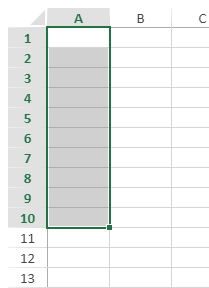
For your use case, you can represent the cells from A1, A2,…,A1000 with the range A1:A1000. You can use the SUM function as “=SUM(A1:A1000)”.
Note that the format A1:A10 is relative. If you want to use absolute references, add the “$” symbol, such as “$A$1:$A$10”.
Please see the attached sample for further clarification.
Sample: https://codesandbox.io/s/solution-forked-r4ig5l?file=/src/index.js
Additionally, you could create your own custom function to suit your needs. The following link provides a demo on how to create a custom function in SpreadJS: https://www.grapecity.com/spreadjs/demos/features/calculation/custom-functions/purejs
References:
cell reference notations: https://www.grapecity.com/spreadjs/docs/formulareference/formulaoverview/cellreferences#a1-notation
relative and absolute references: https://www.grapecity.com/spreadjs/docs/formulareference/formulaoverview/cellreferences#relative-and-absolute
Regards,
Ankit