
Filter on Row groups

Posted by: nishanth.badim on 12 May 2021, 8:06 am EST

    • Post Options:
    • Link

    Posted 12 May 2021, 8:06 am EST

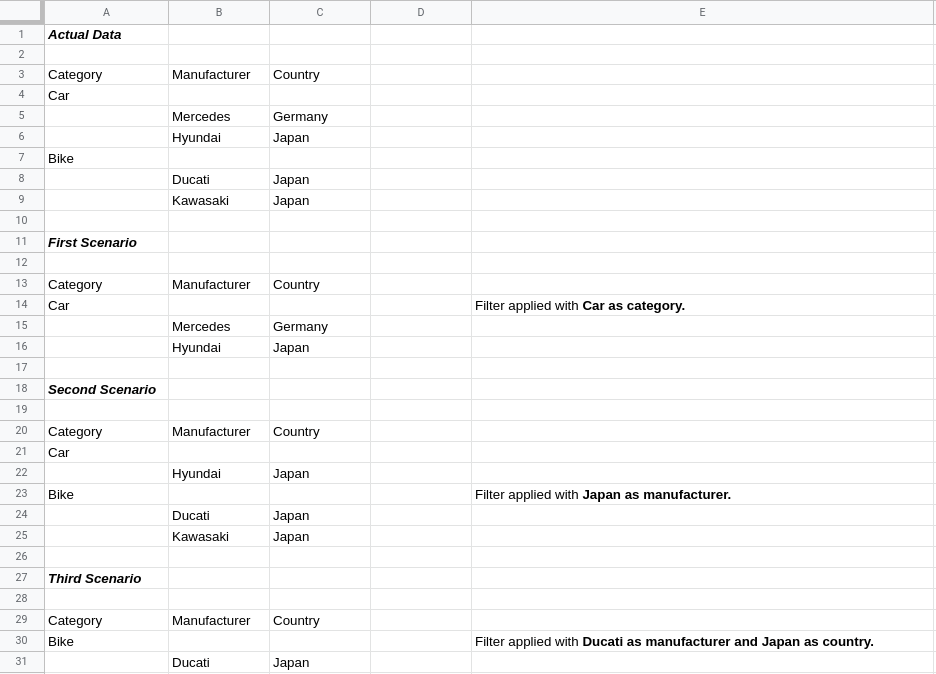
    I have a scenario to filter on group rows. Let’s consider a sheet with following data:-

    1 2 3

    1 Category Manufacturer Country

    2 Car

    3 Mercedes Germany

    4 Hyundai Japan

    5 Bike

    6 Ducati Japan

    7 Kawasaki Japan

    First scenario: If filter is to be applied on a group with Car as category, then the filtered sheet output should be

    	1  			2		3	
    

    1 Category Manufacturer Country

    2 Car

    3 Mercedes Germany

    4 Hyundai Japan

    Second scenario: If filter is to be applied on a group with Japan as country, then the filtered sheet output should be

     1  			2		3	
    

    1 Category Manufacturer Country

    2 Car

    3 Hyundai Japan

    4 Bike

    5 Ducati Japan

    6 Kawasaki Japan

    Third scenario: If filter is to be applied on a group with Ducati as manufacturer and Japan as country, then the filtered sheet output should be

    	1  			2		3
    

    1 Category Manufacturer Country

    2 Bike

    3 Ducati Japan

    Is there any interface for this case in SpreadJS to work on?
  • Posted 12 May 2021, 8:18 am EST - Updated 3 October 2022, 9:50 am EST

    Please refer the image for spread sheet view.

  • Posted 13 May 2021, 5:38 am EST

    Hi,

    You may apply filter conditions according to the scenario. Please refer to the following codes snippet and attached sample that demosntartes the same.

    
     document.getElementById("first").addEventListener("click", () => {
        let compareType =
          GC.Spread.Sheets.ConditionalFormatting.TextCompareType.equalsTo;
        let condition = new GC.Spread.Sheets.ConditionalFormatting.Condition(
          GC.Spread.Sheets.ConditionalFormatting.ConditionType.textCondition,
          { compareType: compareType, expected: "Car" }
        );
        let rowfilter = sheet.rowFilter();
        rowfilter.reset();
        rowfilter.addFilterItem(1, condition);
        rowfilter.filter(1);
      });
    
      document.getElementById("second").addEventListener("click", () => {
        let compareType =
          GC.Spread.Sheets.ConditionalFormatting.TextCompareType.equalsTo;
        let condition = new GC.Spread.Sheets.ConditionalFormatting.Condition(
          GC.Spread.Sheets.ConditionalFormatting.ConditionType.textCondition,
          { compareType: compareType, expected: "Japan" }
        );
        let rowfilter = sheet.rowFilter();
        rowfilter.reset();
        rowfilter.addFilterItem(3, condition);
        rowfilter.filter(3);
      });
    
      document.getElementById("third").addEventListener("click", () => {
        let compareType =
          GC.Spread.Sheets.ConditionalFormatting.TextCompareType.equalsTo;
        let condition = new GC.Spread.Sheets.ConditionalFormatting.Condition(
          GC.Spread.Sheets.ConditionalFormatting.ConditionType.textCondition,
          { compareType: compareType, expected: "Ducati" }
        );
        let secCondition = new GC.Spread.Sheets.ConditionalFormatting.Condition(
          GC.Spread.Sheets.ConditionalFormatting.ConditionType.textCondition,
          { compareType: compareType, expected: "Japan" }
        );
        let rowfilter = sheet.rowFilter();
        rowfilter.reset();
        rowfilter.addFilterItem(3, secCondition);
        rowfilter.addFilterItem(2, condition);
        rowfilter.filter(3);
        rowfilter.filter(2);
      });


    sample: https://codesandbox.io/s/relaxed-moore-5xk79?file=/src/index.js

    Further, you may also use the column outline filter for the required functionality. Please refer to the following demo.

    columnOutline filter Demo: https://www.grapecity.com/spreadjs/demos/features/filters/filter-dialog/purejs

    Regards

    Avinash

Need extra support?

Upgrade your support plan and get personal unlimited phone support with our customer engagement team

Learn More

Forum Channels
