Export to Excel file by excelIO but not return data in sheet of MS Excel

Posted by: thai on 23 January 2019, 10:29 pm EST

    • Post Options:
    • Link

    Posted 23 January 2019, 10:29 pm EST

    Hi,

    I using template by Spread Desinner

    spread = new GC.Spread.Sheets.Workbook(document.getElementById("ShowSpread"), { sheetCount: 1 });
    spread.fromJSON(templateJs);
    

    , and get data to Speard then setDataSource to activeSheet

    spread .getActiveSheet().setDataSource(data, false);// data is list object
    

    In MVC view page not problem but when using export excel file not content data in excel file.

    var json = JSON.stringify(spread.toJSON());
    excelIO.save(json, function (blob) {
    saveAs(blob, FileName);
    //return old value;
    spread = oldSpread;
    }, function (e) {
    if (e.errorCode == 1) {
    alert(e.errorMessage);
    }
    });
    

    i using Spread js 9

    <script src="/Scripts/Spread/gc.spread.sheets.all.9.20171.0.min.js"></script>
    
        <script src="/Scripts/Spread/pluggable/gc.spread.sheets.print.9.20171.0.min.js"></script>
        <script src="/Scripts/Spread/spread.all.3.20152.22.js"></script>
        <script src="/Scripts/Spread/interop/gc.spread.excelio.9.20171.0.min.js"></script>
        <script src="/Scripts/Spread/resources/ja/gc.spread.sheets.resources.ja.9.20171.0.min.js"></script>

    
  • Posted 23 January 2019, 10:36 pm EST

    i attached exported file

  • Posted 24 January 2019, 1:37 am EST

    spread.toJSON()
    ``` export to json type not contain data. data-binding to json is error. while the data was successfully loaded in page.
  • Posted 24 January 2019, 5:32 am EST

    Hi,

    The issue is arising because by default spread doesn’t include the binding source while serializing to JSON. To serialize the binding data as well we need to set the includeBindingSource property to true.

    Please refer to the following code snippet:

    var json = JSON.stringify(spread.toJSON([b]{includeBindingSource: true}[/b]));
    excelIO.save(json, function (blob) {
    saveAs(blob, FileName);
    }, function (e) {
    if (e.errorCode == 1) {
    alert(e.errorMessage);
    }
    });
    

    ~Sharad

  • Posted 24 January 2019, 10:41 pm EST

    Sharad,

    thanks to supported, json include the data of spread but not show style in MS Excel.

  • Posted 24 January 2019, 10:43 pm EST

    Sharad,

    i using

    var serializationOption = {
                    ignoreFormula: false,
                    ignoreStyle: true,
                    columnHeadersAsFrozenRows: true,
                    rowHeadersAsFrozenColumns:true,
                    includeBindingSource:true
                };
    
  • Posted 28 January 2019, 12:57 am EST

    Hi,

    In your code you have set the ignoreStyle to true, causing the spread to not export any styles.

    Please set ignoreStyle to false and it should work as expected.

    You may refer to the following doc for more info on the serializationOptions:

    http://help.grapecity.com/spread/SpreadSheets12/webframe.html#SpreadJS~GC.Spread.Sheets.Workbook~toJSON.html

  • Posted 28 January 2019, 5:32 am EST

    Sharad,

    I try to change ignoreStyle to false value but MS Excel not contain style. I using Spread 9.

    thanks.

  • Posted 29 January 2019, 7:00 am EST

    Hi Thai,

    The ignoreStyle option is not available in spread9 and was introduced in spread 11.

    Further, we are investigating the issue and will update you soon.

  • Posted 31 January 2019, 7:40 am EST - Updated 3 October 2022, 10:59 am EST

    Hi Thai,

    We have further investigated the case and we were unable to replicate the issue at our end with build 9.40.20161.7.

    Here the steps we followed:

    • Create a sample spreadsheet with some formatting using the spread-designer.

    • Open the spread ExcelIOSample(present in the samples folder supplied with spreadjs download) in VS.

    • Edit the site.js(present in ExcelIOSample/Scripts/Site.js) file to include the spread-designer template.

    Following are the changes we made:

    → import template

    ```

    var template; // parse and assign your template here (line #403)

    var spread = new GcSpread.Sheets.Spread($(“#ss”)[0]);

    // import template

    spread.fromJSON(template);

    // add binding source

    var data; // binding data goes here

    var sheet = spread.getActiveSheet();

    sheet.setDataSource(data, false);

    	-> also export binding source
    	```
    // set includeBindingSource flag to export data too
    	spread.toJSON({ includeBindingSource: true }) (line #440)
    

    • Run the sample(You may also need to Copy ExcelIO component if not already, read sample’s readme.txt for more).

    • Click the export button.

    • Open the exported excel file.

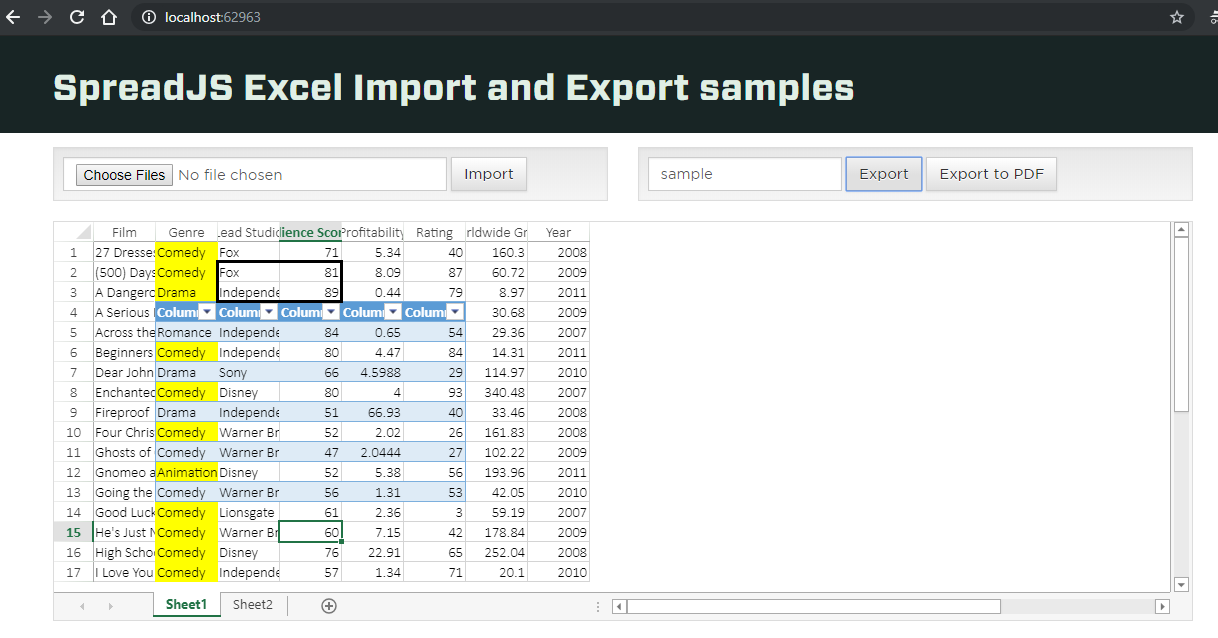
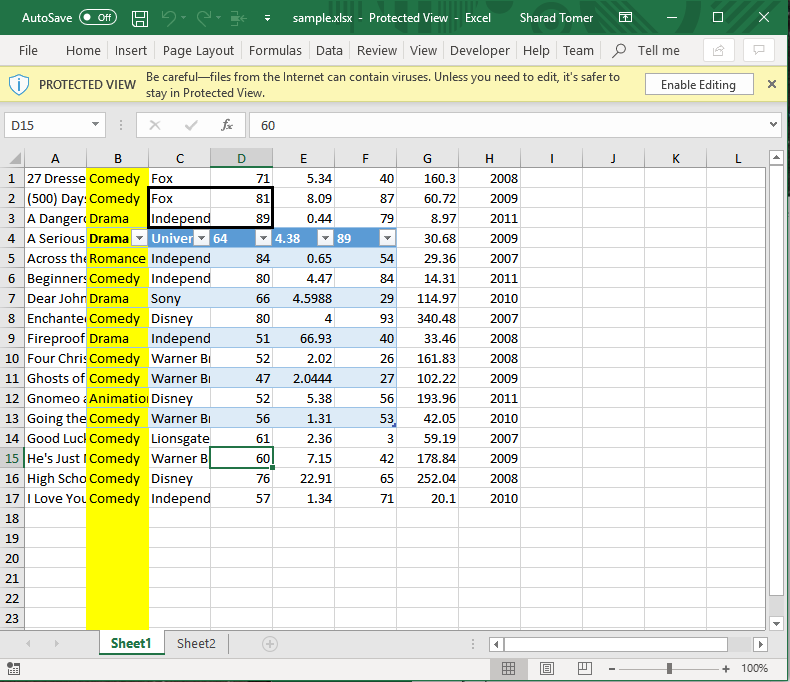
    <Observation>: Exported file also contains the formatting.

    Please try the above steps and let us know us know if you were are able to replicate the issue with the ExcelIOSample as well or if we need to follow some different steps to replicate the issue.

    Also please make sure that the spread designer used to generate template and spread build used are compatible, and you are not setting the DataOnly flag during generating the excel file on the server.

    // in controller on server
    Grapecity.Spread.Sheets.ExcelIO.Exporter exporter = new Grapecity.Spread.Sheets.ExcelIO.Exporter(someSpreadModel);
    MemoryStream stream = new MemoryStream();
    var flag = Grapecity.Windows.SpreadSheet.Data.ExcelSaveFlags.NoFlagsSet; // make sure that it is not Data.ExcelSaveFlags.DataOnly
    exporter.SaveExcel(stream, ExcelFileFormat.XLSX, flag, password);
    

    We have also attached some screenshots of our observation, please have a look at them if you get any different observations.


Need extra support?

Upgrade your support plan and get personal unlimited phone support with our customer engagement team

Learn More

Forum Channels