Posted 30 July 2021, 6:19 am EST
Hi,
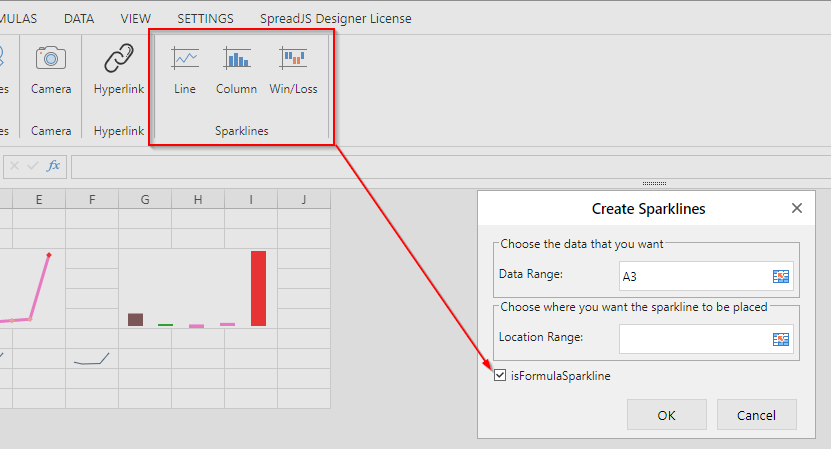
We are sorry but we could not modify the inbuilt templatse. For this, we need to create our own custom command and template. Please refer to the following code snippet and attached sample that implements the custom winloss sparkline command and its template.
 let customBtn = {
    label: 'Custom Command',
    thumbnailClass: '',
    commandGroup: {
      children: [
        {
          direction: 'vertical',
          commands: ['inputWinLossSparkline']
        }
      ]
    }
  };

  if (!config.commandMap) {
    config.commandMap = config.commandMap = {};
  }
  let myTab = {
    id: 'MyTab',
    text: 'My Tab',
    buttonGroups: [customBtn]
  };

  config.ribbon.push(myTab);

  var cutomCmd = {
    title: 'Input',
    text: 'Input',
    iconClass: 'ribbon-button-input-text',
    bigButton: true,
    commandName: 'inputText',
    execute: (context, propertyName) => {
      var dialogOption = {
        text: ''
      };
      GC.Spread.Sheets.Designer.showDialog(
        'myTemplate',
        dialogOption,
        result => {
          debugger;
          if (!result) {
            return;
          }
          let { dataRange, locationRange } = result;
          let spread = context.getWorkbook();
          let sheet = spread.getActiveSheet();
          let range = sheet.getRange(dataRange);
          let cell = sheet.getRange(locationRange);
          var setting = new GC.Spread.Sheets.Sparklines.SparklineSetting();
          setting.options.showMarkers = true;
          setting.options.lineWeight = 3;
          setting.options.displayXAxis = true;
          setting.options.showFirst = true;
          setting.options.showLast = true;
          setting.options.showLow = true;
          setting.options.showHigh = true;
          setting.options.showNegative = true;
          sheet.setSparkline(
            cell.row,
            cell.col,
            range,
            GC.Spread.Sheets.Sparklines.DataOrientation.vertical,
            GC.Spread.Sheets.Sparklines.SparklineType.winloss,
            setting
          );
        },
        error => {
          console.error(error);
        }
      );
    }
  };

  config.commandMap['inputWinLossSparkline'] = cutomCmd;

  var sparklineCustomTemplate = GC.Spread.Sheets.Designer.getTemplate(
    GC.Spread.Sheets.Designer.TemplateNames.InsertSparkLineDialogTemplate
  );

  //remove the checkBox
  sparklineCustomTemplate.content[0].children.pop();

  GC.Spread.Sheets.Designer.registerTemplate(
    'myTemplate',
    sparklineCustomTemplate
  );
  //override the built in command
  let overideBuiltINCommand = GC.Spread.Sheets.Designer.getCommand(
    'sparklinesWinLossSparkline'
  );
  overideBuiltINCommand.execute = cutomCmd.execute;
  config.commandMap['sparklinesWinLossSparkline'] = overideBuiltINCommand;
sample: https://stackblitz.com/edit/js-n7jq4d
Regards
Avinash