Active Reports 19 Web Designer Json Provider using report parameters

Posted by: viacheslav.shendryk on 28 November 2025, 4:58 am EST

  • Posted 28 November 2025, 4:58 am EST - Updated 28 November 2025, 5:03 am EST

    Hi!

    We are using Active Reports 19 WebDesigner (.Net).

    I am trying to configure the JsonProvider DataSource. We need to get a json by URL. But we also need to use report parameter as a value for a header.
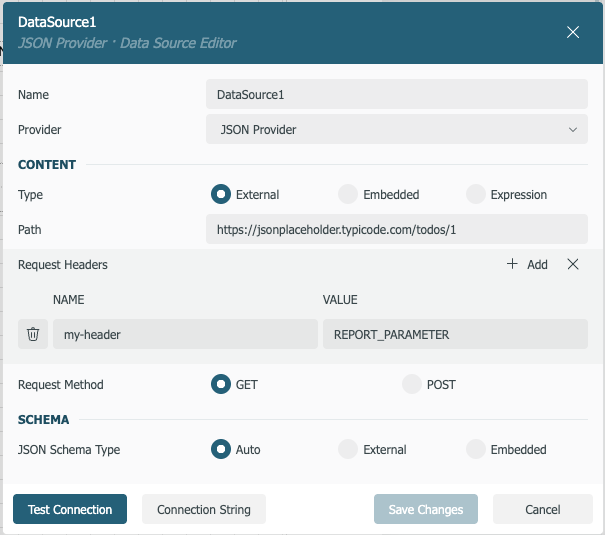
    Is it possible to do it?

    We tried to use parameter in the path just to test but also no result. We used Expression with a format: =“jsondoc=https://demodata.mescius.io/northwind/api/v1/Categories/“+[@paramCategories]+”/Products”.

    In the Network tab i can see a request to test datasource but parameter is not replaced.

    {"dataSource":{"Name":"DataSource1","ConnectionProperties":{"DataProvider":"JSON","ConnectString":"=\"jsondoc=https://demodata.mescius.io/northwind/api/v1/Categories/\"+[@paramCategories]+\"/Products\"","IntegratedSecurity":false,"Prompt":""},"Transaction":false,"DataSourceReference":""},"reportId":null}

  • Posted 28 November 2025, 8:59 am EST

    We used this Dynamic JSON Connection String guide: https://developer.mescius.com/activereportsnet/docs/report-authors/data-binding/data-binding-page-rdl-reports/add-dataset/create-dynamic-json-connection-string.

    We also tried other parameter format like {@paramCategories} or {&ReportName}

    jsondoc=https://demodata.mescius.io/northwind/api/v1/Categories/{@paramCategories}
  • Posted 1 December 2025, 4:41 am EST

    Hi Viacheslav,

    Your expression ‘jsondoc=https://demodata.mescius.io/northwind/api/v1/Categories/{@paramCategories}’ should work as expected.

    However, please note the ‘Test Connection’ may fail as there is no value for ‘paramCategories’, so for ‘Test Connection’, pass in a static value and test the connection, then replace the value with ‘{@paramCategories}’.

    We have attached a sample that has a report ‘CategoriesReport’ in which we have used our parameter in the connection string as ‘https://demodata.grapecity.com/northwind/api/v1/Categories/{@CategoryId}/Products’, which is working as expected. You may refer to the same.

    Regards,

    Anand

    WebDesigner_MVC (2).zip

  • Posted 1 December 2025, 7:49 am EST - Updated 1 December 2025, 7:54 am EST

    Hi Anand,

    thanks for a quick response.

    After using a static value on ‘Test Connection’ step it works. But can I do the same for a header?

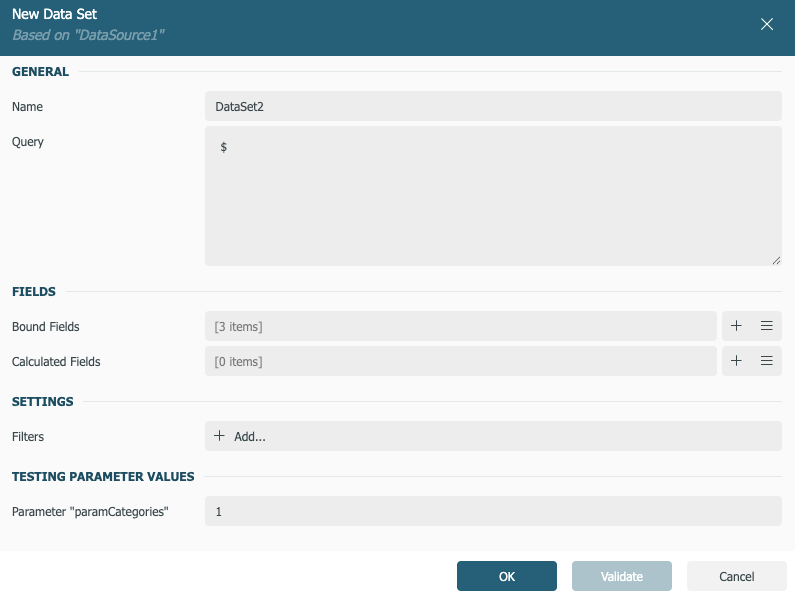
    When I am using the parameter in the path now I can see a parameter test section when creating a data set. Seems to be good.

    But when I configured the data source to use parameter and then reopen the designer for this report or just reload the page with a designer the test command is sent for my data source but not parameters are applied as they are not available during this call. Leading to the same issue why we used a static value instead of a parameter.

    steps:

    1. Add a datasource with a static value instead of a parameter
    2. Test connection
    3. Replace now static value with a parameter
    4. Add data set ( test parameter section is available now)
    5. Close report designer and reopen or refresh the page
    6. Test data source request is sent but no parameters are applied as they are not available in this context
  • Posted 2 December 2025, 3:17 am EST

    Hi Viacheslav,

    Thanks for pointing this out to us. This seems to be a bug. I have reported this to the development team to get some insights on the same[AR-36685].

    I will get back to you once I have any updates on the same

    Regards,

    Akshay

Need extra support?

Upgrade your support plan and get personal unlimited phone support with our customer engagement team

Learn More

Forum Channels