Nuget package for .NET6 C1PrintDocument?

Posted by: wknauf on 13 September 2022, 6:54 am EST

  • Posted 13 September 2022, 6:54 am EST

    C1PrintDocument for .NET6 is contained in the package “C1.Win.Printing”.

    But this package contains also the UI.

    We use “C1PrintDocument” in web applications and background services. Here, all the UI stuff is not necessary, so we would need a package for “C1.PrintDocument.6.dll” and dependencies.

    Does this package exist? If not: could you provide it?

    Best regards

    Wolfgang

  • Posted 14 September 2022, 3:37 am EST

    Hi Wolfgang,

    We have shared your requirement with the development team to see if they can provide something useful. We will update you know as soon as possible.

    [Internal Tracking ID: C1WIN-28149]

    Kind Regards,

    Kartik

  • Posted 16 September 2022, 11:57 am EST

    This also forces me to install a full .NET6 runtime on the webserver, as this package causes the requirement “Microsoft.WindowsDesktop.App” in “myapp.runtimeconfig.json”.

    Best regards

    Wolfgang

  • Posted 19 September 2022, 2:42 am EST

    Hi Wolfgang,

    We have shared your observation with the development team and will let you know the updates as soon as possible.

    Best Regards,

    Kartik

  • Posted 3 November 2023, 7:58 am EST

    Any updates on this?

    But as I learned more about .NET6 since writing this post, I think that for us a separate package without “Microsoft.WindowsDesktop.App” requirement would not really help, because we already include this framework in our low level utility dll (due to code usage of WinForms enums) and thus it would not help if “C1.Win.Printing” was split.

    From my point of view, you could close this issue.

    Best regards

    Wolfgang

  • Posted 6 November 2023, 6:47 am EST

    Hi Wolfgang,

    Thank you for sharing your views. We have forwarded your views and observations to the development team for further consideration. We will let you know the updates soon.

    Best Regards,

    Kartik

  • Posted 10 December 2024, 6:57 am EST - Updated 10 December 2024, 7:02 am EST

    To come back with this issue: though the “Microsoft.WindowsDesktop.App” runtime will probably be needed anyway due to code in our app, I think there is something to improve:

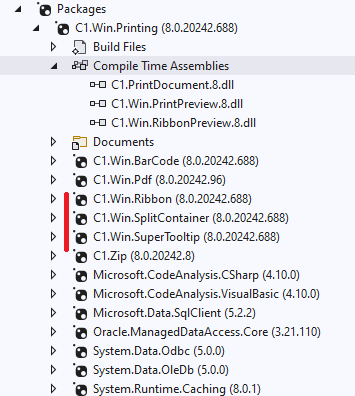
    I just noticed that the “C1.Win.Printing” package has several GUI dependencies like “C1.Win.Ribbon”, which clearly will not work in a web application or a windows service and are unnecessary in this environment:


    But a “dotnet publish” will pick those files anyway and make the deployed app bigger.

    So, are there plans to split “C1.Win.Printing”?

    Best regards

    Wolfgang

  • Posted 11 December 2024, 12:21 am EST

    Hello Wolfgang,

    We have forwarded your concerns to the development team and will update you once we have the information.

    Regards,

    Uttkarsh.

  • Posted 14 May 2025, 12:13 am EST

    Hello Wolfgang,

    The team has considered your concerns as a feature request and will be splitting Engine from UI in C1.Win.Printing.

    [Feature Request ID: C1WIN-34030]

    Regards,

    Uttkarsh.

  • Posted 8 September 2026, 7:37 am EST

    Hi,

    any progress on this?

    Best regards

    Wolfgang

  • Posted 8 September 2026, 11:48 pm EST

    Hello Wolfgang,

    We’re sorry, but there doesn’t seem to be any progress at the moment. However, we have reached out to the team for an update and will let you know as soon as we have more information.

    Regards,

    Uttkarsh.

  • Posted 15 September 2026, 2:50 am EST

    Hello Wolfgang,

    We checked with the development team, and at this time there is no progress or timeline planned for splitting the engine from the UI in C1.Win.Printing. The overall package size is relatively small, and the unneeded UI dependencies can be trimmed out on the client side, so this hasn’t been prioritized against other work on the roadmap.

    That said, the request remains open on team’s backlog. We’ll update you if there is any update on ETA or when feature is available.

    Regards,

    Uttkarsh.

  • Posted 15 September 2026, 5:03 am EST

    Hi Uttkarsh,

    Do you mean this feature? https://learn.microsoft.com/en-us/dotnet/core/deploying/trimming/trimming-options

    If yes: for testing, I set

    <PublishTrimmed>true</PublishTrimmed>
    in our background service project and received a lot of warnings from a bunch of nuget packages.

    Some of them originate from “C1.Win.Printing”.

    To reproduce: attached is a small sample: PrintingTestApp.zip

    In the sample dir, run “dotnet publish” with this command:

    dotnet publish -r win-x64 --self-contained true -c Release

    It will print those warnings:

        C:\Users\USERNAME\.nuget\packages\c1.win.printing\10.0.20261.813\lib\net10.0-windows7.0\C1.PrintDocument.10.dll : warning IL2104: Assembly 'C1.PrintDocument.10' produced trim warnings. For more information see https://aka.ms/il2104
        C:\Users\USERNAME\.nuget\packages\c1.win\10.0.20261.813\lib\net10.0-windows7.0\C1.Win.10.dll : warning IL2104: Assembly 'C1.Win.10' produced trim warnings. For more information see https://aka.ms/il2104

    Do you know what this means ;-)? But it seems trimming is no option for us because of too many warnings.

    Best regards

    Wolfgang

  • Posted 16 September 2026, 12:38 am EST

    Hello Wolfgang,

    Apologies for the ambiguous wording there: by “trimmed out on the client side” we meant manually excluding the unused UI assemblies (like C1.Win.Ribbon) from your publish output.

    On the warnings you found: this is expected. WinForms-based libraries like C1.Win.Printing and C1.Win rely on reflection for things like design-time support and serialization, which the IL Linker can’t statically verify as trim-safe. Microsoft doesn’t officially support PublishTrimmed for WinForms/WPF-based assemblies for the same reason, so your conclusion is correct — full IL trimming isn’t a viable path here. (ref: https://learn.microsoft.com/en-us/dotnet/core/deploying/trimming/incompatibilities)

    What we meant instead was excluding the specific unused DLLs from your publish output directly, either by

    • overriding the transitive package reference or
      <ItemGroup>
        <PackageReference Include="C1.Win.Printing" Version="10.0.20261.813" />
        <PackageReference Include="C1.Win.Ribbon" Version="10.0.20261.813" ExcludeAssets="all" />
      </ItemGroup>
    • with a small MSBuild cleanup step.
    <PropertyGroup>
      <C1UiAssembliesToExclude>C1.Win.Ribbon.10;C1.Win.RibbonPreview.10;C1.Win.SuperTooltip.10</C1UiAssembliesToExclude>
    </PropertyGroup>
    <Target Name="ExcludeC1UiAssembliesFromPublish" BeforeTargets="ComputeFilesToPublish">
      <ItemGroup>
        <ResolvedFileToPublish Remove="@(ResolvedFileToPublish)" Condition="'$(C1UiAssembliesToExclude.Contains(%(Filename)))' == 'true'" />
      </ItemGroup>
    </Target>

    Please refer to the attached updated sample for implementation: PrintingTestApp_Mod.zip

    Regards,

    Uttkarsh.

Need extra support?

Upgrade your support plan and get personal unlimited phone support with our customer engagement team

Learn More

Forum Channels