Wijmo has just shipped its build 5.20252.44. Continuing our focus on quality, this release includes several bug fixes and new features that prioritize accessibility and compliance with WVAG 2.1 standards. This blog details:
- Enhanced Accessibility and High-Contrast Theme Improvements
- FlexGrid Reliability Improvements for Mobile and Tooltips
- Improved Menu and Input Control Flexibility
- Change Log of Improvements
- API Updates
Ready to try it out? Download Wijmo Today!
Enhanced Accessibility and High-Contrast Theme Improvements
This release continues our strong focus on accessibility, delivering broad improvements across Wijmo controls to better align with WCAG 2.1 AA standards. High-contrast theme updates were consistently applied across grids, inputs, menus, calendars, and selection-based controls to ensure a clearer visual hierarchy, improved readability, and stronger focus indicators. These changes include refined background colors, border visibility, and selection highlights that improve usability for users with low vision or contrast sensitivity without compromising overall design clarity.

To view additional screenshots of these changes, refer to the Change Log section below.
In addition to visual refinements, we addressed multiple ARIA-related enhancements, including corrected aria-rowcount and aria-colcount values in FlexGrid, restructured accessible names to improve speech recognition compatibility, and added polite aria-live regions for meaningful status announcements. Together, these updates make Wijmo applications more usable for screen reader users, keyboard-only navigation, and assistive technology workflows, helping teams meet modern accessibility requirements with confidence.
FlexGrid Reliability Improvements for Mobile and Tooltips
FlexGrid received a significant set of quality improvements in this release, with a particular focus on mobile behavior and interaction accuracy. Several long-standing mobile issues were resolved, including incorrect dropdown positioning, unintended scrolling during row selection, row resizing triggering browser scroll, and difficulty interacting with pin buttons on narrow columns. These fixes result in a smoother and more predictable grid experience on touch devices, particularly for data-intensive mobile applications.
We also addressed multiple tooltip-related issues within FlexGrid, ensuring that tooltips can be hovered, positioned correctly after validation errors, and remain accessible during user interaction. Combined with improved contrast under high-contrast themes, these changes make FlexGrid more robust, accessible, and user-friendly across both desktop and mobile environments—especially in enterprise scenarios where precision and clarity are critical.
Improved Menu and Input Control Flexibility
This release introduces impactful enhancements to Wijmo’s Menu and Input-related controls, providing developers with greater flexibility and better usability out of the box. A new keepOpen property was added to the Menu control, allowing menus to remain open after an item is selected. This is ideal for multi-selection scenarios, configuration panels, or workflows where repeated actions are required without reopening the menu each time.
In parallel, we delivered a range of usability and accessibility fixes across dropdowns, ComboBox, ListBox, MultiSelect, and InputNumber controls. These include improved screen reader support (such as corrected NVDA reading for grouped ComboBox items), better mobile keyboard behavior in Safari, and more consistent interaction with soft keyboards. Together, these improvements help ensure that Wijmo Input controls behave reliably across devices, input methods, and accessibility tools, while giving developers finer control over user interaction patterns.
Change Log
Improvements:
- [Accessibility] Enhanced accessibility support to comply with WCAG 2.1 AA standards. Adjusted contrast ratio of controls under high-contrast theme, as well as some mobile experience improvements.
- [FlexGrid] Adjusted contrast ratio of the grid area under the high-contrast theme: changed header area background color from #4e0721 to #A34661, changed cell border from rgba(0,0,0,0.2) to rgba(255,255,255,0.55), changed selection color from #576EDB to #587694, and changed dragging indicator color from #0021ab to #ffd60a. (WJM-37105)

- [FlexGrid] Corrected the result of aria-colcount and aria-rowcount. (WJM-37226)
- [FlexGrid][Mobile] Fixed the issue that the dropdown in grid is incorrectly positioned. (WJM-37110)(WJM-37123)
- [FlexGrid][Mobile] Fixed the issue that pin button cannot be clicked when the column is too small. (WJM-37121)
- [FlexGrid][Mobile] Fixed the issue that the grid will scroll when you select rows with RowRange mode. (WJM-37403)
- [FlexGrid][Mobile] Fixed the issue where resizing a row triggers browser scrolling. (WJM-37404)
- [FlexGrid][Tooltip] Fixed the issue of being unable to hover the tooltip in grid. (WJM-37129) (WJM-37184)
- [FlexGrid][Tooltip] Fixed the issue that when the column in grid has isRequired set to true, after entering invalid data and clearing it again, the Tooltip displays in the wrong position. (WJM-37402)
- [FlexGridFilter] Adjusted the contrast ratio under the high-contrast theme, changed the input elements border from dotted #e2e2e2 to solid #e2e2e2, changed the value list container border color from rgba(0,0,0,0.2) to rgba(110,110,110,0.8). (WJM-37046)
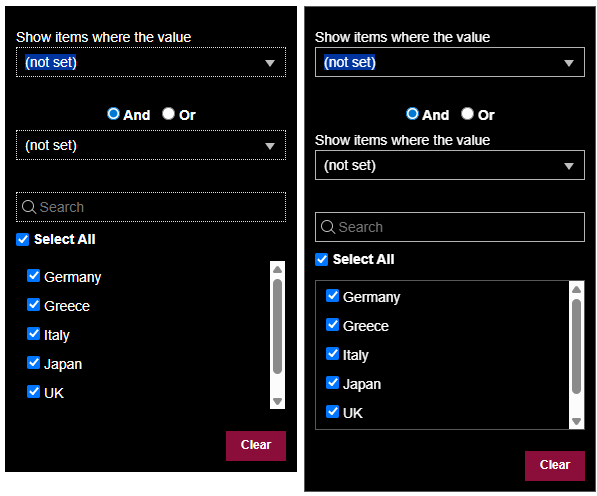
- [FlexGridFilter] Added visible labels for the value input field in ConditionFilterEditor. (WJM-36635)
- [FlexGridFilter][Mobile] Fixed the issue that the filter dialog in grid is incorrectly positioned. (WJM-37110)
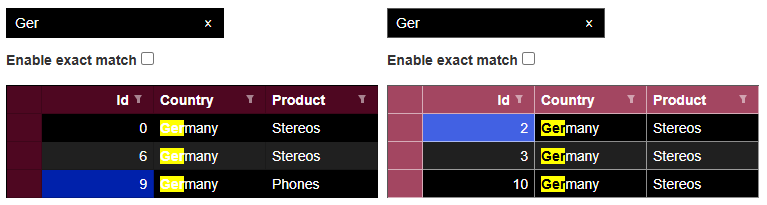
- [FlexGridSearch] Adjusted the contrast ratio of the searching results under the high-contrast theme, changed the highlight text color from #fff to #000. (WJM-37042)
- [GroupPanel] Adjusted the contrast ratio of the group button under the high-contrast theme, changed the icon color from radial-gradient(#000 1px, transparent 2px) to radial-gradient(#fff 1px, transparent 2px), changed the button background color from #4e0721 to #A34661. (WJM-37045)

- [GroupPanel] Restructured aria-label to start with visible text to ensure it appears first in accessible name for speech recognition compatibility. (WJM-37045)
- [GroupPanel] Added aria-live="polite" region for status announcements when groups are removed. (WJM-37045)
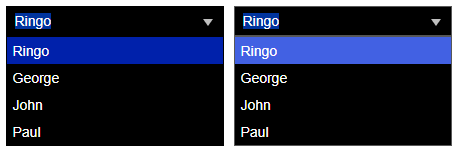
- [Dropdown] Adjusted the contrast ratio of the dropdown selected item under the high-contrast theme, changed its background color from #0021ab to #4261e3. (WJM-37027)
- [Dropdown][Mobile] Fixed the issue that the dropdown is incorrectly positioned. (WJM-37205)
- [Dropdown][Mobile] Fixed the issue that the button to close in dropdown cannot be clicked in mobile. (WJM-37093)
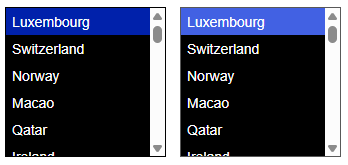
- [Listbox] Adjusted the contrast ratio of the selected item under the high-contrast theme, changed its background color from #0021ab to #4261e3. (WJM-37043)
- [ComboBox] Adjusted the contrast ratio of the dropdown selected item and group item under the high-contrast theme, changed dropdown selected item background color from #0021ab to #4261e3, changed group item background color from #4e0721 to #A34661. (WJM-37030)
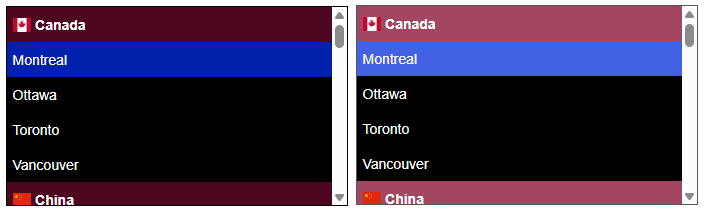
- [ComboBox] Fixed the issue that the reading content is not correct when using NVDA to read the combo box grouping list items. (WJM-37170)
- [InputNumber][Mobile] Fixed the issue that the spin button will not work while the soft keyboard is open. (WJM-37150)
- [InputNumber][Mobile] Fixed the issue that continuously entering the "." character in InputNumber with n2 format will move the cursor position to the last digit. (WJM-37153)
- [InputNumber][Mobile] Fixed the issue that entering "-" after entering "+" in InputNumber with p2 format will not remove the negative sign. (WJM-37154)
- [InputNumber][Mobile] Fixed the issue that prevented the use of the soft keyboard to input symbols like "-" in Safari. (WJM-37163)
- [AutoComplete][Mobile] Fixed the issue that prevented the use of the soft keyboard to input something while dropdown is opening in Safari. (WJM-37315)
- [Menu] Adjusted the contrast ratio of the active menu and selected item under the high-contrast theme, changed active menu border color and selected item background color from #0021ab to #4261e3. (WJM-37032)
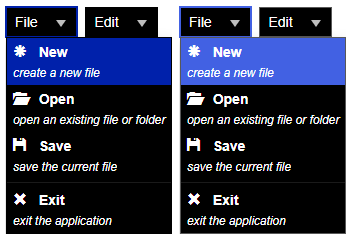
- [Menu] Fixed the issue that prevents the use of arrow keys to open or close the sub-menu in RTL mode. (WJM-37374)
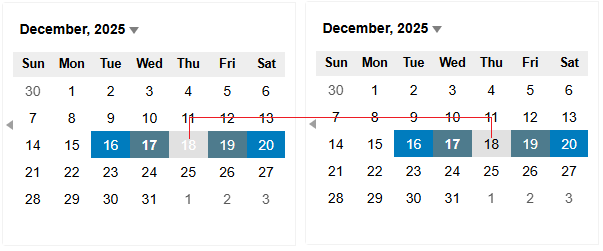
- [Calendar] Adjusted the contrast ratio of the week elements and selected day under the high-contrast theme, changed the week elements background color from #4e0721 to #A34661, changed selected day background color from #0021ab to #4261e3. (WJM-37040)
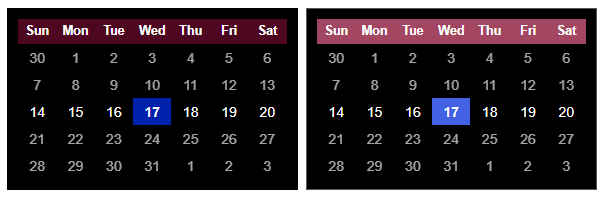
- [Calendar] Adjusted the contrast ratio of the selected day in multiple month view under the default theme, changed the selected day in other month background color from #007cbe to #007CBE. (WJM-37135)
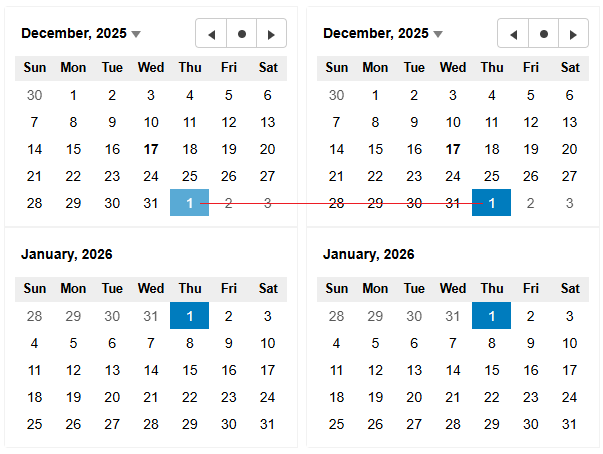
- [Calendar] Adjusted the contrast ratio of the mouse hover day in date range under the default theme, changed its text color from #ffffff to #000000. (WJM-37135)
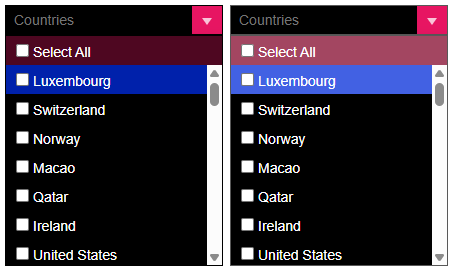
- [MultiSelect][MultiSelectListBox] Adjusted the contrast ratio of the select all and active item under the high-contrast theme, changed select all background color from #4e0721 to #A34661, changed active item background color from #0021ab to #4261e3. (WJM-37035)(WJM-37033)
- [MultiSelect][Mobile] Prevented opening dropdown after touch moved. (WJM-37233)
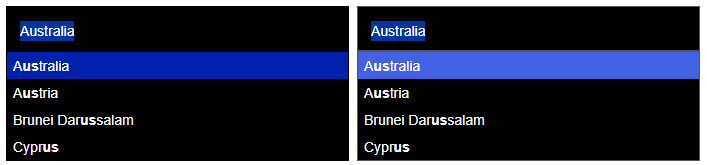
- [MultiSelectAutoComplete] Adjusted the contrast ratio of the selected item under the high-contrast theme, changed its background color from #0021ab to #4261e3. (WJM-37034)
- [Menu] Added a property keepOpen to prevent closing the menu after selected any options. (WJM-34932)
- [FlexSheet][EXCEL] Supported StrikeThrough style while importing or exporting Excel process. (WJM-37228)
- [Redux][ImmutabilityProvider] Supported ImmutabilityProvider for TransposedGrid, the customer can use TransposedGrid in their Redux applications. (WJM-36003)
- [Framework] Supported Next.js 16 version. (WJM-37126)
- [License] Supported IPv4 CIDR validation. (WJM-37214)
- [Security] Checked and upgraded the version of dependencies to prevent vulnerabilities. (WJM-36982)
- [FlexGrid] Adjusted contrast ratio of the grid area under the high-contrast theme: changed header area background color from #4e0721 to #A34661, changed cell border from rgba(0,0,0,0.2) to rgba(255,255,255,0.55), changed selection color from #576EDB to #587694, and changed dragging indicator color from #0021ab to #ffd60a. (WJM-37105)
API Updates:
- [Menu] Added a property
keepOpento Menu to prevent closing the menu after selecting any options. - [XLSX] Added a property
strikethroughtoWorkbookFontandIWorkbookFontto get or set whether the font has strikethrough applied. - [FlexSheet] Added a property
isStrikethroughto the result ofFlexSheet.getSelectionFormatState()to indicate whether strikethrough style is applied to the current selection.
Ready to check it out? Download Wijmo Today!
Tags:
Related Blogs
Try Our JavaScript UI Components & Datagrid
