ActiveReports.NET v19.2 Has Released
Hey everyone! We’re pleased to announce that ActiveReports v19.2 has been released! Here, you’ll find a handful of highlights; below, we’ll include the full release notes as well.
Check Out Our Latest Release! Download ActiveReports.NET Today!
Configurable Permissions for PDFs Exported From Web Viewers
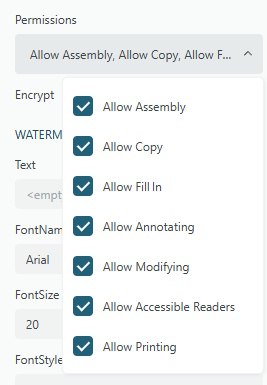
A new Permissions option is now part of the PDF Export panel in all Web Viewers - JS Viewer, Blazor Viewer, and ASP.NET WebViewer. The selected permissions from this option are only applied if the Encrypt setting is set to True.
These options allow you to enable or restrict how end users are able to interact with the exported PDF. The toggles include Assembly, Copy, Fill In, Annotating, Modifying, Accessible Readers, and Printing.
Predefined Export Settings | JS Viewer API | Blazor Viewer API
Disable In-Line Editing in Report Designers
Web Designer
The new allowInlineEditing option for the Web Designer allows toggling the end user’s ability to use the in-line editor to add/change/delete text in report items such as TextBoxes, Tables, etc. This is useful if you want to allow users to move things around, change certain properties, etc. without allowing them to change the contents of the controls.
arWebDesigner.create('#ar-web-designer', {
  allowInLineEditing: 'False',
  //other options...
});
Desktop Designer
In the Desktop Designer, you can instead use the EditModeEntering event to achieve a similar result.
designer.EditModeEntering += (sender, args) =>
{
  args.Cancel = true;
};
This event also offers a bit more flexibility in that you can also disable editing for specific report controls, instead of only a blanket toggle for all controls.
designer.EditModeEntering += (sender, args) =>
{
  if(args.Control is CheckBox)
	args.Cancel = true;
};
Web Designer API | Desktop Designer API
Export Hidden Text in Section Reports (TXT Format)
A new PreserveHiddenText property of the Text export allows you to include hidden text from your section reports when exporting to the Plain Text (TXT) format. This will ensure that any text that is partially cut off or fully invisible will still be included in your text exports.

Expand/Collapse DocumentMap Items in JS Viewer
This enhancement enables support for expanding and collapsing DocumentMap items with sub-items in the JS Viewer.

Note: This is already supported in the desktop designer.
Auto Detect CSV Data Source Line Endings
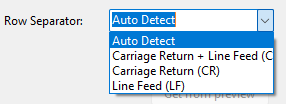
A new Auto Detect option as a row separator value in the connection string builder of the CSV data provider makes it possible to read CSV data regardless of the line ending style in it (CRLF or LF). Selecting this property removes RowSeparator from the connection string of the CSV data provider. As a result, the CSV data is read correctly regardless of the line ending style (CRLF or LF).
Check Out Our Latest Release! Download ActiveReports.NET Today!
v19.2 Release Notes
Enhancements
- AR-35580 Added functionality to disable tooltips for financial charts, enhancing user control over chart interactivity.
- AR-35591 Upgraded to
DsDocs/DsExcel8.1.4, including updates to core components and installer checks for improved compatibility and performance. - AR-35647 Introduced support for the CCITT4 TIFF format in Page/RDLX reports, aligning with existing support in Section reports.
- AR-35709 Enhanced the Configure JSON Data Source by adding item names to the connection link verification icon for improved accessibility.
- AR-36019 Improved PDF export performance in the CrossPlatform mode of Section reports, addressing performance gaps compared to GDI mode.
- AR-36049 Added the ability to hide the Group - Label property for chart controls, streamlining chart customization.
- AR-36146 Resolved issues in ASP.NET WebViewer projects created from scratch that displayed multiple "Could not load file or assembly" errors.
- AR-36170 Enabled the option to disable tooltips for financial charts in the WebDesigner, improving user experience consistency.
- AR-36195 Added an option to disable the in-line editor in the WebDesigner, providing greater flexibility for report customization.
- AR-36211 Introduced an option to disable the in-line editor in the Desktop Designer, enhancing user control over editing features.
- AR-36219 Added a "Permissions" PDF export option to the JSViewer's export panel, allowing users to configure document permissions during export.
- AR-36346 Implemented a toggle feature for DocumentMap headers in the JSViewer, improving navigation by allowing users to collapse or expand sub-topics.
Fixes
- AR-30720 Fixed an issue where dashboards with multiple sections used as subreports generated empty sections in the WinViewer.
- AR-33510 Resolved extra padding on the right of left-side parameter labels that obscured their rightmost letters.
- AR-33536 Addressed scrolling issues in reports with ToC and Table/Tablix controls rendered in SVG format.
- AR-34471 Fixed a bug where reports were marked as "dirty" despite no changes being made.
- AR-35099 Corrected the behavior of the Themes dropdown list, which previously jumped when the window size was reduced.
- AR-35196 Resolved an issue in the WebDesigner where hidden Shape Legend properties were displayed upon legend selection.
- AR-35432 Fixed incorrect colors displayed in Classic Chart plots in the JSViewer.
- AR-35439 Addressed an issue where the "Start Each Group on a New Page" setting did not affect Tablix column groups.
- AR-35450 Resolved a bug in the WebDesigner where RPX reports saved
TrustServerCertificatesettings with spaces in the DataSource. - AR-35475 Fixed an issue where the Sizing property in the Property Grid did not update when multiple images were selected.
- AR-35483 Prevented editing of the
LogarithmicBasechart axis property via the properties grid when the scale type was not set to logarithmic. - AR-35486 Corrected the behavior of nested Tablix controls pre-configured via the Tablix Wizard to ensure they occupy the entire Tablix cell.
- AR-35495 Fixed an issue where the specified XML node was not selected in the Visual Query Designer (VQD).
- AR-35511 Corrected the formatting of default
falsevalues for some Property Grid properties. - AR-35522 Adapted field types in the Report Wizard for High DPI displays.
- AR-35523 Updated icons in the Report Explorer, top panel, and context menus to adapt to High DPI when the Designer is opened after changing the scale.
- AR-35535 Fixed an issue where chart tab selection was not removed upon switching to the Layout tab.
- AR-35557 Resolved a bug where the Chart Data Smart Dialog allowed saving an empty chart value caption.
- AR-35559 Prevented containers with nested data regions from being added inside report headers/footers.
- AR-35573 Fixed an issue where the
ConsumeWhiteSpaceproperty of a banded list was always set toFalseafter reopening a report in the End-User Designer (EUD). - AR-35575 Added specific names to elements in the DOM tree for the "Filters" tab in the Chart Plot property dialog.
- AR-35582 Improved handling of multiple datasets in Page reports.
- AR-35588 Corrected group cell names in the Report Explorer for Tablix controls created in existing reports.
- AR-35594 Fixed the
Page Break='Between'setting for Tablix column groups to ensure it takes effect. - AR-35596 Resolved incorrect values displayed in the Chart Size legend when animation was enabled.
- AR-35597 Addressed an issue where HTML export generated a different
.svgfor the Image control withSizing=Clipfor every export. - AR-35598 Fixed a bug where DVChart tooltips were not split into multiple lines when animation was enabled.
- AR-35602 Resolved an "index out of bounds" warning when changing margins in Page reports.
- AR-35603 Fixed dataset validation for PostgreSQL providers when non-string parameters were used in queries.
- AR-35604 Addressed dataset validation issues for MySQL providers when
DateTimemulti-value parameters were used in queries. - AR-35609 Resolved rendering issues for some financial charts during Classic Chart conversion in the WebDesigner.
- AR-35610 Fixed missing labels in financial charts during Classic Chart conversion in the WebDesigner.
- AR-35627 Restored missing
TextStyleproperties for chart labels after Classic Chart conversion in the WebDesigner. - AR-35628 Corrected stacking behavior for converted charts in the WebDesigner.
- AR-35629 Fixed incorrect legend item conversion during Classic Chart conversion in the WebDesigner.
- AR-35632 Resolved extra values appearing in the Color legend after Classic Chart conversion in the WebDesigner.
- AR-35633 Corrected axis label value formatting during Classic Chart conversion in the WebDesigner.
- AR-35636 Fixed data action issues for XY charts when the X field was set.
- AR-35639 Addressed incorrect axis scaling for Area stacked charts after Classic Chart conversion in the WebDesigner.
- AR-35640 Switching types of JSON data now properly erases added but unsaved data.
- AR-35648 Restored the
Marker Sizeproperty during Classic Chart conversion in the WebDesigner. - AR-35653 Updated the NuGet package
System.Buffersduring file conversion. - AR-35654 Fixed an issue where reports with charts created in ReportBuilder could not be opened.
- AR-35656 Resolved missing legends for the second data series during Classic Chart conversion in the WebDesigner.
- AR-35660 Fixed incorrect plot coloring caused by one series group in the Color Legend during Classic Chart conversion.
- AR-35679 Addressed disappearing bullets in previews when the Sparkline control was removed from reports with nested datasets.
- AR-35682 Fixed exceptions caused by copy-pasting between AR18 and AR19 designers.
- AR-35703 Resolved an issue where the "Credentials required" checkbox did not affect chart data sources in Section reports.
- AR-35706 Fixed hover animation issues in charts where the wrong slice would grow.
- AR-35711 Restored the ToC panel in parent reports after jumping back from child reports without a ToC panel.
- AR-35717 Corrected selection area offsets in Continuous and Multipage view modes in the WPFViewer.
- AR-35783 Fixed missing tooltips for disabled buttons in fullscreen mode/expanded toolbar in the JSViewer.
- AR-35791 Resolved extra values shown for child parameters when switching parent parameters in cascading parameters in the JSViewer.
- AR-35808 Fixed error messages pointing to incorrect datasets in the JSViewer.
- AR-35819 Addressed preview issues for reports with POST requests in the WebDesigner.
- AR-35825 Restored missing properties in the Chart control for Section reports.
- AR-35831 Fixed default size creation for controls in Page reports when manually drawing and skipping the Report Wizard.
- AR-35841 Resolved issues where
TextStylescould not be applied to labels in Area charts in DVChart. - AR-35883 Fixed missing wizards when the DataSource was set to prompt for credentials.
- AR-35887 Corrected label conversion issues with the
ColorFieldtemplate in DVChart 2.0. - AR-35889 Fixed conversion issues for the "Previous" rule in financial charts.
- AR-35902 Resolved extra page previews in the Content report in the WebDesigner.
- AR-35912 Fixed issues where the WebViewer could not fetch report info after refresh.
- AR-35934 Increased the character limit for GS1DataMatrix barcodes from 54 characters to support longer values.
- AR-35944 Addressed image rendering changes in RDLX reports that caused icon size reductions.
- AR-36014 Restored the
LabelRowCountproperty for the bar chart Y Axis. - AR-36031 Fixed empty chart previews in design-time when the axis minimal value was greater than 100.
- AR-36063 Resolved issues where the Auto JSON schema type was selected after clicking the embedded type.
- AR-36064 Fixed saving issues for the Expression JSON data type when a JSON schema was specified.
- AR-36065 Addressed issues where switching XML data types did not erase unsaved data.
- AR-36088 Fixed empty
Initial Catalogfields for the OleDb provider when entering connection strings. - AR-36090 Resolved multilingual issues with date parameters.
- AR-36100 Fixed cascading parameter regression causing report failures when generating datasets.
- AR-36103 Resolved "Invalid image" errors when adding images to reports.
- AR-36117 Fixed issues where chart legends could not be removed using the "Delete" keyboard key.
- AR-36124 Addressed crashes in code-based report designers during report previews.
- AR-36133 Fixed WebViewer upgrade failures caused by duplicate keys.
- AR-36139 Resolved 500 errors during previews of invalid charts in Classic Chart conversion.
- AR-36157 Fixed improper conversion of old DVCharts with
DataSetParametersto the new Chart format. - AR-36172 Addressed rectangle margin issues in Section reports.
- AR-36180 Fixed fullscreen toolbar persistence after returning to the design area in Dashboard reports in the WebDesigner.
- AR-36186 Resolved lag issues during report loading in the WPFViewer.
- AR-36201 Updated saving behavior for
DataSetParameternames in DVChart 2.0. - AR-36205 Addressed compilation warnings when using code-based reports in .NET Framework apps.
- AR-36208 Fixed inconsistent display of the ellipsis button in the Report Data Source dialog for XML data sources.
- AR-36218 Resolved upgrade tool freezes during project upgrades with code-based Section reports.
- AR-36243 Fixed image overlapping text in RichTextBox controls when using HTML content.
- AR-36266 Corrected a typo in the XLSX
SheetModedropdown list in the JSViewer. - AR-36288 Fixed issues where changes in the DataSet query reset the
DataSetNameof DataRegions in the WebDesigner. - AR-36301 Resolved preview failures for Line charts using specific
Switchexpressions in Marker Border Color. - AR-36304 Fixed server-side crashes in the JSViewer caused by
VALUE.valueexpressions. - AR-36318 Addressed character overlap issues when changing display magnification.
- AR-36334 Resolved
System.OutOfMemoryExceptionerrors when running reports with large CSV data in Section reports. - AR-36351 Fixed sporadic "Bad code path" errors during report previews in the JSViewer.
- AR-36364 Addressed issues where the
Hiddenproperty of report sections was ignored by the Subreport control in RDLX reports. - AR-36373 Fixed rendering issues caused by the
RepeatBlankRowsproperty. - AR-36389 Resolved unnecessary HTTP JSON data requests during dataset creation/editing.
- AR-36391 Fixed incorrect default page size values in the WinDesigner when changing properties.
- AR-36393 Addressed incorrect page orientation settings for Page reports.
- AR-36398 Fixed validation issues for the
PaperOrientationfield in Page reports. - AR-36449 Resolved preview failures for newly created WebViewer projects with Section reports.
- AR-36450 Fixed rendering issues for the AcmeStore report in the JSViewer.
- AR-36451 Addressed preview failures for RDLX reports with embedded stylesheets.
- AR-36468 Fixed errors preventing the addition of Chart controls in Visual Studio 2019 due to
System.Text.Json.JsonDocumentissues.
Tags:
Related Blogs
Try Our .NET Reporting Tool
ActiveReports.NET Resources
