


- Getting Started
-
Topics
- Wijmo
- Chart
- Map
- Cloud
- Gauge
- Grid
-
Scheduler
- overview
- Create and Bind Scheduler
- Configure Event Data
- Query, Filter, and Refresh Events
- Configure Resources
- Configure Views and Navigate the Schedule
- Create Advanced Layouts
- Synchronize Scrolling
- Configure Working Time
- Configure Time Zones
- Create, Edit, and Delete Events
- Drag and Resize Events
- Detect and Handle Conflicts
- Customize Event Display and Templates
- Customize Context Menus
- Hit Testing
- Keyboard Navigation, Focus, and Selection
- Troubleshooting
- OLAP
- Input
- Nav
- Viewer
- Tutorials
Create Advanced Layouts
Use a custom SchedulerDefinition when a built-in view does not match the way users need to scan time and resource data. A definition places ordered time and resource bindings on the row and column axes.
Define a custom layout
Binding type | Defines | Typical values | Required properties | Optional properties |
|---|---|---|---|---|
Time | Date or time slots |
|
|
|
Resource | Groups from |
|
| None |
Binding order determines which binding becomes the outer group. The fieldExpr of a resource binding must match a configured resource descriptor.
const definition: wjScheduler.SchedulerDefinition = {
  key: 'weekByRoom',
  rows: {
    bindings: [{
      type: wjScheduler.SchedulerAxisBindingType.Time,
      unit: wjScheduler.SchedulerTimeUnit.Hour,
    }],
  },
  columns: {
    bindings: [
      { type: wjScheduler.SchedulerAxisBindingType.Time, unit: wjScheduler.SchedulerTimeUnit.DayOfWeek },
      { type: wjScheduler.SchedulerAxisBindingType.Resource, fieldExpr: 'roomId' },
    ],
  },
  cellSemantic: wjScheduler.SchedulerCellSemantic.Timed,
};

scheduler.definition = definition;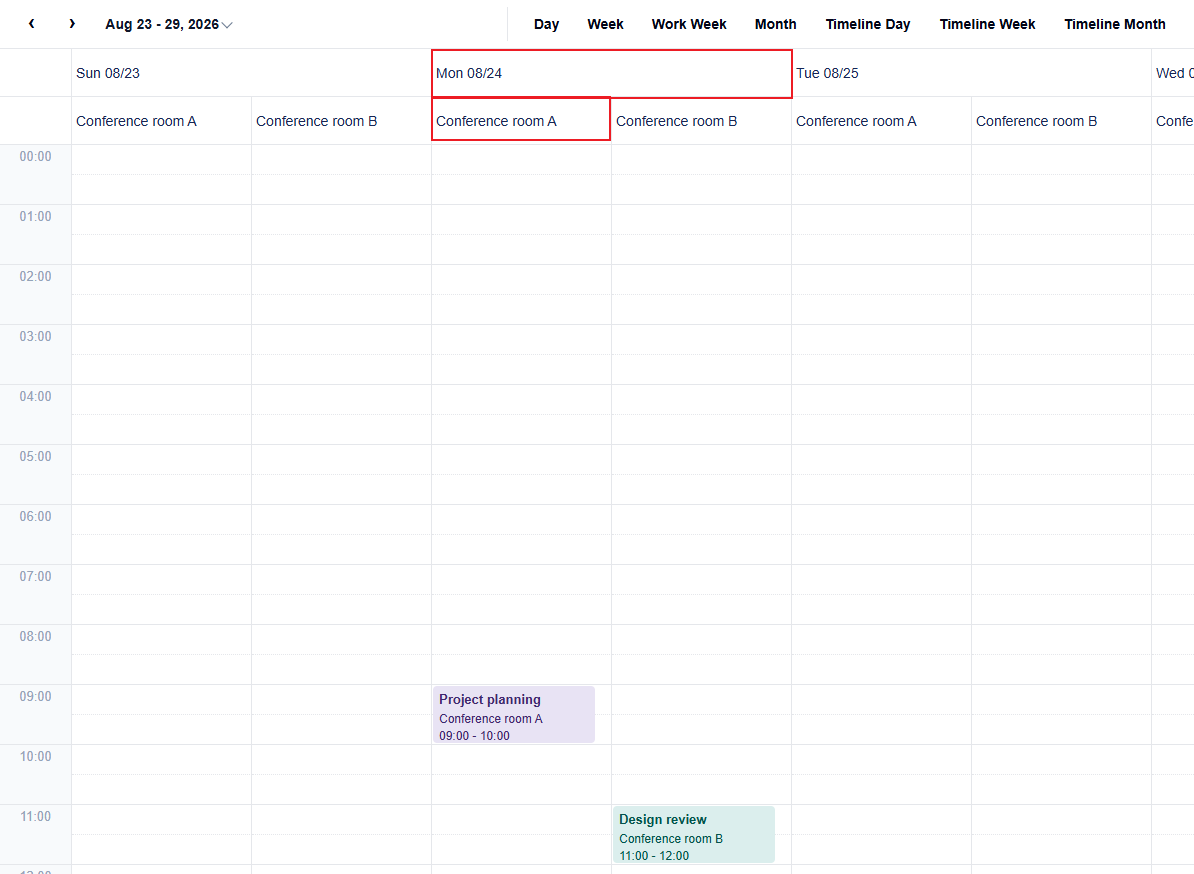
Check the layout before rendering
Use planSchedulerProjection when views are assembled dynamically or supplied by configuration. It analyzes the definition without changing Scheduler state.
const plan = wjScheduler.planSchedulerProjection(definition);
console.log(plan.slotAxis);
console.log(plan.integrity.level);
console.log(plan.integrity.reasons);
plan.integrity.level reports whether the definition can be rendered as written.
Integrity level | Meaning | Result |
|---|---|---|
| Axis structure and binding order can be preserved. | Renders as configured. |
| The view can render, but part of the requested order is normalized. | Renders with normalized grouping. |
| The definition is ambiguous or cannot be projected. | Assigning it throws an error and leaves the previously active definition unchanged. |
When Scheduler cannot keep the declared order, it adjusts the layout and reports why in plan.integrity.reasons. The message may say that a binding is normalized or rendered as an outer grouping, which means Scheduler placed it in a group around the time axis.
Timed definition rules
Timed layouts position events by their time range and require one continuous hour axis.
Rule | Valid configuration | Invalid or normalized configuration |
|---|---|---|
Hour axis | Exactly one | Missing or repeated |
Hour binding placement | The hour binding is alone on its row or column axis | Sharing the axis with another binding is |
Resource identity | Each resource field appears once across both axes | Repeating the same resource field is unsupported |
Calendar context | Include a day-level binding when sections need concrete dates |
|
In a Timed definition, time:hour must provide one continuous time axis. Keep it as the only binding on its axis and place other bindings on the opposite axis. Use planSchedulerProjection to identify configurations that Scheduler must normalize.
Summary definition rules
Summary layouts arrange fixed-size items inside cells and do not require a time:hour binding.
Rule | Behavior |
|---|---|
Repeated time unit | Unsupported when the same unit appears more than once |
Repeated resource field | Unsupported when the same resource field appears more than once |
Resize | Not supported for summary items |
Single lane | A timed definition with one |
Handle unsupported definitions
Validate a custom definition before assigning it and provide a supported fallback when configuration is user-supplied. Assignment can also be protected with try/catch when definitions are assembled dynamically.
const plan = wjScheduler.planSchedulerProjection(definition);

if (plan.integrity.level === 'unsupported') {
  scheduler.definition = wjScheduler.createSchedulerDefinitionPreset(
    wjScheduler.SchedulerBuiltInViewItem.Week
  );
} else {
  scheduler.definition = definition;
}
Keep definitions minimal while testing a new layout: start with one time binding, add resource bindings one at a time, and verify the resulting grouping before introducing additional axes.