


- Getting Started
-
Topics
- Wijmo
- Chart
- Map
- Cloud
- Gauge
- Grid
-
Scheduler
- overview
- Create and Bind Scheduler
- Configure Event Data
- Query, Filter, and Refresh Events
- Configure Resources
- Configure Views and Navigate the Schedule
- Create Advanced Layouts
- Synchronize Scrolling
- Configure Working Time
- Configure Time Zones
- Create, Edit, and Delete Events
- Drag and Resize Events
- Detect and Handle Conflicts
- Customize Event Display and Templates
- Customize Context Menus
- Hit Testing
- Keyboard Navigation, Focus, and Selection
- Troubleshooting
- OLAP
- Input
- Nav
- Viewer
- Tutorials
Configure Time Zones
Use timeZone when events must be displayed or edited in a specific IANA time zone. Configure one consistent strategy for the event data and Scheduler display.
Recommended storage strategy
Store absolute UTC instants on the server.
Configure Scheduler with the time zone used for display and editing.
Convert user-entered local times explicitly before persistence.
Do not store a local wall-clock value and a UTC instant interchangeably in the same field.
Set the Scheduler time zone
const scheduler = new wjScheduler.FlexScheduler('#scheduler', {
  itemsSource,
  displayDate: new Date('2026-05-06T01:00:00Z'),
  timeZone: 'Asia/Shanghai',
});
timeZone accepts identifiers supported by the browser's Intl.DateTimeFormat, such as Asia/Shanghai, America/Los_Angeles, and Europe/London. Its default value is null, which uses the browser's local time zone. Available identifiers depend on the browser and its ICU data; an invalid identifier is not applied. Set the time zone before loading data when possible.
Understand JavaScript dates
A JavaScript Date represents one absolute instant on the UTC timeline. It does not retain the time zone used to create or display it. Changing scheduler.timeZone changes the display and interpretation of the same Date values; it does not rewrite start or end in itemsSource.
The setting affects event display, displayDate, visible ranges, navigation, selection, creation, editing, moving, and resizing. Store an unambiguous instant or an offset on the server and apply one conversion policy when building Date values.
Existing events when the time zone changes
Existing events are converted for display in the new time zone without being normalized again. Switching back restores the original display because the source Date values were not changed.
For example, an event stored as 2026-03-29T00:00:00Z to 2026-03-29T01:00:00Z displays as 08:00-09:00 in Shanghai and crosses the London daylight-saving transition as 00:00-02:00. Its elapsed duration remains one hour.
Handle daylight-saving time
Daylight-saving rules create two special cases for wall-clock input. They apply when Scheduler converts a time entered in the editor or by selection, drag, move, or resize into an event Date. An event Date supplied through the API is already an absolute instant.
Spring transition: the gap
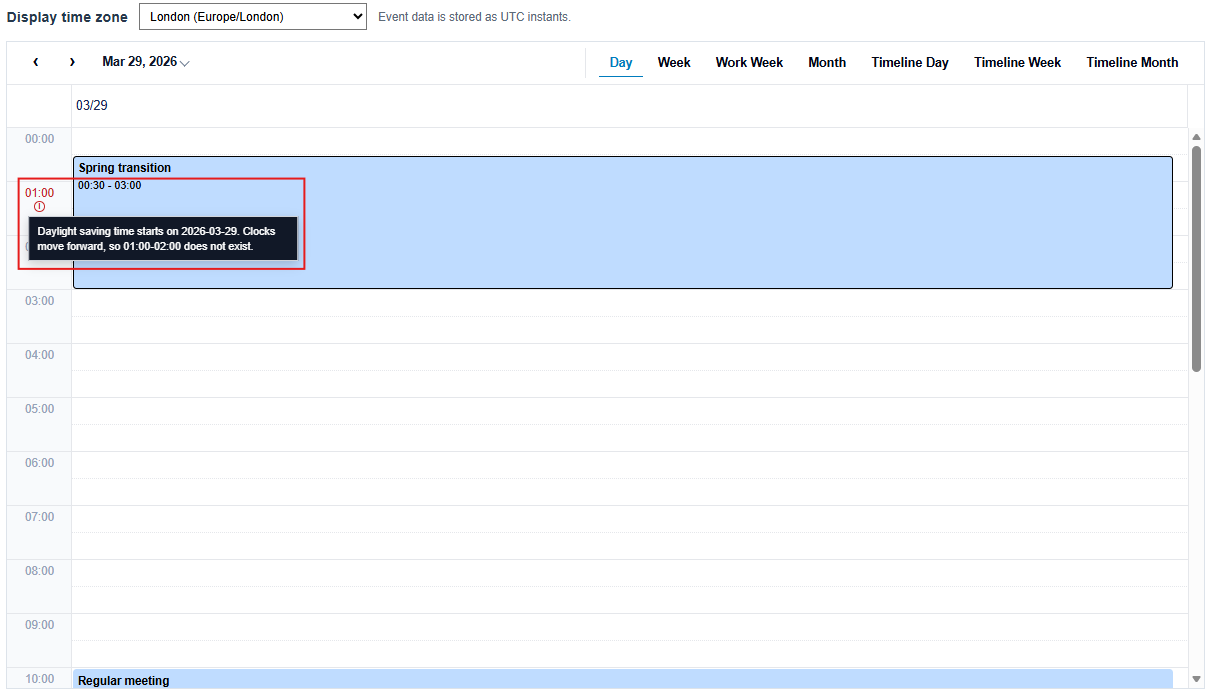
When clocks move forward, a range of local times does not exist. In London on March 29, 2026, 01:00-02:00 is skipped.
Scheduler resolves a new or edited time in the gap by subtracting the skipped duration. If that would make the end no later than the start, it adjusts the end forward by the skipped duration. For example, an entered 00:30-01:00 can resolve to 00:30-02:00 so the resulting interval remains valid.
Autumn transition: the fold
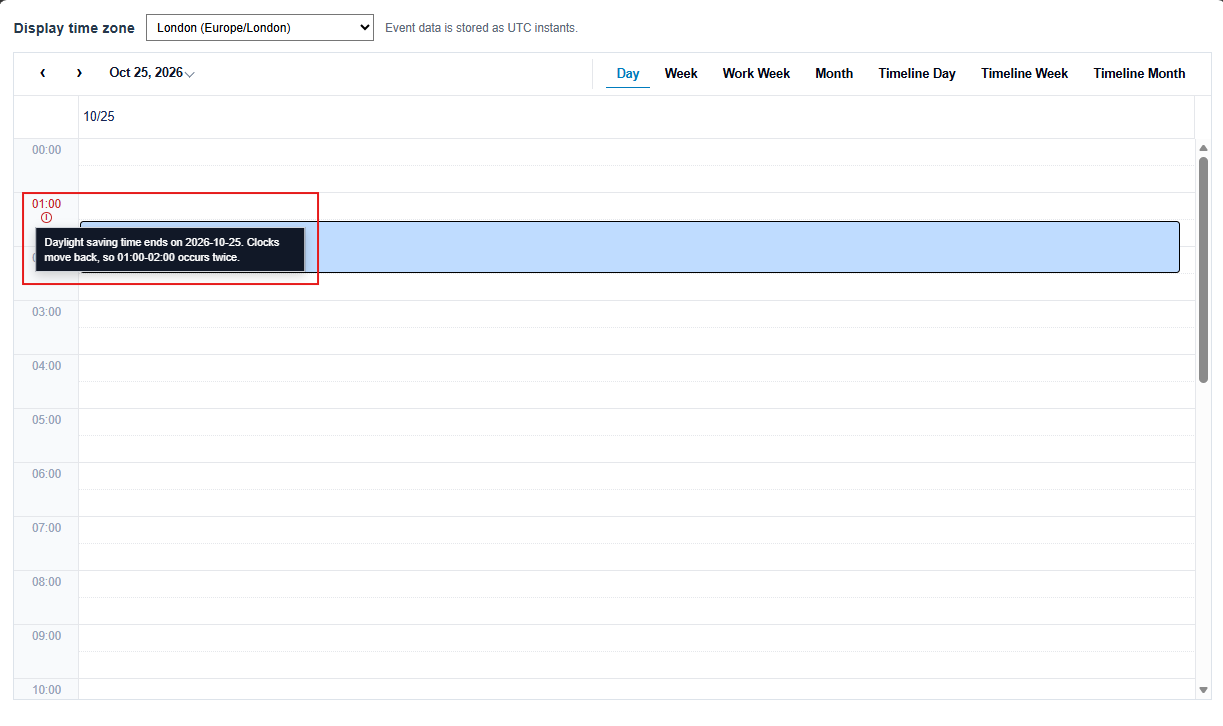
When clocks move backward, a range of local times occurs twice. In London on October 25, 2026, 01:00-02:00 occurs once in daylight time and once in standard time.
For new or edited values, Scheduler uses the first occurrence for a start time and the first end occurrence that is later than the resolved start. If an existing start or end is unchanged, Scheduler preserves its original absolute instant and therefore its original occurrence.
An event displayed as 01:00-02:00 across the fold can have an actual duration of two hours. Moving or displaying it in another time zone preserves that elapsed duration.
Fixed timed-axis behavior
Timed views use a fixed visual axis from 00:00 through 24:00. A gap hour is not removed and a fold hour is not duplicated. Users can still select, create, edit, move, and resize events in these regions. Consequently, a crossing event can look longer or shorter on the visual axis than its actual elapsed duration; the stored absolute dates remain unchanged.
In a single-day vertical Timed view, including a resource Day view, the affected row header displays a DST indicator. Multi-day, Week, and Timeline views do not display this indicator. The indicator is informational; it does not disable the slot or prevent selection, creation, editing, dragging, moving, or resizing.
Validate application input
When users enter local times, validate values in the configured time zone and define how the application handles a nonexistent or ambiguous time. Do not mix local-clock values and UTC instants in one collection without explicit conversion. Server-side validation should remain authoritative for persisted schedules.