


Forms
PDF-based fillable forms, also known as AcroForms, are interactive forms that contain a collection of fields such as text boxes, buttons, and check boxes. These fields can be filled either programmatically or manually by the user to capture input. For more information about AcroForms, see PDF Specification 2.0, Section 12.7.
DsPdfJS allows you to create and manage AcroForms using the AcroForm class. Form fields are accessed through the fields property of the AcroForm class, which provides a collection of all fields in the form. Using this collection, you can add, retrieve, modify, or delete form fields in a PDF document.
The following field types are supported:
TextField
CheckBoxField
CombTextField
ComboBoxField
ListBoxField
PushButtonField
RadioButtonField
SignatureField
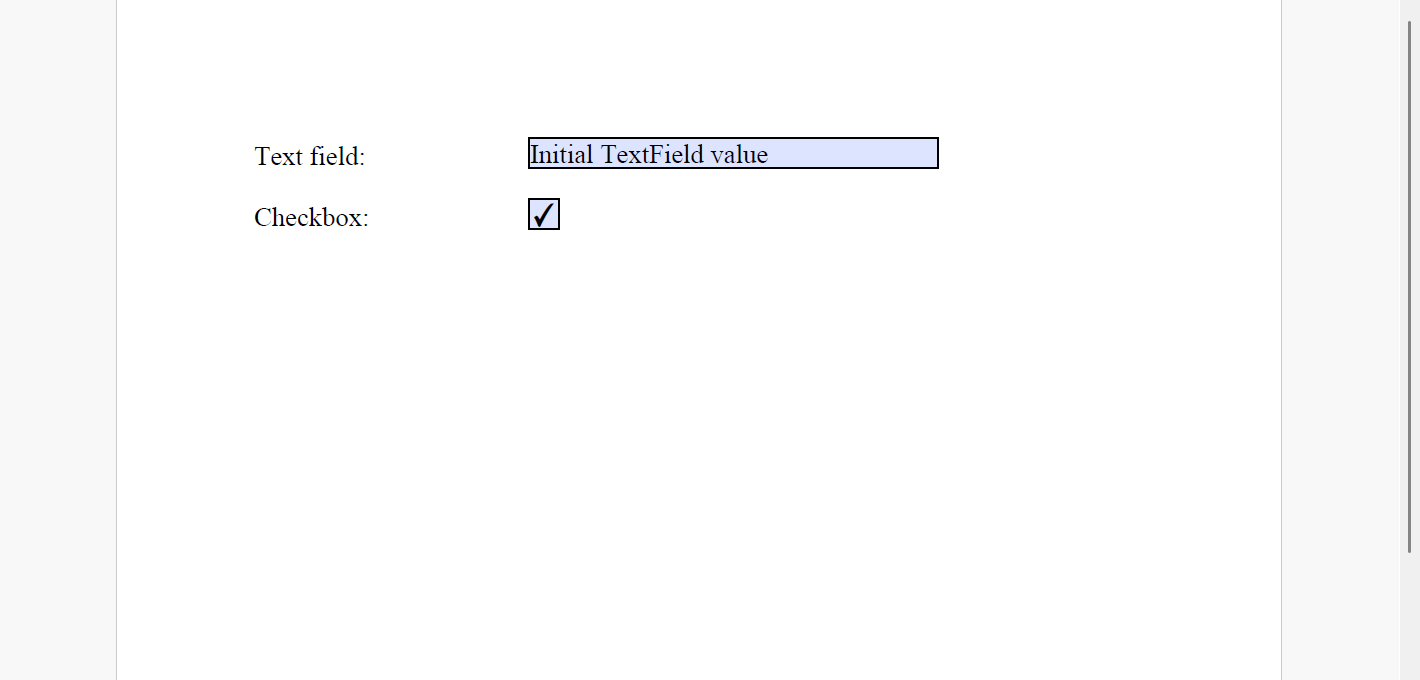
Add AcroForm Fields
You can add form fields to a PDF document by creating field objects and adding them to the document’s AcroForm.
To add AcroForm fields in a PDF document:
Create an instance of the class corresponding to the field you want to add, for example TextField.
Set the basic properties of the field, such as its value and widget properties.
Add the field to the form using the add method of the FieldCollection class.
Note: The examples on this page use helper functions from the Snippet Helpers module. These utilities are provided only to simplify the examples and are not part of the DsPdfJS API.
const doc = new PdfDocument();
const page = doc.newPage();
const ctx = page.context;
const tf = new Format({
    font: Font.getPdfFont(StandardPdfFont.Times),
    fontSize: 14
});
let x = 72;
let y = 72;
const fldOffset = 72 * 2;
const fldHeight = tf.fontSize * 1.2;
const dY = 32;

// Add TextField
ctx.drawText("Text field:", tf, x, y);
const fldText = new TextField();
fldText.value = "Initial TextField value";
fldText.widget.page = page;
fldText.widget.rect = { x: x + fldOffset, y: y, width: 72 * 3, height: fldHeight };
fldText.widget.defaultAppearance.font = tf.font;
fldText.widget.defaultAppearance.fontSize = tf.fontSize;
doc.acroForm.fields.add(fldText);
y += dY;

// Add Checkbox:
ctx.drawText("Checkbox:", tf, x, y);
var fldCheckbox = new CheckBoxField();
fldCheckbox.value = true;
fldCheckbox.widget.page = page;
fldCheckbox.widget.rect = { x: x + fldOffset, y: y, width: fldHeight, height: fldHeight };
doc.acroForm.fields.add(fldCheckbox);
y += dY;

//Save the document
Util.saveFile("AddAcroFormFields.pdf", doc.savePdf());
Modify AcroForm Fields
To modify form fields in a PDF document, retrieve the required field from the form’s fields collection by specifying its index using the getAt method. After retrieving the field, you can update its properties such as name, value, calculationIndex, etc.
// Load document
const inputDocData = await Util.loadFile("AddAcroFormFields.pdf");
const doc = PdfDocument.load(inputDocData);

// Change the value property
doc.acroForm.fields.getAt(0).value = "Sample Text";

//Save the document
Util.saveFile("ModifyAcroFormFields.pdf", doc.savePdf());
Delete AcroForm Fields
To delete form fields from a PDF document, use the fields collection of the document’s AcroForm.
To delete AcroForm fields:
Call the removeAt method on the FieldCollection class and specify the index of the field you want to remove.
Call the clear method on the FieldCollection class to remove all form fields from the document.
// load document
const inputDocData = await Util.loadFile("AddAcroFormFields.pdf");
const doc = PdfDocument.load(inputDocData);

// Delete a particular field
doc.acroForm.fields.removeAt(0);

// Delete all the fields
doc.acroForm.fields.clear();

//Save the document
Util.saveFile("DeleteAcroFormFields.pdf", doc.savePdf());
Import or Export Forms Data from FDF
Some PDFs contain forms that can be transferred over the web as forms data after being filled. In DsPdfJS, form data can be imported from or exported to the FDF (Forms Data Format). An FDF file stores the values of form fields as key/value pairs.
You can export form data using the exportFormDataToFDF method of the PdfDocument class, and import form data using the importFormDataFromFDF method.
async function exportFDF() {
    // load document
    const inputDocData = await Util.loadFile("AddAcroFormFields.pdf");
    const doc = PdfDocument.load(inputDocData);

    // export to FDF
    const fdfData = doc.exportFormDataToFDF();
    Util.saveFile("formData.fdf", fdfData);
}

async function importFDF() {
    // load document
    const inputDocData = await Util.loadFile("AddAcroFormFields.pdf");
    const doc = PdfDocument.load(inputDocData);

    // modify field value, it will be overwritten after import FDF
    doc.acroForm.fields.getAt(0).value = "temp value";

    //
    const fdfData = await Util.loadFile("formData.fdf");
    doc.importFormDataFromFDF(fdfData);

    Util.saveFile("ImportFDF.pdf", doc.savePdf());
}
Define Tab Order of Form Fields
You can navigate form fields in a PDF document using the Tab key. Use the annotationsTabsOrder property to define the tab order of annotations and form fields on a page.
The annotationsTabsOrder property supports the following values:
RowOrder: form fields are visited in rows running horizontally across the page.
ColumnOrder: form fields are visited in columns running vertically across the page.
StructureOrder: form fields are visited in the order in which they appear in the structure tree.
page.annotationsTabsOrder = AnnotationsTabsOrder.StructureOrder;Note: StructureOrder can be used in tagged PDF and PDF/UA document workflows. For more information, see PDF Conformance.