


Document Properties
Apart from its content, a PDF document also contains additional information in the form of document properties. These properties define attributes of the document as a whole.
DsPdfJS provides several document properties through the PdfDocument class, including the following:
Compression
DsPdfJS allows you to reduce the file size of a PDF document using the compressionLevel property. You can set the compression level to values such as fastest, noCompression, optimal, or smallestSize. By default, the compression level is set to fastest.
Document Info
The DocumentInfo property contains basic information about a PDF document, such as the title, author, keywords, etc. This information helps identify the document. If not set explicitly, some properties may be generated automatically.
Document Options
DsPdfJS provides the PdfDocumentOptions type, which defines options such as compressionLevel, conformanceLevel, defaultPageHeight, defaultPageWidth, and fontEmbedMode for creating a PDF document.
Font Embedding
DsPdfJS allows you to specify the fond embedding mode with the fontEmbedMode property. By default, the document embeds font subsets. You can change this behavior to embed full fonts or disable font embedding.
Metadata
DsPdfJS provides access to document metadata through the metadata property. Metadata includes information such as keywords, description contributors, creators, and copyright. External systems, such as search engines or document management tools, can use this information to categorize and locate documents.
Actions
DsPdfJS allows you to define an action that's displayed or performed when the document opens by using the openAction property.
Pdf Version
Users can get the PDF version of a document using the pdfVersion property.
Viewer Preferences
DsPdfJS provides the viewerPreferences property of the PdfDocument class to define how a PDF viewer displays a document. Viewer preferences allow you to control various display and printing behaviors. For example, you can hide viewer interface elements, set the reading direction for text, define page boundaries used for viewing or printing, and specify print-related options.
Page Layout
DsPdfJS allows you to specify the page layout used when the document is opened through the pageLayout property of the PdfDocument class. This property defines how the viewer arranges document pages.
Page Mode
DsPdfJS allows you to control how the document is displayed when opened using the pageMode property of the PdfDocument class. This property determines which navigation panels or document elements are visible when the document is opened in a viewer.
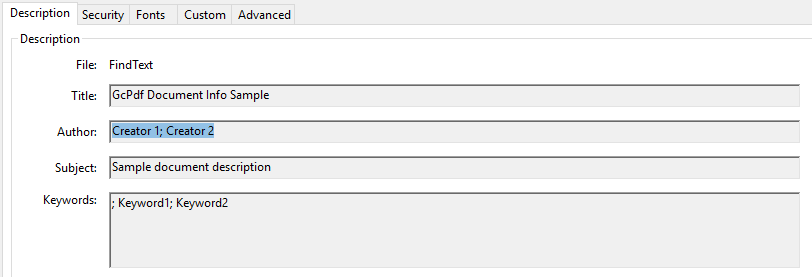
Get Document Properties
The following sample code demonstrates how to retrieve document properties from a PDF document:
Note: The examples on this page use helper functions from the Snippet Helpers module. These utilities are provided only to simplify the examples and are not part of the DsPdfJS API.
// Load a PDF document
const inputDocData = await Util.loadFile("fendo-13-1005722.pdf");
const doc = PdfDocument.load(inputDocData);

// Get and Display the property values
console.log(`Author of the document is ${doc.documentInfo.author}`);
console.log(`Document subject is ${doc.documentInfo.subject}`);
console.log(`Documentation title ${doc.documentInfo.title}`);
Set Document Properties
The following sample code demonstrates how to set document properties when creating a PDF document:
// Create a new PDF document:
const doc = new PdfDocument();
const page = doc.newPage();
const ctx = page.context;

// set document info properties
doc.documentInfo.title = "Document Info Sample";
doc.documentInfo.author = "John Doe";
doc.documentInfo.subject = "PdfDocument.DocumentInfo";
doc.documentInfo.producer = "DsPdfJS Producer";
doc.documentInfo.creator = "DsPdfJS Creator";
doc.documentInfo.createDate = Date.now();

// Document metadata is available via the PdfDocument.metadata property.
// It provides a number of predefined accessors, such as:
doc.metadata.contributors = ["contributor 1", "contributor 2"];
doc.metadata.copyright = "MESCIUS, Inc.";
doc.metadata.creators = ["Creator 1", "Creator 2"];
doc.metadata.description = "Sample document description";
doc.metadata.keywords = ["Keyword1", "Keyword2"];
doc.metadata.source = "Sourced by DsPdfWeb";

// Finally, add some text to the document and save the document
ctx.drawText("This is a sample text", Font.getPdfFont(StandardPdfFont.Helvetica), 16, "Black", 72, 72);
const docData = doc.savePdf();