


- ASP.NET MVC
- Getting Started
- Configuring your MVC Application
- Adding NuGet Packages to your App
- Adding Controls
- Client-Side Support
- Globalization
-
Working with Controls
- Accordion
- Barcode
- CollectionView
- DashboardLayout
- Excel
- File Manager
- Financial Charts
- FlexChart
-
FlexGrid
- Key Features
- Quick Start
-
Work with FlexGrid
- Clip String
- Columns
- Custom Cell Template
- Custom Editors
- Data Binding
- Data Map
- Detail Row
- Disable Server Reading
- Editing
- Excel Import and Export
- Excel RTL Export
- Exclusive Value Search
- Filtering
- FlexGrid Selector
- Full Text Search
- Case-sensitive Search
- Grouping
- Header Focusability
- Keyboard Handling
- Merging
- Overlays
- Paging
- PDF Export
- ReSize
- Right To Left Rendering
- Scaffolding
- Selection Modes
- Star Sizing
- Styling and CSS
- Transposed Grid
- TreeGrid
- Unbound FlexGrid
- Unobtrusive Validation
- Virtual Scrolling
- FlexMap
- FlexPie
- FlexRadar
- FlexReport
- FlexSheet
- FlexViewer
- Gauge
- Input Controls
- MultiRow
- TransposedMultiRow
- OLAP
- Sunburst Chart
- TabPanel
- TreeMap
- TreeView
- Styling
- ASP.NET MVC Samples
- Release History
Clipboard
FlexGrid supports standard clipboard operations through the AutoClipboard property. When AutoClipboard is set to true, users can copy, paste, and cut cell values by using standard keyboard shortcuts. The PreventCut property controls whether the grid processes cut operations. PreventCut applies only when AutoClipboard is enabled.
Clipboard Behavior
Configuration | Behavior |
|---|---|
AutoClipboard = | FlexGrid ignores clipboard keyboard shortcuts. PreventCut has no effect. |
AutoClipboard = | FlexGrid performs the default cut operation. Selected values are copied to the clipboard, and editable cell values are cleared. Read-only cells are copied but remain unchanged. Rows are not deleted. |
AutoClipboard = | FlexGrid does not process cut shortcuts. Copy and paste behavior remains available, and applications can handle the shortcut through custom logic or a parent element. |
The default value of PreventCut is false.
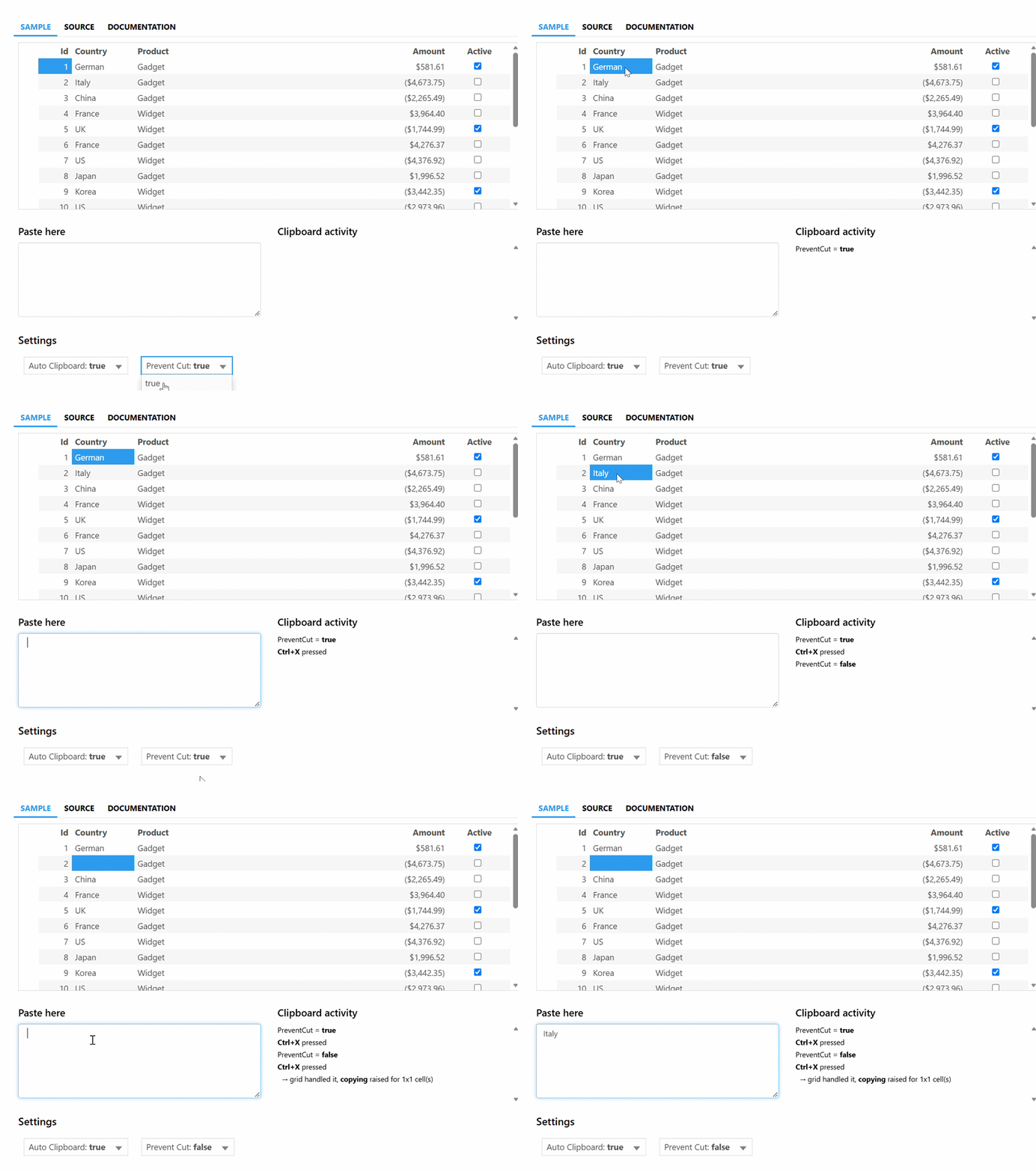
Code Snippets
The following example enables clipboard support and suppresses the built-in cut operation.
Controllers
Add the following action method to configure the clipboard settings for the FlexGrid sample.
private static List<Sale> _clipboardSource = Sale.GetData(20).ToList();
public ActionResult Index()
{
    return View(_clipboardSource);
MVC View
Add the following configuration to enable clipboard operations and prevent cut behavior.
@(Html.C1().FlexGrid<Sale>()
    .Id("clipboardGrid")
    .Bind(Model)
    .AutoGenerateColumns(false)
    .AutoClipboard(true)
    .PreventCut(true)
    .Columns(columns =>
    {
        columns.Add(c => c.Binding("ID").Header("Id").IsReadOnly(true));
        columns.Add(c => c.Binding("Country").Header("Country"));
        columns.Add(c => c.Binding("Product").Header("Product"));
        columns.Add(c => c.Binding("Amount").Header("Amount").Format("c2"));
        columns.Add(c => c.Binding("Active").Header("Active"));
    })
)