


- SpreadJS Overview
- Getting Started
- JavaScript Frameworks
- Best Practices
-
Features
- Workbook
- Worksheet
- Rows and Columns
- Headers
-
Cells
- Work with Cells
- Cell Types
- Cell Format
- Cell States
- Cell Range
- Get Dirty Status
- Cell Buttons
- Cell Dropdowns
- Cell Comments
- Cell Threaded Comments
- Hyperlink
- Auto Merge Cells
- AutoFit
- Auto Fill Data
- Mask Input
- Shrink to Fit
- Cell Overflow
- Ellipsis or Tips for Cell Overflow
- Cell Alignment and Indentation
- Cell Padding and Label Styles
- Cell Span
- Cell Tags
- Styles
- Cell Decoration
- Cell Colors
- Cell Background Image
- Borders, Gridlines and Diagonal Lines
- Quote Prefix
- Insert Cut or Copied Cells
- Rotate Text In Cells
- Text Direction
- Text Decoration
- Rich Text
- Image Rich Data
- Wrap Text
- Drag and Drop
- Drag and Merge
- Editing
- Watermark
- Display Zero as Blank
- IME Mode
- Pattern Fill and Gradient Fill
- Paste Options
- Data Binding
- Data Manager
- TableSheet
- GanttSheet
- ReportSheet
- Data Charts
- JSON Schema with SpreadJS
- SpreadJS File Format
- Data Validation
- Conditional Formatting
- Sort
- Group
- Formulas
- What-If Analysis
- Serialization
- Keyboard Actions
- Shapes
- Floating Objects
- Barcodes
- Charts
- Sparklines
- Tables
- Pivot Table
- Slicer
- Theme
- User Management
- Culture
- AI Assistant
- SpreadJS Designer
- SpreadJS Designer VSCode Plugin
- Tutorials
- SpreadJS Designer Component
- SpreadJS Collaboration Server
- Touch Support
- Formula Reference
- Import and Export Reference
- Events
- API Documentation
- Release Notes
Double-click for Auto Fill
SpreadJS allows users to fill data by double-clicking the fill handle. This operation is useful when users need to fill values or formulas down a column without manually dragging the fill handle across many rows.
When users double-click the fill handle, SpreadJS determines the fill range based on the surrounding data and fills the empty cells in the target column. The fill result depends on the source value and the selected fill option, such as Copy Cells, Fill Series, Fill Formatting Only, and Fill Without Formatting.
Double-Click Auto Fill Operations
When the fill handle is double-clicked, the empty cells down the column are filled based on the selected source range.
The following auto fill operations can be performed by double-clicking the fill handle.
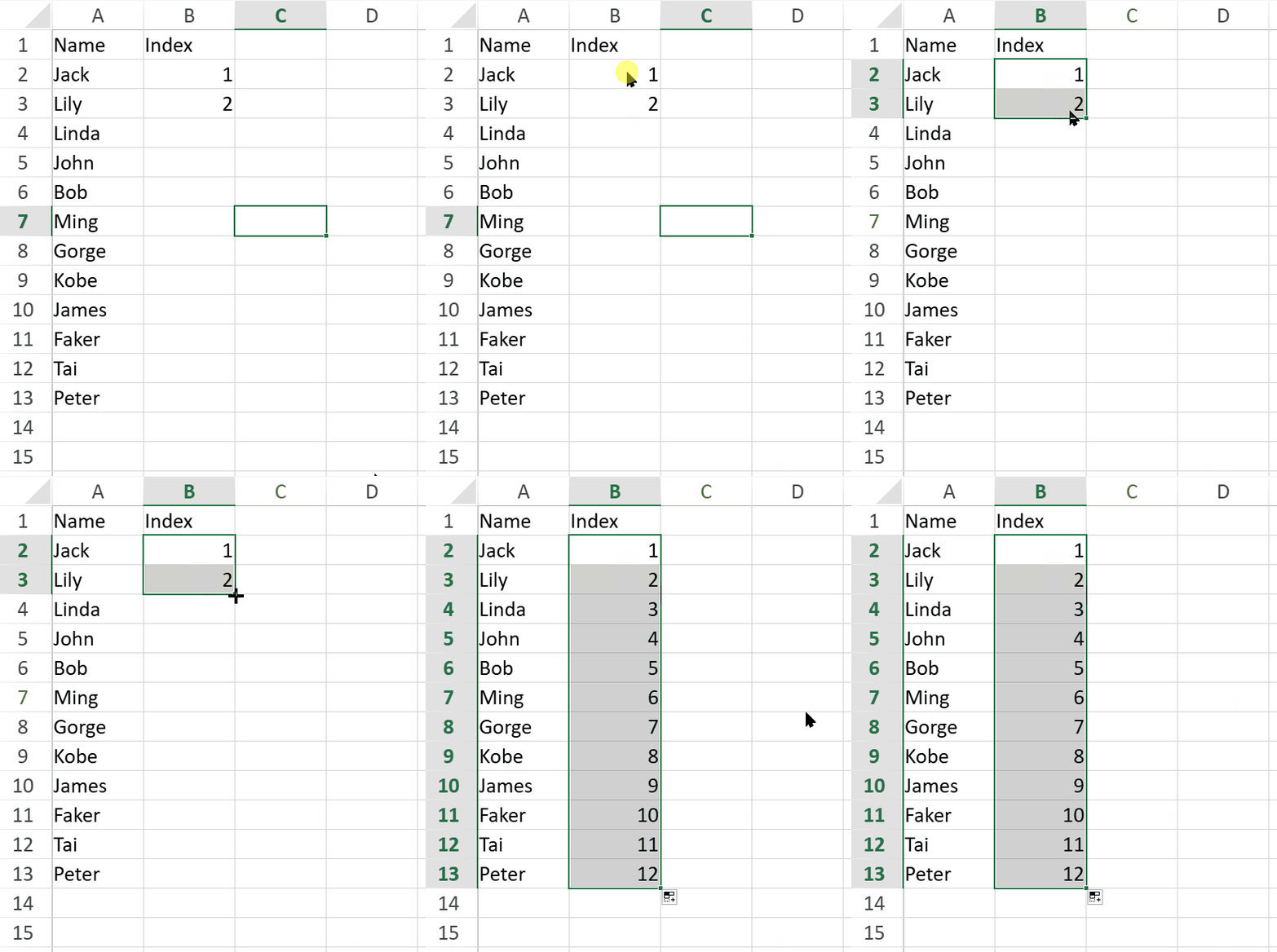
Auto Fill Numbers: If the source range contains numeric values, SpreadJS fills the column by using the detected numeric pattern and the selected fill option.
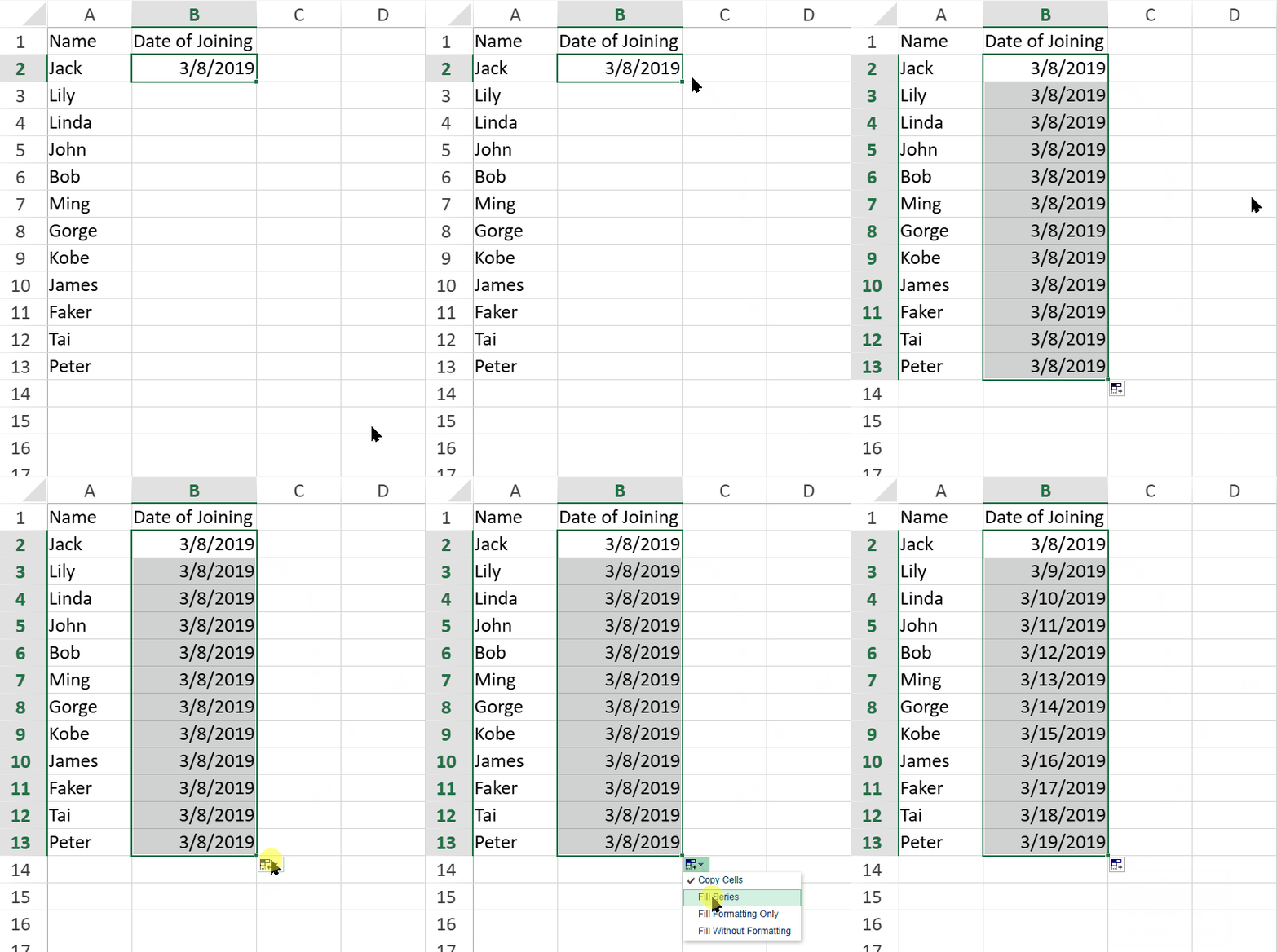
Auto Fill Dates: If the source range contains date values, SpreadJS fills the column with date values. By default, double-clicking the fill handle copies date values. To fill consecutive dates, open the fill options menu and select Fill Series.
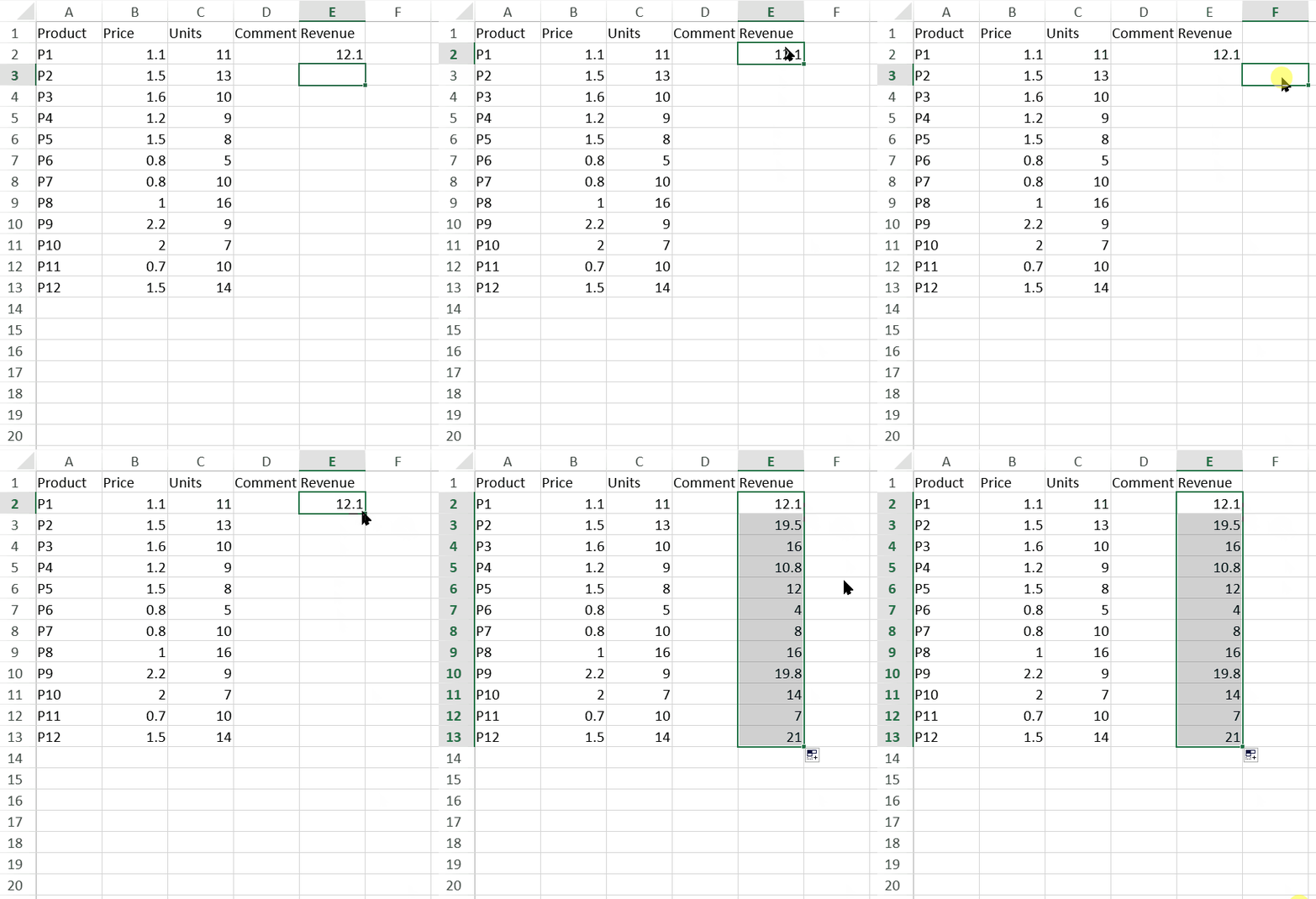
Auto Fill Formulas: If the source range contains a formula, SpreadJS copies the formula down the column.
Notes:
Double-click auto fill works only when there are non-empty cells in the column adjacent to the fill handle.
When users double-click the fill handle, SpreadJS fills down to the last non-empty cell in the current region.
If the adjacent column contains empty cells, SpreadJS fills down to the last non-empty cell in the adjacent column.
Double-Click Auto Fill in Worksheet Tables
When double-click auto fill is used inside the data range of a worksheet table, SpreadJS determines the fill range based on whether the next cell in the table range contains a value.
If the next cell has no value, SpreadJS fills the subsequent empty cells in the table range until it reaches a cell that contains a value.
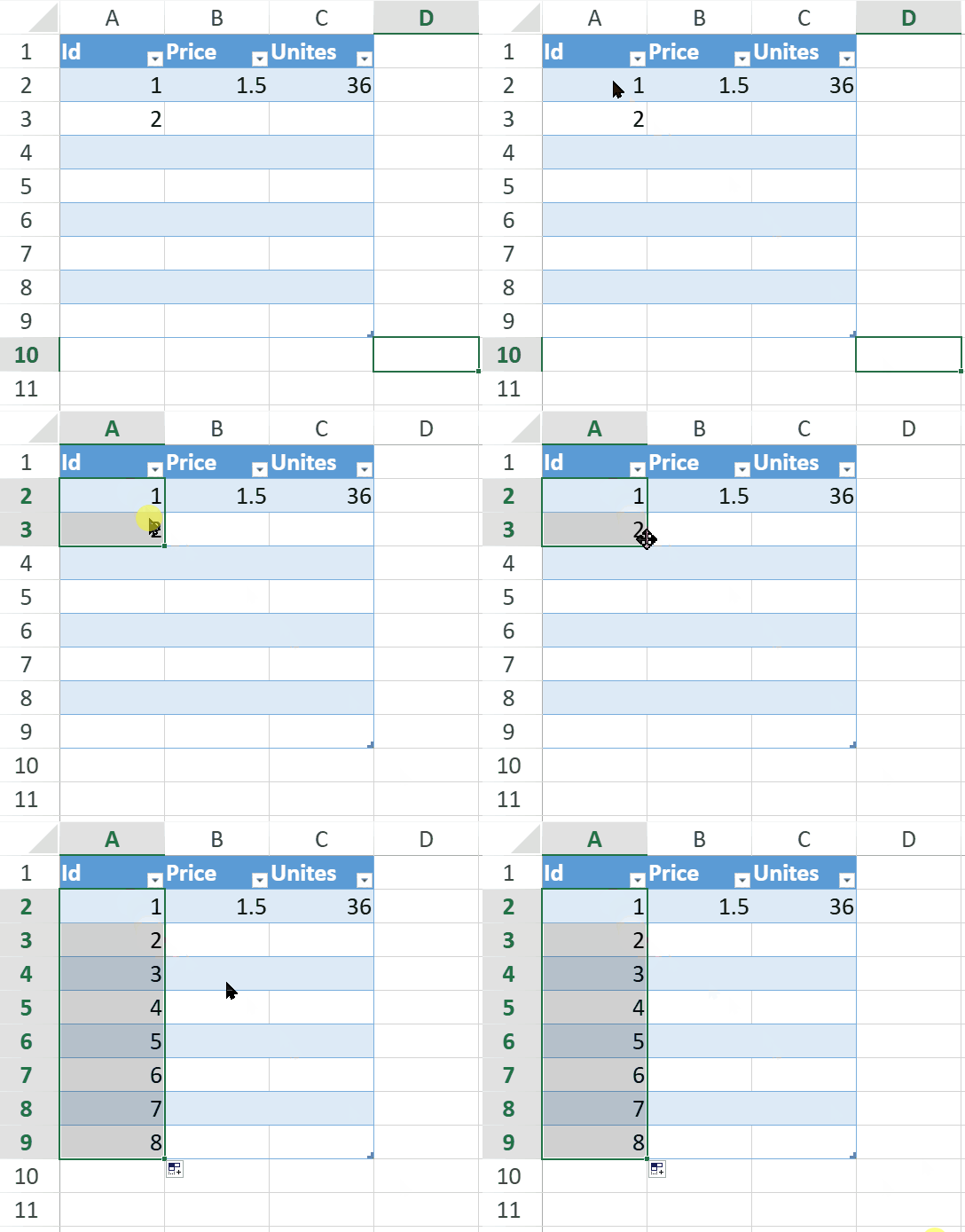
If the next cell has a value, SpreadJS overwrites the subsequent non-empty cells in the table range until it reaches an empty cell.
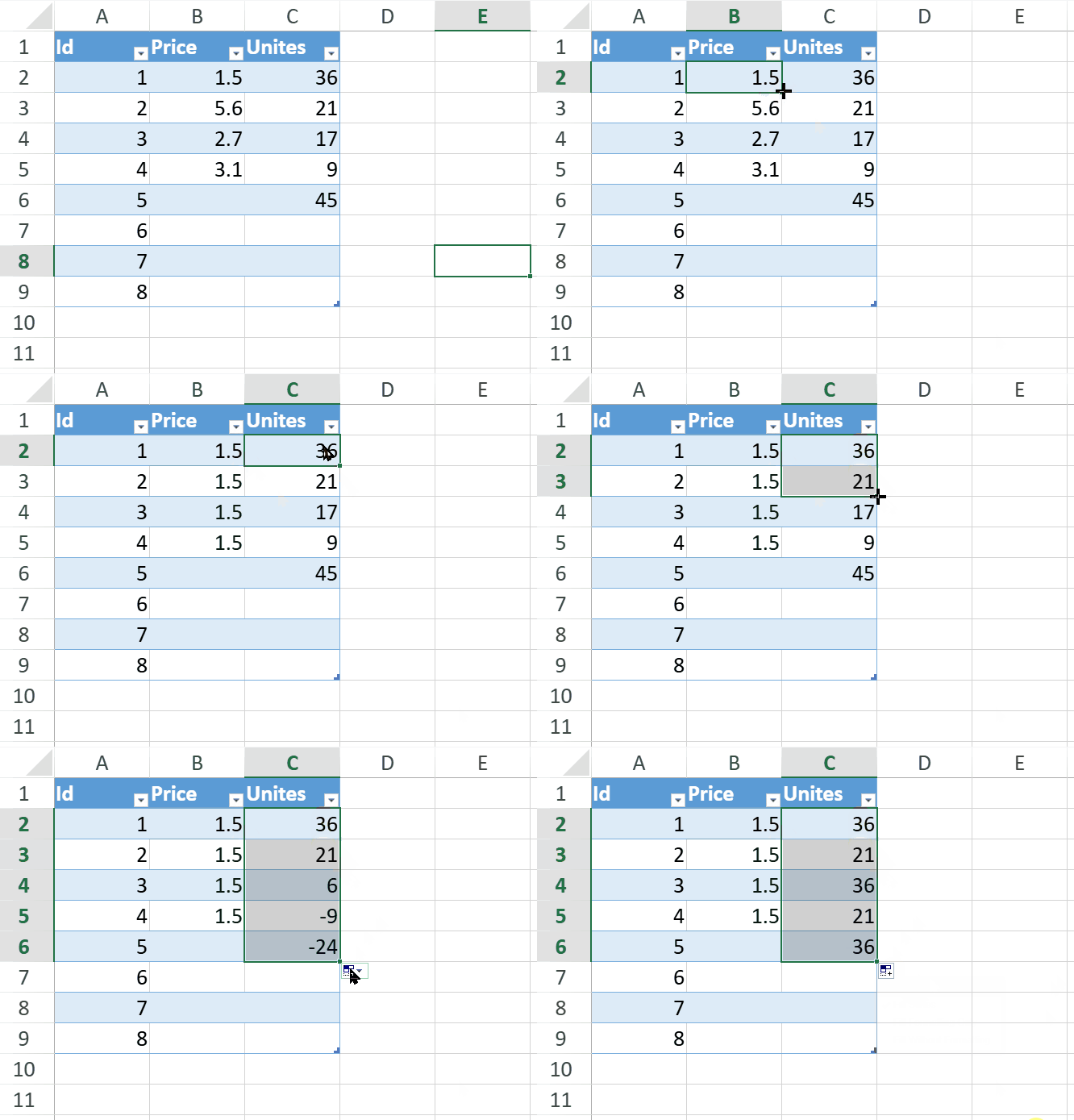
This behavior applies within the table data range.