


- SpreadJS Overview
- Getting Started
- JavaScript Frameworks
- Best Practices
-
Features
- Workbook
- Worksheet
- Rows and Columns
- Headers
-
Cells
- Work with Cells
- Cell Types
- Cell Format
- Cell States
- Cell Range
- Get Dirty Status
- Cell Buttons
- Cell Dropdowns
- Cell Comments
- Cell Threaded Comments
- Hyperlink
- Auto Merge Cells
- AutoFit
- Auto Fill Data
- Mask Input
- Shrink to Fit
- Cell Overflow
- Ellipsis or Tips for Cell Overflow
- Cell Alignment and Indentation
- Cell Padding and Label Styles
- Cell Span
- Cell Tags
- Styles
- Cell Decoration
- Cell Colors
- Cell Background Image
- Borders, Gridlines and Diagonal Lines
- Quote Prefix
- Insert Cut or Copied Cells
- Rotate Text In Cells
- Text Direction
- Text Decoration
- Rich Text
- Image Rich Data
- Wrap Text
- Drag and Drop
- Drag and Merge
- Editing
- Watermark
- Display Zero as Blank
- IME Mode
- Pattern Fill and Gradient Fill
- Paste Options
- Data Binding
- Data Manager
- TableSheet
- GanttSheet
- ReportSheet
- Data Charts
- JSON Schema with SpreadJS
- SpreadJS File Format
- Data Validation
- Conditional Formatting
- Sort
- Group
- Formulas
- What-If Analysis
- Serialization
- Keyboard Actions
- Shapes
- Floating Objects
- Barcodes
- Charts
- Sparklines
- Tables
- Pivot Table
- Slicer
- Theme
- User Management
- Culture
- AI Assistant
- SpreadJS Designer
- SpreadJS Designer VSCode Plugin
- Tutorials
- SpreadJS Designer Component
- SpreadJS Collaboration Server
- Touch Support
- Formula Reference
- Import and Export Reference
- Events
- API Documentation
- Release Notes
Text Decoration
SpreadJS supports multiple text decoration styles that can be applied to cell text, including standard and accounting underline types.
Text decorations are configured using the textDecoration property on a cell or a Style object.
Supported Types
Text decorations are defined by the TextDecorationType enum.
TextDecorationType is a bitwise flag enum.
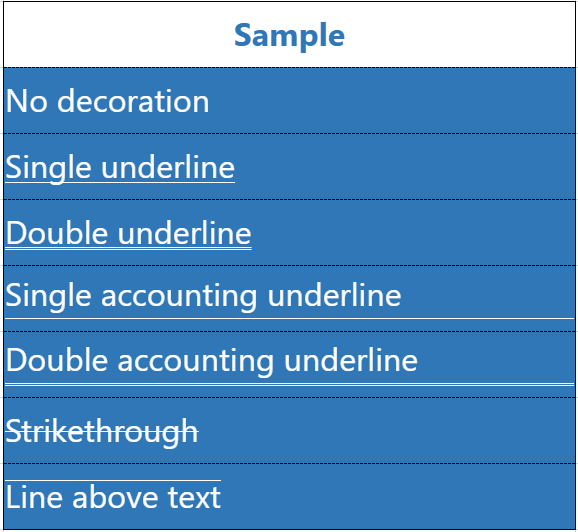
Name | Value | Description |
|---|---|---|
none | 0 | No decoration |
underline | 1 | Single underline |
lineThrough | 2 | Strikethrough |
overline | 4 | Line above text |
doubleUnderline | 8 | Double underline |
accountingUnderline | 16 | Single accounting underline |
doubleAccountingUnderline | 32 | Double accounting underline |
Note:
The enum supports bitwise combinations where applicable (for example,
underline | lineThrough).
Applying Text Decoration
Using getCell
activeSheet.getCell(0, 0).textDecoration(
    GC.Spread.Sheets.TextDecorationType.underline
);

activeSheet.getCell(1, 0).textDecoration(
    GC.Spread.Sheets.TextDecorationType.doubleAccountingUnderline
);
Using a Style Object
var style = new GC.Spread.Sheets.Style();
style.textDecoration =
    GC.Spread.Sheets.TextDecorationType.accountingUnderline;

activeSheet.setStyle(2, 1, style);
Standard vs Accounting Underlines
SpreadJS supports both standard underline styles and Excel‑compatible accounting underline styles.
Aspect | Standard Underlines | Accounting Underlines |
|---|---|---|
Supported Types |
|
|
Position | Drawn directly beneath the text glyphs | Positioned further below the text baseline |
Spacing | Fixed visual offset | Spacing scales proportionally with font size |
Underline Width | Matches text width | Matches text width for numbers and rotated text; may span the full column width for general text |
Rotation | Follows text rotation(not supported for vertical text) | Follows text rotation (not supported for vertical text) |
Typical Usage | General text emphasis | Financial reports and Excel‑style accounting formatting |
Behavior Notes of Accounting Underlines
Accounting underlines are applied at the cell level and cannot be set per rich-text segment.
For numeric and date-formatted values, the underline width matches the text width.
For general text, the underline may span the full column width.
In merged cells, the underline spans the entire merged width.
Vertical text does not render accounting underlines (consistent with Excel).
SpreadJS does not automatically increase row height when an accounting underline is applied.
If the row height is insufficient, the underline may visually degrade instead.
(In Excel, row height may increase automatically in this scenario.)
Setting Text Decoration in SpreadJS Designer
In addition to the API, text decoration can also be configured in SpreadJS Designer.
Select one or more cells.
Go to the Home tab.
In the Font group, click the dialog launcher (small arrow icon).

In the Format Cells dialog, open the Font tab.
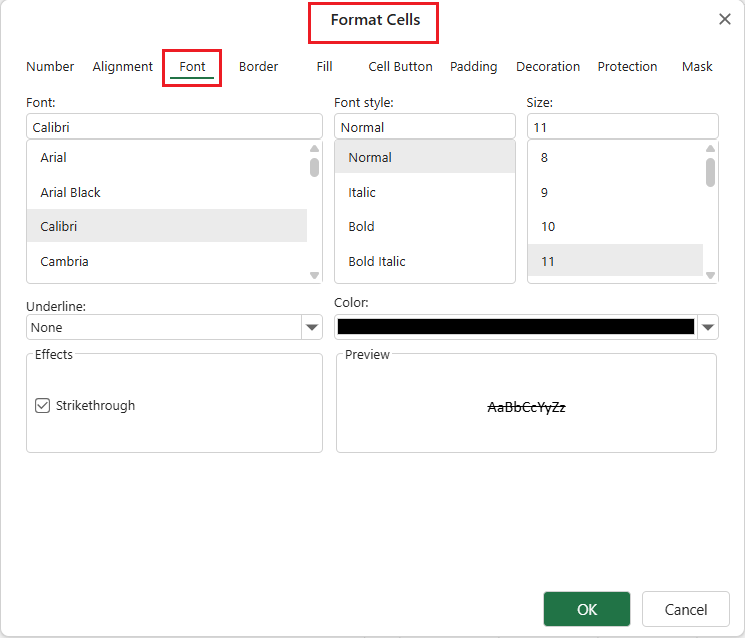
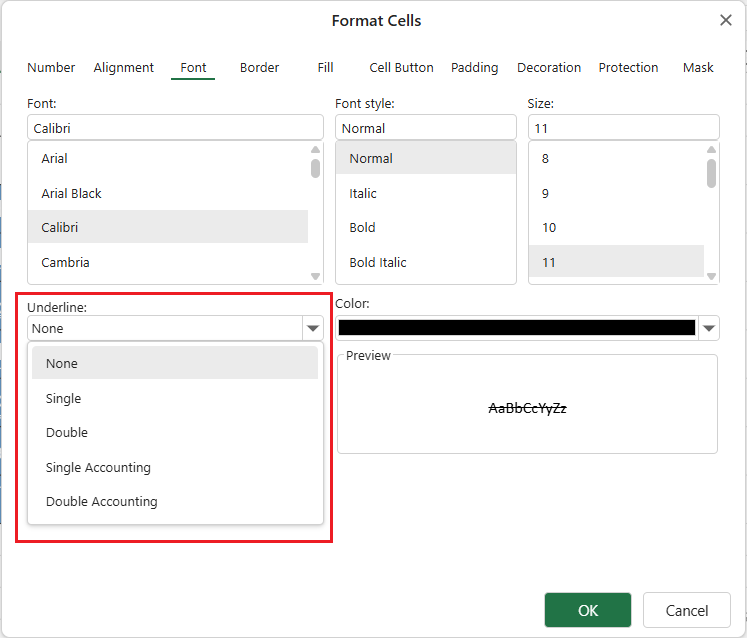
Use the Underline dropdown list to select:
Single
Double
Single Accounting
Double Accounting
Click OK to apply the setting.
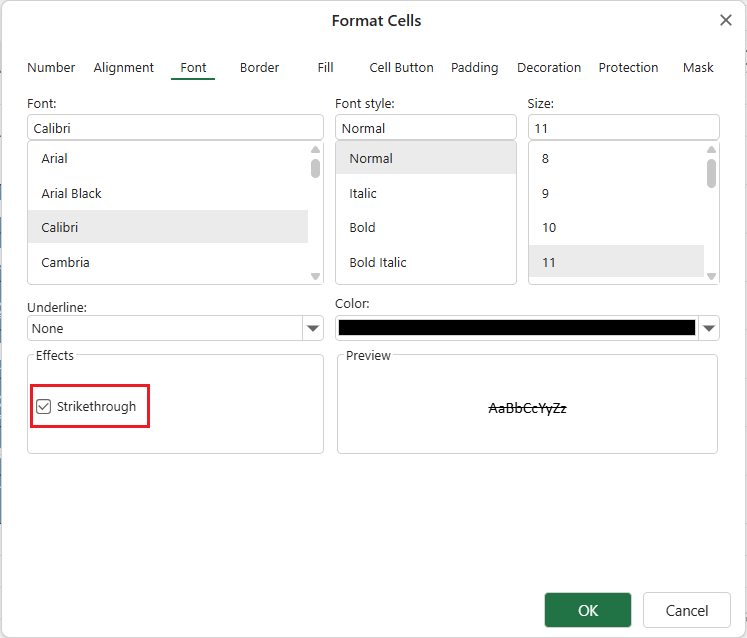
Strikethrough can also be enabled in the same dialog under Effects.
Accounting underline types should not be combined with other underline types.
The selected underline type is applied to the entire cell and corresponds directly to the TextDecorationType enum in the API.