


- SpreadJS Overview
- Getting Started
- JavaScript Frameworks
- Best Practices
-
Features
- Workbook
- Worksheet
- Rows and Columns
- Headers
-
Cells
- Work with Cells
- Cell Types
- Cell Format
- Cell States
- Cell Range
- Get Dirty Status
- Cell Buttons
- Cell Dropdowns
- Cell Comments
- Cell Threaded Comments
- Hyperlink
- Auto Merge Cells
- AutoFit
- Auto Fill Data
- Mask Input
- Shrink to Fit
- Cell Overflow
- Ellipsis or Tips for Cell Overflow
- Cell Alignment and Indentation
- Cell Padding and Label Styles
- Cell Span
- Cell Tags
- Styles
- Cell Decoration
- Cell Colors
- Cell Background Image
- Borders, Gridlines and Diagonal Lines
- Quote Prefix
- Insert Cut or Copied Cells
- Rotate Text In Cells
- Text Direction
- Text Decoration
- Rich Text
- Image Rich Data
- Wrap Text
- Drag and Drop
- Drag and Merge
- Editing
- Watermark
- Display Zero as Blank
- IME Mode
- Pattern Fill and Gradient Fill
- Paste Options
- Data Binding
- Data Manager
- TableSheet
- GanttSheet
- ReportSheet
- Data Charts
- JSON Schema with SpreadJS
- SpreadJS File Format
- Data Validation
- Conditional Formatting
- Sort
- Group
- Formulas
- What-If Analysis
- Serialization
- Keyboard Actions
- Shapes
- Floating Objects
- Barcodes
- Charts
- Sparklines
- Tables
- Pivot Table
- Slicer
- Theme
- User Management
- Culture
- AI Assistant
- SpreadJS Designer
- SpreadJS Designer VSCode Plugin
- Tutorials
- SpreadJS Designer Component
- SpreadJS Collaboration Server
- Touch Support
- Formula Reference
- Import and Export Reference
- Events
- API Documentation
- Release Notes
Borders, Gridlines and Diagonal Lines
SpreadJS supports borders around cells, columns, or rows. The widget also displays gridlines by default. You can set the color or line style of the border around the cells, columns, or rows. You can specify the color and whether to show gridlines. You can also set diagonal lines in a cell and a cell range.
Set Border Color
SpreadJS supports customizing the border by setting the border color for each side of a cell.
Use the setBorder method to set a border. You can also use the borderBottom, borderTop, borderRight, and borderLeft methods to set a cell border.
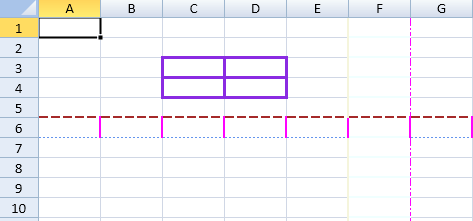
The following code sample sets the border color of a cell.
activeSheet.getRange(2, 2, 2, 2, GC.Spread.Sheets.SheetArea.viewport).setBorder(new GC.Spread.Sheets.LineBorder("#8A2BE2", GC.Spread.Sheets.LineStyle.medium), {all:true});
activeSheet.getRange(-1,5, -1, 1).borderTop(new GC.Spread.Sheets.LineBorder("#F0FFFF",GC.Spread.Sheets.LineStyle.medium));
activeSheet.getRange(-1, 5, -1, 1).borderLeft(new GC.Spread.Sheets.LineBorder("#F5F5DC",GC.Spread.Sheets.LineStyle.medium));
activeSheet.getRange(-1, 5, -1, 1).borderRight(new GC.Spread.Sheets.LineBorder("#FF02FF", GC.Spread.Sheets.LineStyle.dashDot));
activeSheet.getRange(-1, 5, -1, 1).borderBottom(new GC.Spread.Sheets.LineBorder("#FFE4C4",GC.Spread.Sheets.LineStyle.thin));
activeSheet.getRange(5, -1, 1, -1).borderTop(new GC.Spread.Sheets.LineBorder("#A52A2A",GC.Spread.Sheets.LineStyle.mediumDashed));
activeSheet.getRange(5, -1, 1, -1).borderLeft(new GC.Spread.Sheets.LineBorder("#FF02FF",GC.Spread.Sheets.LineStyle.medium));
activeSheet.getRange(5, -1, 1, -1).borderRight(new GC.Spread.Sheets.LineBorder("#5F9EA0", GC.Spread.Sheets.LineStyle.dashDot));
activeSheet.getRange(5, -1, 1, -1).borderBottom(new GC.Spread.Sheets.LineBorder("#6495ED",GC.Spread.Sheets.LineStyle.dotted));
Set Border Line Styles
The diagonal border line feature in SpreadJS supports all types of line styles (dashDot, dashDotDot, dashed, dotted, double, empty, hair, medium, mediumDashDot, mediumDashDotDot, mediumDashed, SlantedDashDot, thick, thin) as shown in the below image.
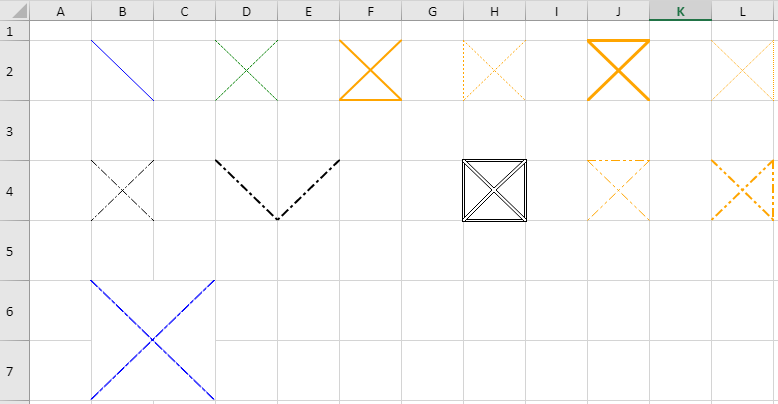
The following image shows different line types and colors set on each side of a cell.
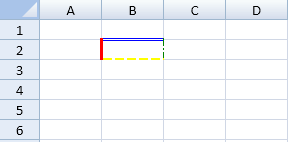
window.onload = function()
{
   var spread =
   new GC.Spread.Sheets.Workbook(document.getElementById("ss"),{sheetCount:3});
   var activeSheet = spread.getActiveSheet();

   // Set border lines to cell(1,1).
   var cell = activeSheet.getCell(1, 1, GC.Spread.Sheets.SheetArea.viewport);
   cell.borderLeft(new GC.Spread.Sheets.LineBorder("Red", GC.Spread.Sheets.LineStyle.thick));
   cell.borderTop(new GC.Spread.Sheets.LineBorder("Blue", GC.Spread.Sheets.LineStyle.double));
   cell.borderRight(new GC.Spread.Sheets.LineBorder
   ("Green", GC.Spread.Sheets.LineStyle.dashDot));
   cell.borderBottom(new GC.Spread.Sheets.LineBorder
   ("Yellow", GC.Spread.Sheets.LineStyle.mediumDashed));
}
Apart from the above line styles, diagonal border lines also support JSON serialization/deserialization, Excel I/O, and PDF export (for printing).
Set Rounded Borders
SpreadJS supports rounded borders for cells, ranges, spans, and header areas. Rounded borders are useful for report-style layouts, grouped business forms, payroll-style forms, and other layouts that need rounded rectangular sections built directly from worksheet cells.
You can set rounded corners by using the borderRadius style property or the borderRadius and setBorderRadius methods on a cell range.
Rounded borders work with existing border line styles. When adjacent borders use different styles, SpreadJS follows the existing border priority rules and renders the rounded corner using the higher-priority border.
Border Radius Value
The border radius value is a shorthand string that accepts one to four non-negative numeric values separated by spaces.
Value Count | Meaning |
|---|---|
1 | Applies the same radius to all four corners. |
2 | Applies the first value to top-left and bottom-right, and the second value to top-right and bottom-left. |
3 | Applies the first value to top-left, the second value to top-right and bottom-left, and the third value to bottom-right. |
4 | Applies the values to top-left, top-right, bottom-right, and bottom-left. |
The following examples show valid border radius values.
"8"
"8 12"
"8 12 16"
"8 12 16 20"
Invalid, empty, or zero-equivalent values do not render rounded corners.
Set Rounded Borders with Style
You can set borderRadius on a Style object and apply the style to a cell, span, or range.
var sheet = spread.getActiveSheet();
var style = new GC.Spread.Sheets.Style();
style.borderLeft = new GC.Spread.Sheets.LineBorder("#7da6ff", GC.Spread.Sheets.LineStyle.thin);
style.borderTop = new GC.Spread.Sheets.LineBorder("#7da6ff", GC.Spread.Sheets.LineStyle.thin);
style.borderRight = new GC.Spread.Sheets.LineBorder("#7da6ff", GC.Spread.Sheets.LineStyle.thin);
style.borderBottom = new GC.Spread.Sheets.LineBorder("#7da6ff", GC.Spread.Sheets.LineStyle.thin);
style.borderRadius = "8";
sheet.getCell(1, 1).setStyle(style);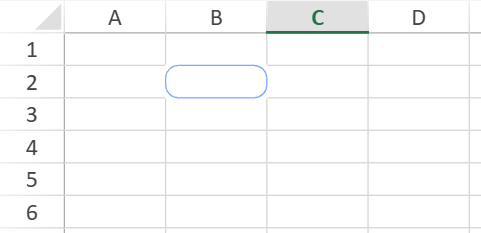
Set Rounded Borders on a Cell or Range
Use the borderRadius method to apply the same border radius value to each cell in the target range.
sheet.getCell(1, 1).borderRadius("28 0");
sheet.getRange(3, 1, 2, 2).borderRadius("8 12 8 12");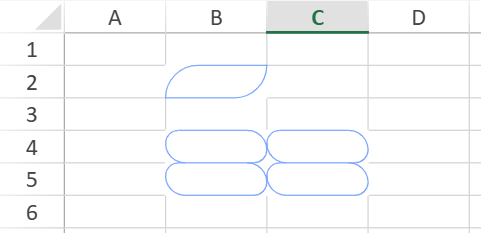
Set Rounded Borders by Range Scope
Use the setBorderRadius method when you want to apply rounded corners by range-level scope.
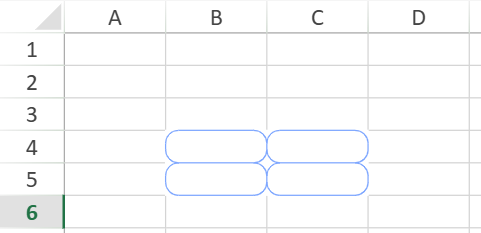
The all option applies the same border radius value to every cell in the selected range.
sheet.getRange(3, 1, 2, 2).setBorderRadius("8", {
    all: true
});
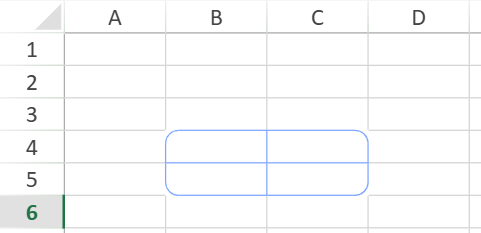
The outer option applies the resolved radius values to the visible outer corners of the selected range.
sheet.getRange(3, 1, 2, 2).setBorderRadius("8", {
    outer: true
});
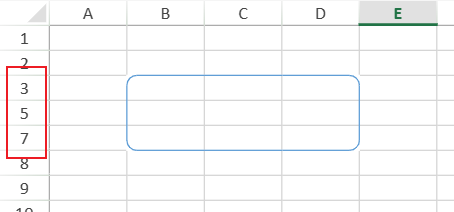
When
outeris used, hidden rows and columns, as well as zero-size rows and columns, are skipped when SpreadJS resolves the visible outer corners.
Content and Overflow Behavior
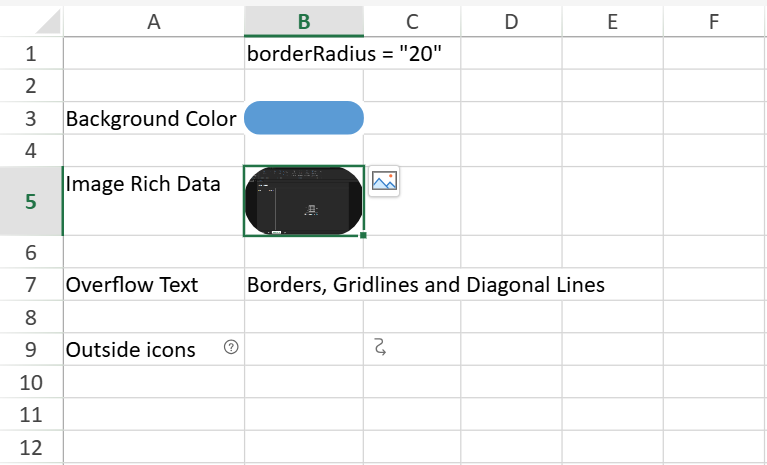
Rounded borders also affect the visible area of content painted inside the cell.
Content that is normally constrained by the cell boundary is clipped to the rounded area. This includes cell background color, image rich data, and main cell content painted inside the standard cell painting flow.
Content that is already allowed to exceed the cell boundary keeps its existing overflow behavior. For example, overflow text and outside icons are not clipped by rounded corners.
Limitations
The following limitations apply to rounded borders:
Custom background styling is not supported for the area outside the rounded border but still inside the cell. That area uses the default background.
Cells that use rotated text in existing rotated-border geometry scenarios do not render self-owned rounded corners.
Header, layout, and border combinations that are not supported by existing border rendering remain unsupported when rounded borders are applied.
Rounded borders do not introduce additional gridline painting behavior.
Set Diagonal Lines in a Cell
You can organize complex data headers by setting diagonal line borders in the cell.
In order to set diagonal lines in a cell or a cell range, you can use the diagonalUp method and diagonalDown method. The diagonalUp method represents the top-right point line in a cell to the bottom-left point line in a cell (refer to the yellow line in the diagram shown below). The diagonalDown method represents the top-left point line in a cell to the bottom-right point in a cell (refer to the green line in the diagram shown below).

The following code sample shows how to set the diagonal lines in a cell.
var sheet = spread.getActiveSheet();
var cell = sheet.getCell(1, 1);
cell.diagonalDown(new GC.Spread.Sheets.LineBorder("blue",GC.Spread.Sheets.LineStyle.thick));
cell = sheet.getCell(1, 3);
cell.diagonalDown(new GC.Spread.Sheets.LineBorder("green" ,GC.Spread.Sheets.LineStyle.double));
cell.diagonalUp(new GC.Spread.Sheets.LineBorder("yellow",GC.Spread.Sheets.LineStyle.double));
Set Gridline Options
SpreadJS provides the options.gridline property that can be used to set the gridline color and specify the horizontal or vertical gridline in the widget. By default, the sheet displays both the vertical and horizontal grid lines. The default grid line color is #d0d7e5.
The following code sample specifies whether to show the gridlines and sets the gridline color.
worksheet.options.gridline = {color:"#FF2235", showVerticalGridline: true, showHorizontalGridline: false};