


- SpreadJS Overview
- Getting Started
- JavaScript Frameworks
- Best Practices
-
Features
- Workbook
- Worksheet
- Rows and Columns
- Headers
-
Cells
- Work with Cells
- Cell Types
- Cell Format
- Cell States
- Cell Range
- Get Dirty Status
- Cell Buttons
- Cell Dropdowns
- Cell Comments
- Cell Threaded Comments
- Hyperlink
- Auto Merge Cells
- AutoFit
- Auto Fill Data
- Mask Input
- Shrink to Fit
- Cell Overflow
- Ellipsis or Tips for Cell Overflow
- Cell Alignment and Indentation
- Cell Padding and Label Styles
- Cell Span
- Cell Tags
- Styles
- Cell Decoration
- Cell Colors
- Cell Background Image
- Borders, Gridlines and Diagonal Lines
- Quote Prefix
- Insert Cut or Copied Cells
- Rotate Text In Cells
- Text Direction
- Text Decoration
- Rich Text
- Image Rich Data
- Wrap Text
- Drag and Drop
- Drag and Merge
- Editing
- Watermark
- Display Zero as Blank
- IME Mode
- Pattern Fill and Gradient Fill
- Paste Options
- Data Binding
- Data Manager
- TableSheet
- GanttSheet
- ReportSheet
- Data Charts
- JSON Schema with SpreadJS
- SpreadJS File Format
- Data Validation
- Conditional Formatting
- Sort
- Group
- Formulas
- What-If Analysis
- Serialization
- Keyboard Actions
- Shapes
- Floating Objects
- Barcodes
- Charts
- Sparklines
- Tables
- Pivot Table
- Slicer
- Theme
- User Management
- Culture
- AI Assistant
- SpreadJS Designer
- SpreadJS Designer VSCode Plugin
- Tutorials
- SpreadJS Designer Component
- SpreadJS Collaboration Server
- Touch Support
- Formula Reference
- Import and Export Reference
- Events
- API Documentation
- Release Notes
Auto Fill Strings
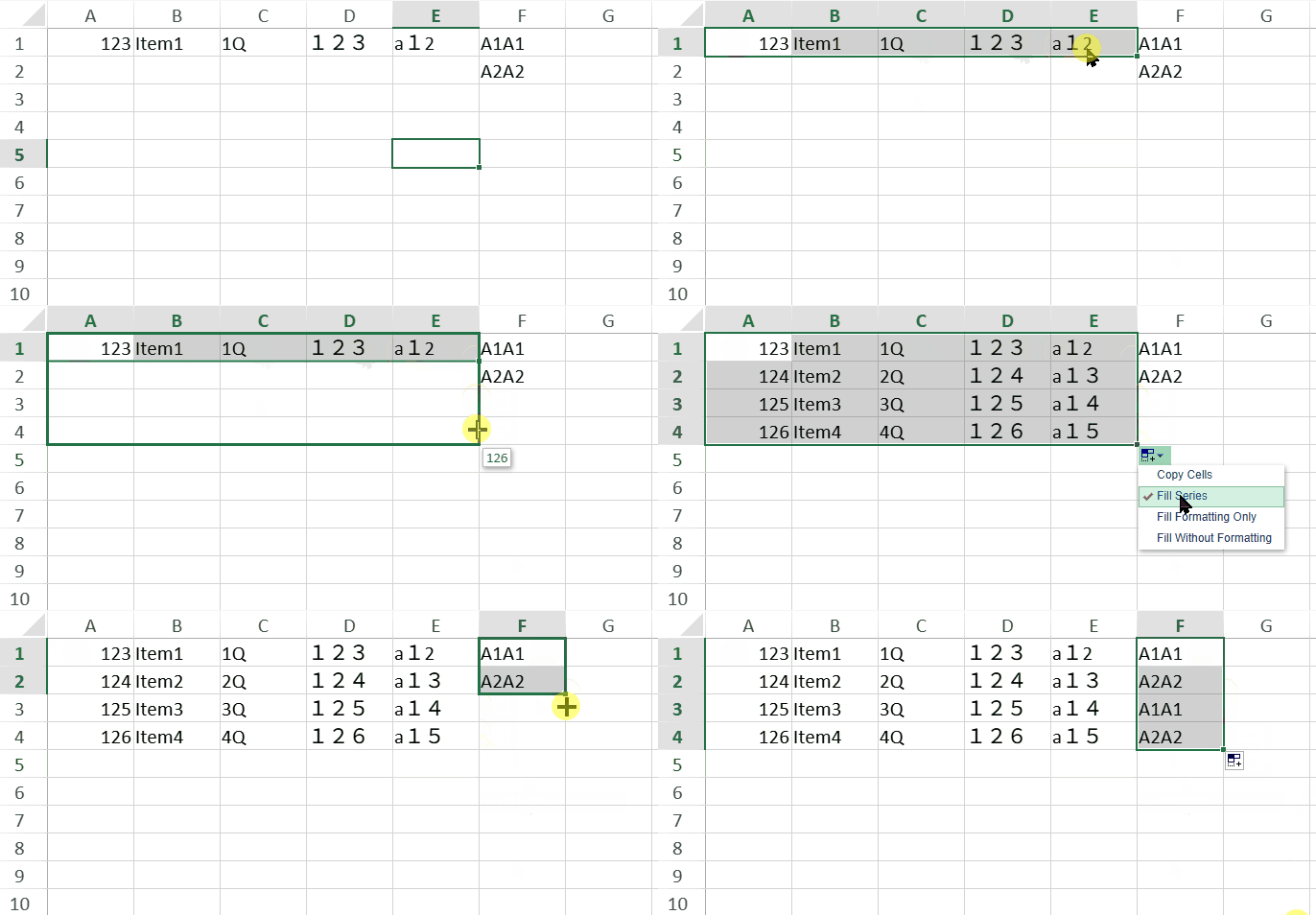
SpreadJS can fill string values by copying the selected values or by generating a string series. A string series is generated when SpreadJS detects a numeric part in the source value and increments that numeric part during the fill operation.
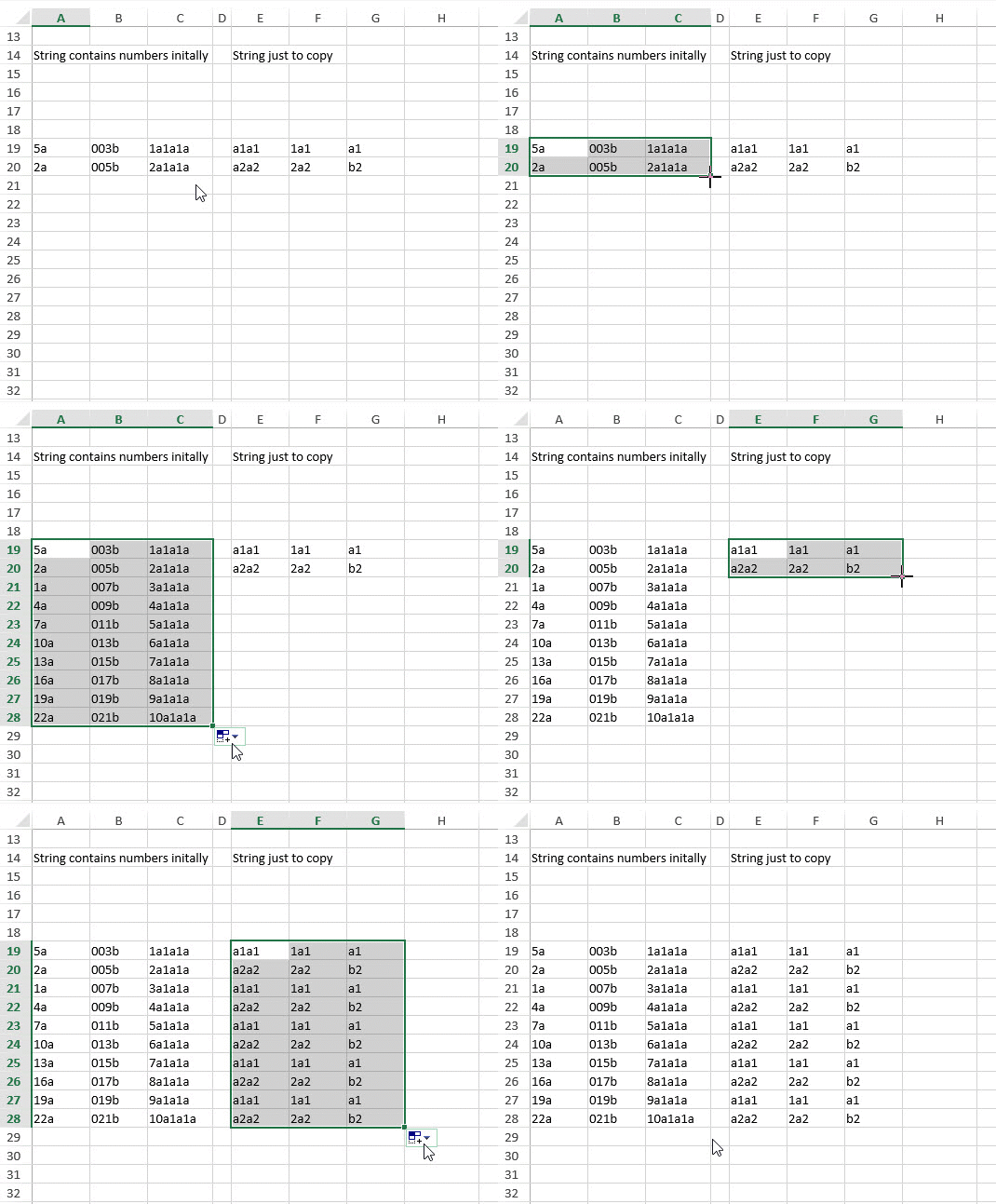
For example, SpreadJS can fill strings that contain only numbers, strings with a number at the end, and strings with a number at the beginning. If the selected values do not form a supported series pattern, SpreadJS copies the values in the same order.
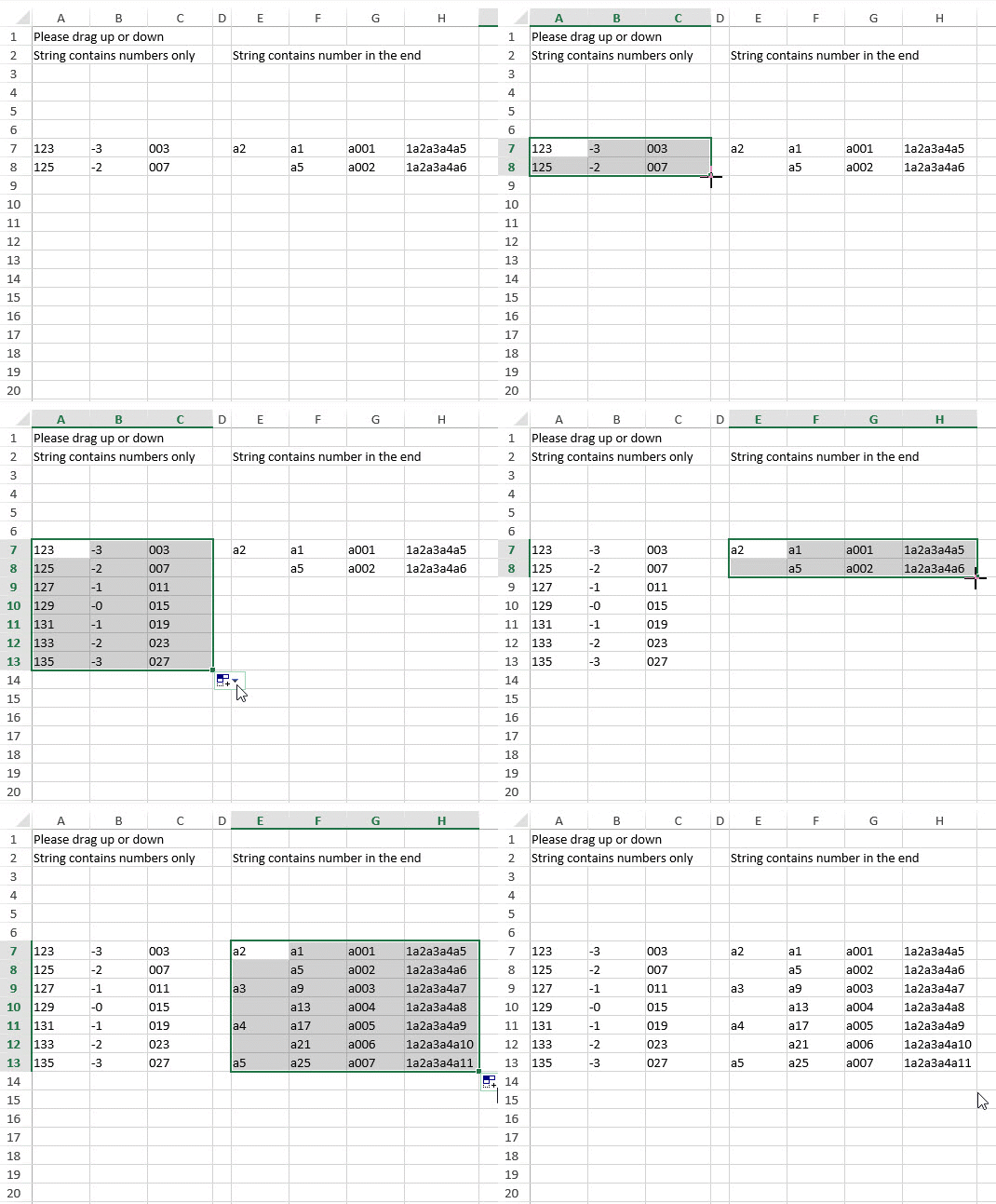
Strings that contain numbers at the beginning and strings that do not form a numeric series can also be filled based on the detected pattern.
String Series Behavior
When filling a string series, SpreadJS detects numeric parts in the source values. A numeric part can contain half-width digits (0 to 9), full-width digits (0 to 9), or a supported mix of both.
The following table shows common string series patterns.
Source value | Filled values | Description |
|---|---|---|
|
| A number-only string is incremented as a numeric series. |
|
| A numeric suffix is incremented. |
|
| A numeric prefix is incremented. |
|
| Full-width digits are recognized as numeric digits. |
|
| Mixed full-width and half-width digits in one numeric token are parsed as one number. |
|
| Values that do not form a supported series pattern are copied in order. |
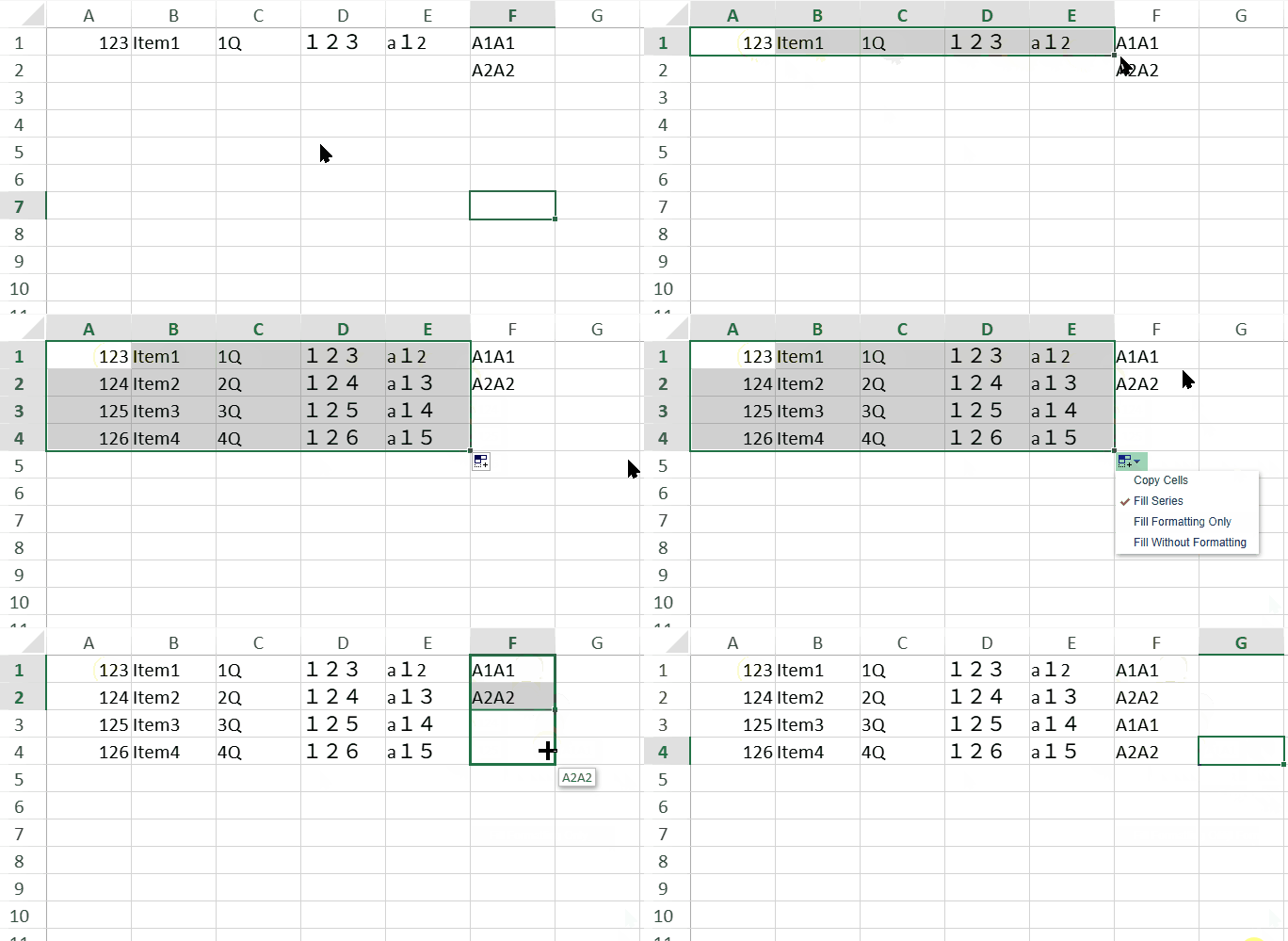
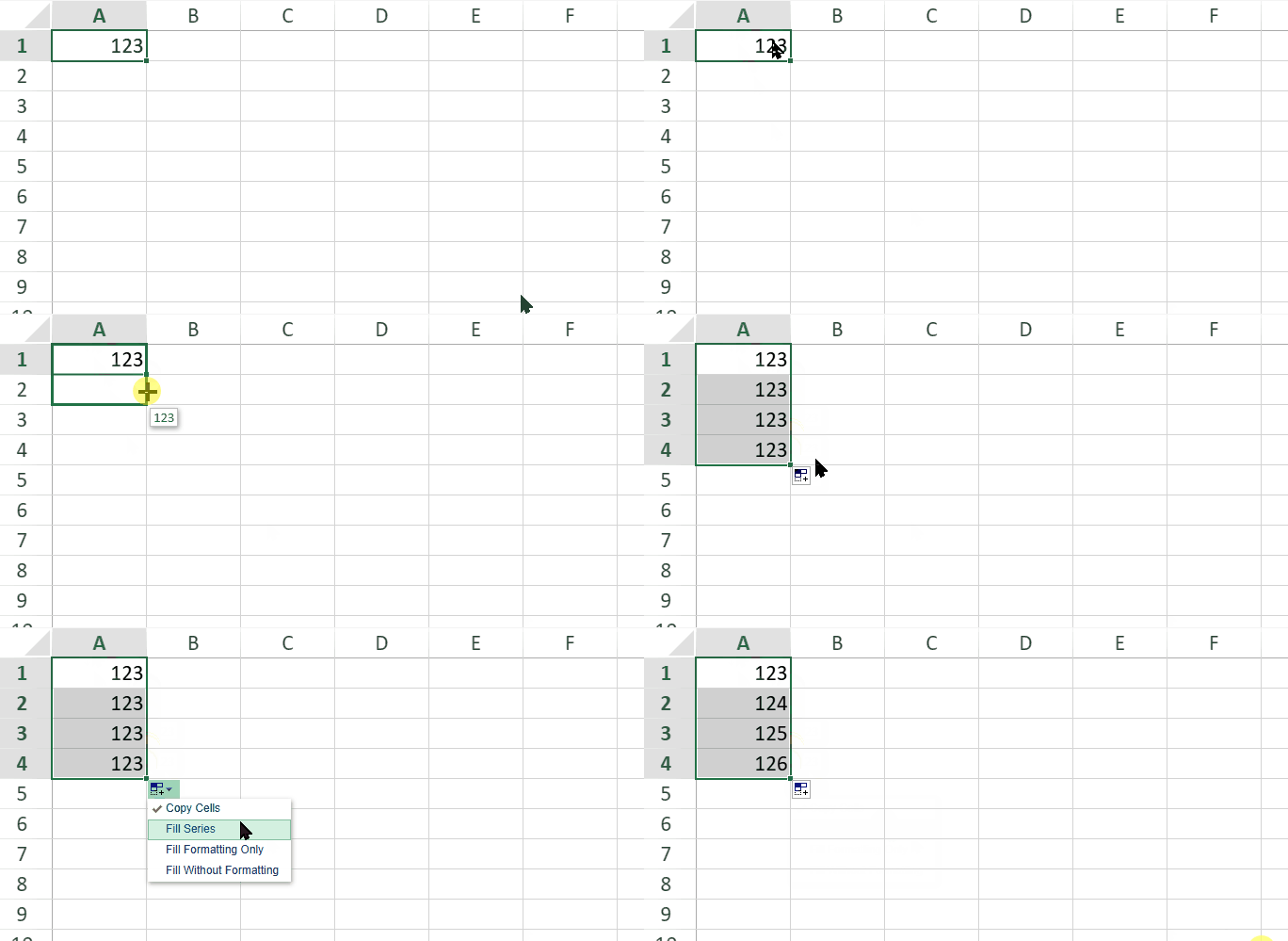
When a single string value is copied after drag fill, users can open the fill options menu and select Fill Series to generate a series.
Full-Width Digits in String Series
String series can include full-width decimal digits (0 to 9). During series detection, SpreadJS treats full-width digits as numeric digits, equivalent to half-width digits (0 to 9).
This recognition is always enabled and is not limited to CJK cultures. Full-width and half-width digits can also be mixed within the same numeric token. SpreadJS parses the combined token as one number and preserves the digit-width pattern from the source value when generating the filled values.
The following table shows examples of string series that include full-width digits.
Source value | Filled values | Description |
|---|---|---|
|
| A number-only string with full-width digits is incremented as a numeric series. |
|
| A full-width numeric suffix is incremented. |
|
| A full-width numeric prefix is incremented. |
|
| Mixed full-width and half-width digits in one numeric token are parsed as one number. |
|
| Arithmetic step detection works with full-width digits. |
|
| Values with different text prefixes are copied instead of incremented. |
Culture-specific string patterns, such as CJK text-number-text patterns and linker patterns, still depend on the active culture.
Note: In the default English culture, string series that contain full-width digits may produce results that are different from Excel.
Using Code
You can also fill a string series programmatically by using the fillAuto method.
The following code sample fills a string series that contains full-width digits.
const sheet = spread.getActiveSheet();

sheet.setValue(0, 0, "a1");

sheet.fillAuto(
    new GC.Spread.Sheets.Range(0, 0, 1, 1),
    new GC.Spread.Sheets.Range(0, 0, 4, 1),
    {
        fillType: GC.Spread.Sheets.Fill.FillType.auto,
        series: GC.Spread.Sheets.Fill.FillSeries.column,
        fillDirection: GC.Spread.Sheets.Fill.FillDirection.down
    }
);

// Result:
// a1
// a2
// a3
// a4