


Data Mappings
The easiest way to set mappings is to use the Data Source settings dialog box in the C1Schedule Smart Designer. For more information on accessing the C1Schedule Smart Designer, see C1Schedule Smart Designer.
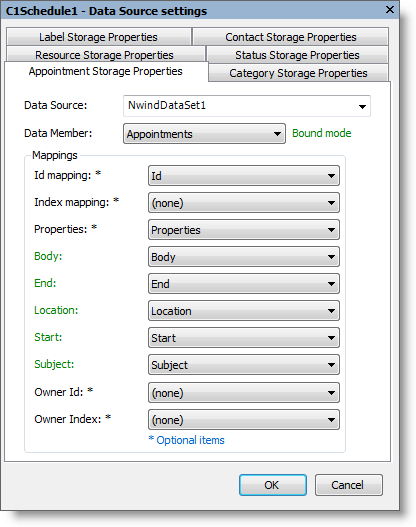
From this dialog box, you can set DataSource and DataMember properties for all Scheduler for WinForms storages. After setting the data source and data member, set the required and optional fields for the storage mapping.
Note: Required field names will appear in green once they have been successfully mapped. Once all required fields have been sucessfully mapped the BoundMode text will also appear in green.
All objects in the Scheduler for WinForms' object model are identified by either Id or Index property. To allow data to be correctly restored from your data sources you should specify mapping either for the IdMapping or IndexMapping properties, which makes sense if you bind to your data storages of Resources, Labels, Contacts or Categories. C1Schedule saves only Ids or Indexes of these objects in the AppointmentStorage. If there is no mapping for IdMapping or IndexMapping, C1Schedule will not be able to identify the appointment's properties correctly in storages initialized by your data.
To map a data table to the C1Schedule control, first set either the Id mapping drop-down list to a Globally Unique Identifier (GUID) field or the Index mapping drop-down list to an Integer field.
Appointment Storage Properties Tab
The following fields are available for mapping to the AppointmentStorage:
Mapping | Required/Optional | Data Type |
|---|---|---|
Id mapping | Optional | GUID |
Index mapping | Optional | Integer |
Properties | Optional | Text |
Body | Required | Text |
End | Required | Date/Time |
Location | Required | Text |
Start | Required | Date/Time |
Subject | Required | Text |
Owner ID | Optional | GUID |
Owner Index | Optional | Integer |
Category Storage Properties Tab
The following fields are available for mapping to the CategoryStorage:
Mapping | Required/Optional | Data Type |
|---|---|---|
Id mapping | Optional | GUID |
Index mapping | Optional | Integer |
Caption Mapping | Optional | Text |
Text Mapping | Required | Text |
Contact Storage Properties Tab
The following fields are available for mapping to the ContactStorage:
Mapping | Required/Optional | Data Type |
|---|---|---|
Id mapping | Optional | GUID |
Index mapping | Optional | Integer |
Caption Mapping | Optional | Text |
Color Mapping | Optional | Text |
Text Mapping | Required | Text |
Label Storage Properties Tab
The following fields are available for mapping to the LabelStorage:
Mapping | Required/Optional | Data Type |
|---|---|---|
Id mapping | Optional | GUID |
Index mapping | Optional | Integer |
Caption Mapping | Optional | Text |
Color Mapping | Optional | Text |
Text Mapping | Required | Text |
Resource Storage Properties Tab
The following fields are available for mapping to the ResourceStorage:
Mapping | Required/Optional | Data Type |
|---|---|---|
Id mapping | Optional | GUID |
Index mapping | Optional | Integer |
Caption Mapping | Optional | Text |
Color Mapping | Optional | Text |
Text Mapping | Required | Text |
Status Storage Properties Tab
The following fields are available for mapping to the StatusStorage:
Mapping | Required/Optional | Data Type |
|---|---|---|
Id mapping | Optional | GUID |
Index mapping | Optional | Integer |
Caption Mapping | Optional | Text |
Color Mapping | Optional | Text |
Text Mapping | Required | Text |