


Predefined Labels
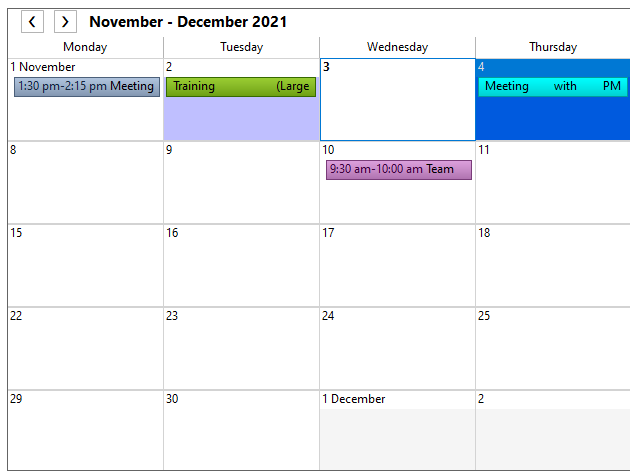
C1Schedule provides 12 predefined labels that can be assigned to appointments. The label color appears in every data view of the C1Schedule control.
The following image shows appointments with labels in Month view.
Predefined Labels
The predefined labels include the following:
Label | Color | Index |
|---|---|---|
None |
| 0 |
Important |
| 1 |
Business |
| 2 |
Personal |
| 3 |
Vacation |
| 4 |
Deadline |
| 5 |
Must Attend |
| 6 |
Travel Required |
| 7 |
Needs Preparation |
| 8 |
Birthday |
| 9 |
Anniversary |
| 10 |
Phone Call |
| 11 |


Assigning Predefined Labels to an Appointment
Assign labels in code or at run time through the Appointment dialog box.
The following code in the Form_Load event assigns the Must Attend label to an appointment:
// Add a new appointment.
C1.C1Schedule.Appointment app;
app = this.c1Schedule1.DataStorage.AppointmentStorage.Appointments.Add();
// Set some details for the appointment.
app.Subject = "Meeting";
app.Location = "Large Conference Room";
app.Duration = TimeSpan.FromMinutes(45);
app.Start = new DateTime(2021, 11, 01, 13, 30, 0);
// Assign a predefined label to the appointment.
app.Label = this.c1Schedule1.DataStorage.LabelStorage.Labels[6];
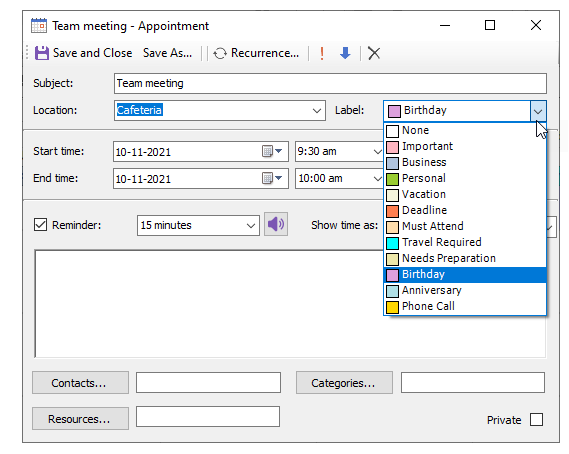
At run time, open the Label drop-down list in the Appointment dialog box and select one of the available labels.
The following image shows the Must Attend label selected.
Assigning Custom Labels to an Appointment
Assign a custom label by using the Label property. A custom label can specify a color, name, and identifying text.
// Create a new appointment.
C1.C1Schedule.Appointment app1 = this.c1Schedule1.DataStorage.AppointmentStorage.Appointments.Add();
// Make the appointment an all day event.
app1.Start = new DateTime(2021, 11, 02, 13, 30, 0);
app1.AllDayEvent = true;
// Set some details for the appointment.
app1.Subject = "Training";
app1.Location = "Large Conference Room";
// Assign a custom label to the appointment.
app1.Label = new C1.C1Schedule.Label(Color.DeepSkyBlue, "Meeting", "Meeting");