


Contacts
A contact stores personal information about a person. Contacts are stored in the ContactCollection class and are optional. An appointment can have one or more assigned contacts.
Assigning Contacts to an Appointment
Assign contacts to an appointment at run time through the Contacts dialog box.
Open the appointment in the Appointment dialog box.
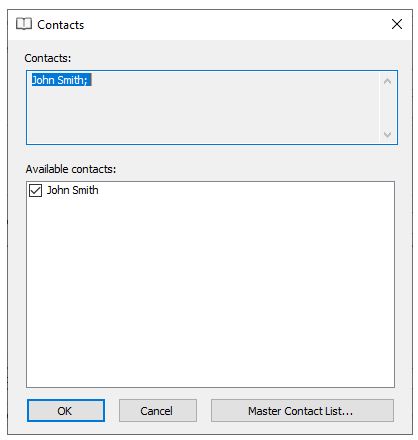
Select Contacts to open the Contacts dialog box.
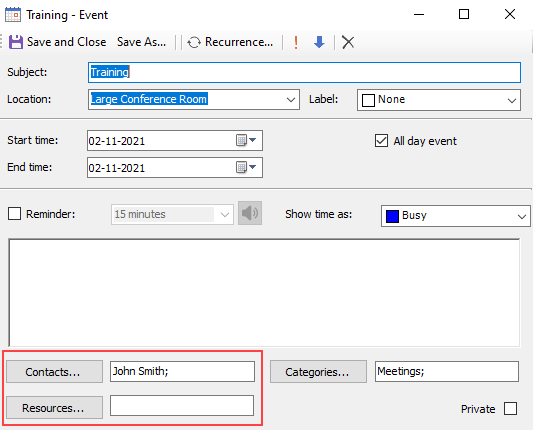
Select the contacts to associate with the appointment.
Select OK.
Note: Press ENTER in the Reminder dialog box while focus is on the snooze options combo box or the reminders list to snooze the selected reminder for the selected time period.
Adding Contacts to the Master Contact List
C1Schedule supports contacts created in code or at run time through the Master Contact List dialog box.
The following code, added to the Form_Load event, creates a contact for John Smith:
// Create the contact.
C1.C1Schedule.ContactCollection contcol;
contcol = this.c1Schedule1.DataStorage.ContactStorage.Contacts;
C1.C1Schedule.Contact contact = new C1.C1Schedule.Contact();
contact.Text = "John Smith";
// Insert the contact into the Master Contact List.
contcol.Insert(0, contact);
To create or remove contacts at run time:
Open the Contacts dialog box.
Select Master Contact List.
Add or remove the required contacts.
Select OK.
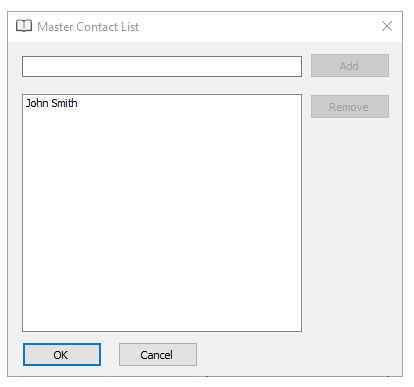
After creating contacts, assign them to the appointment in the Contacts dialog box.