


- SpreadJS Overview
- Getting Started
- JavaScript Frameworks
- Best Practices
-
Features
- Workbook
- Worksheet
- Rows and Columns
- Headers
- Cells
- Data Binding
- Data Manager
- TableSheet
- GanttSheet
- ReportSheet
- Data Charts
- JSON Schema with SpreadJS
- SpreadJS File Format
- Data Validation
- Conditional Formatting
- Sort
- Group
- Formulas
- What-If Analysis
- Serialization
- Keyboard Actions
- Shapes
- Floating Objects
- Barcodes
- Charts
- Sparklines
- Tables
- Pivot Table
- Slicer
- Theme
- User Management
- Culture
- AI Assistant
- SpreadJS Designer
- SpreadJS Designer VSCode Plugin
- Tutorials
- SpreadJS Designer Component
- SpreadJS Collaboration Server
- Touch Support
- Formula Reference
- Import and Export Reference
- Events
- API Documentation
- Release Notes
What-If Analysis
What‑If Analysis is a modeling technique used to evaluate how changes in one or more input values affect the result of a formula.
Instead of manually modifying cells and recalculating repeatedly, What‑If Analysis allows you to systematically explore different scenarios and observe how results respond to varying assumptions.
SpreadJS provides three complementary approaches to perform What‑If Analysis:
Data Table Analysis using the
SJS.TABLEworksheet functionGoal Seek Analysis using the
GC.Spread.Sheets.CalcEngine.goalSeekmethodScenario Analysis using workbook-level scenarios managed by
ScenarioManager
Although these features support scenario‑based evaluation, they serve different purposes and operate differently.
Data Table Analysis (SJS.TABLE)
SJS.TABLE evaluates a result cell or range across multiple input combinations and returns the collected results as a dynamic array.
It is implemented as a standard worksheet formula, which means it:
Participates in normal worksheet recalculation
Can be edited, copied, and nested inside other functions
Automatically spills results into adjacent cells
In addition, SJS.TABLE:
Supports dynamic arrays and inline arrays
Allows multiple input variables in a single formula
Supports cross‑sheet references and named ranges
Data Table Analysis is best suited for comparing outcomes across predefined sets of input values.
Goal Seek Analysis
goalSeek is an imperative calculation method that adjusts the value of a specified cell until a formula reaches a desired target result.
Unlike SJS.TABLE, Goal Seek:
Modifies the changing cell directly
Uses an internal numerical solving algorithm
Returns a
booleanorPromise<boolean>Operates through the CalcEngine API rather than a worksheet formula
Goal Seek is best suited for solving inverse problems, such as determining what interest rate produces a specific payment amount.
Scenario Analysis
Scenario Analysis saves named sets of input values and applies them to a workbook to compare different business outcomes.
A scenario stores values for one or more changing cells. When a scenario is applied, SpreadJS writes the stored values to the target cells and recalculates dependent formulas. When the scenario is restored, the affected cells are returned to their captured base values.
Scenario Analysis is best suited for comparing named assumptions, such as optimistic, pessimistic, and break-even forecasts.
Comparison
Feature | Data Table ( | Goal Seek ( | Scenario |
|---|---|---|---|
Type | Worksheet formula | CalcEngine API method | Workbook-level scenario state |
Execution model | Declarative | Imperative | Saved and applied value sets |
Primary purpose | Evaluate multiple input combinations | Find an input value for a target result | Compare named sets of input assumptions |
Returns | Dynamic array |
| Applies or restores worksheet values |
Modifies worksheet cells | No | Yes | Yes, when a scenario is applied or restored |
Related Topics
Topic | Description |
|---|---|
Syntax, parameters, and common usage patterns | |
Detailed rules for output size and input matching behavior | |
Controlling recalculation and monitoring progress | |
API reference and solving behavior | |
Saving, applying, restoring, and managing named scenarios | |
Import and export behavior for What-If Analysis features |
Using What‑If Analysis in SpreadJS Designer
In SpreadJS Designer, What‑If Analysis tools are available on the What‑If Analysis menu.
Options include:
Scenario Manager
Goal Seek
Data Table
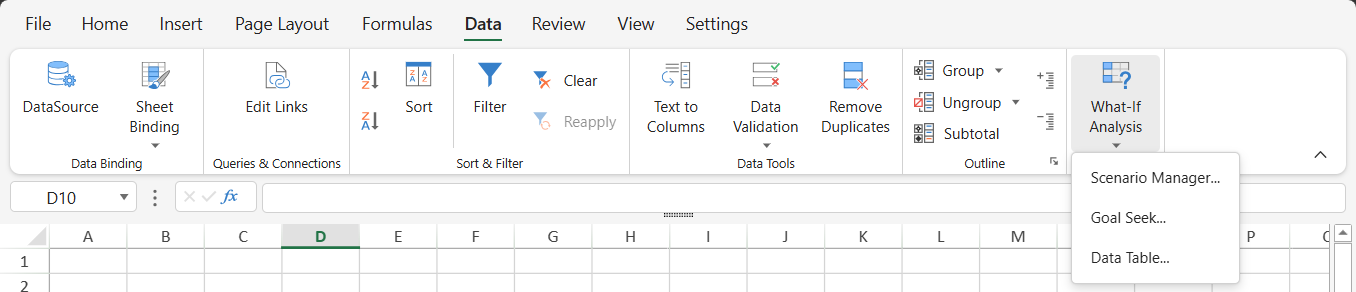
For details about the Designer interface and configuration workflow, see What-If Analysis.