- SpreadJS Overview
- Getting Started
- JavaScript Frameworks
- Best Practices
-
Features
- Workbook
- Worksheet
- Rows and Columns
- Headers
- Cells
- Data Binding
- Data Manager
- TableSheet
- GanttSheet
- ReportSheet
- Data Charts
- JSON Schema with SpreadJS
- SpreadJS File Format
- Data Validation
- Conditional Formatting
- Sort
- Group
-
Formulas
- Built-In Formulas
- Allow Users to Enter Formulas
- Allow Invalid Formulas
- Set Formulas
- Calculation Mode
- Show Cell Formulas
- Create Custom Names
- Create Custom Formulas
- Formula Text Box
- Use Formula Text Box as a Control
- Formula Editor Panel
- Formula Auditing
- Array Formulas
- Dynamic Array Formulas
- Incremental Calculations
- Asynchronous Functions
- Calculating Formulas Outside Worksheets
- East Asian Full-Width Formula Input
- Language Package
- What-If Analysis
- Serialization
- Keyboard Actions
- Shapes
- Floating Objects
- Barcodes
- Charts
- Sparklines
- Tables
- Pivot Table
- Slicer
- Theme
- User Management
- Culture
- AI Assistant
- SpreadJS Designer
- SpreadJS Designer VSCode Plugin
- Tutorials
- SpreadJS Designer Component
- SpreadJS Collaboration Server
- Touch Support
- Formula Reference
- Import and Export Reference
- Events
- API Documentation
- Release Notes
Custom Functions in Calc Worker
When the calcWorker plugin is loaded and incrementalCalculation is enabled, SpreadJS evaluates formulas inside a Web Worker instead of the main thread.
In this mode, built‑in formulas execute directly inside the Calc Worker. Custom functions, however, are evaluated on the main thread: when the worker encounters a custom function, execution is delegated to the UI thread and the result is returned to the worker.
Starting in version 19.1.0, SpreadJS allows eligible custom functions to execute directly inside the Calc Worker. This removes cross‑thread message passing between the worker and the UI thread, reducing communication overhead when custom functions are invoked frequently.
Requirements
A custom function runs inside the Calc Worker only if:
The calcWorker plugin is loaded.
spread.options.incrementalCalculation = true.supportCalcWorker()of the Custom Function returnstrue.
Notes:
If
incrementalCalculationis disabled,supportCalcWorker()is ignored.If the calcWorker plugin is not loaded, calculations always run on the main thread.
Execution Model
When supportCalcWorker() returns true, the function implementation is serialized and loaded into the Calc Worker. Execution then occurs entirely inside the worker thread.
Implications
All required logic must be defined inside
evaluate()orevaluateAsync().Prototype and instance members are not preserved.
Workbook,Worksheet, andGC.Spread.SheetsAPIs are not available.Only evaluation context, arguments, and Web Worker built‑in APIs can be used.
Helper methods must be defined inside the function body.
Supported Return Types
Custom functions that run inside the Calc Worker can return the following result types:
Primitive values (
string,number,boolean,null)GC.Spread.CalcEngine.CalcArrayCalcEngine error objects (for example,
GC.Spread.CalcEngine.Errors.Value)
When a function returns a CalcArray or a CalcEngine error object, the result behaves the same as when the function is evaluated on the main thread.
Enabling Worker Execution
Available on:
GC.Spread.CalcEngine.Functions.FunctionGC.Spread.CalcEngine.Functions.AsyncFunction
supportCalcWorker() {
    return true;
}
Metadata Transfer Behavior
When a custom function runs inside the Calc Worker:
The evaluation method executes in the worker thread.
Supported function metadata is transferred automatically.
Prototype extensions and unsupported behaviors are not available.
Do not rely on prototype‑based logic or UI‑thread behavior when enabling worker execution.
Example
Basic sample: utility function running in Calc Worker
function Base64Decode() {}
Base64Decode.prototype =
    new GC.Spread.CalcEngine.Functions.Function("BASE64DECODE", 1, 1);

Base64Decode.prototype.supportCalcWorker = function () {
    return true;
};

Base64Decode.prototype.evaluate = function (value) {
    if (typeof value !== "string") {
        return "#VALUE!";
    }
    try {
        return atob(value);
    } catch {
        return "#VALUE!";
    }
};

sheet.addCustomFunction(new Base64Decode());
spread.options.incrementalCalculation = true;
Extended sample: initialize function and global cache on first evaluation
class Hash extends GC.Spread.CalcEngine.Functions.AsyncFunction {
    constructor() {
        super("HASH", 1, 1);
    }

    supportCalcWorker() {
        return true;
    }

    evaluateAsync(context, input) {
        const global = globalThis;

        if (!global.cache) {
            global.cache = {};
        }

        if (global.cache[input]) {
            return global.cache[input];
        }

        const encoder = new TextEncoder();
        const data = encoder.encode(String(input));

        crypto.subtle.digest("SHA-256", data).then(buffer => {
            const hex = Array.from(new Uint8Array(buffer))
                .map(b => b.toString(16).padStart(2, "0"))
                .join("");

            global.cache[input] = hex;
            context.setAsyncResult(hex);
        }).catch(() => {
            context.setAsyncResult("#HASH_ERROR!");
        });
    }
}

GC.Spread.CalcEngine.Functions.defineGlobalCustomFunction("HASH", new Hash());
Design Guidelines
For worker‑compatible custom functions:
Keep the implementation self‑contained.
Define helper logic inside the evaluation method.
Use only Worker‑safe APIs.
Avoid UI‑thread dependencies.
Ensure values are serializable.
Worker execution is most beneficial in large or formula‑dense workbooks where main‑thread delegation becomes a bottleneck.
Performance Considerations
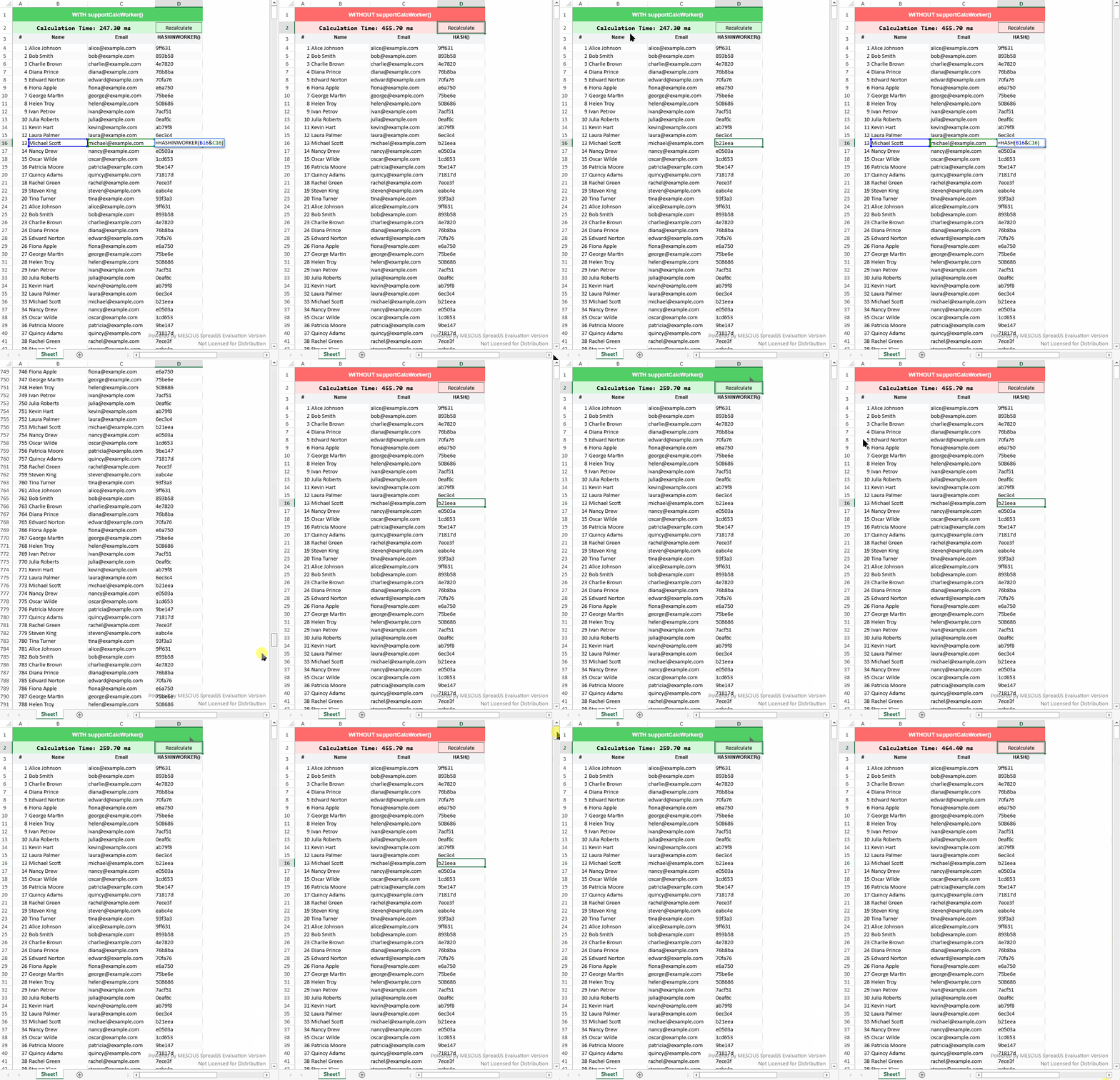
Enabling worker execution for custom functions eliminates cross‑thread communication between the Calc Worker and the UI thread.
Without supportCalcWorker():
The worker pauses when encountering a custom function.
Execution is delegated to the main thread.
The result is returned to the worker.
This introduces message‑passing overhead for each invocation.
With supportCalcWorker() enabled:
The function executes entirely inside the worker.
No cross‑thread messaging occurs.
Performance gains are most noticeable when:
The custom function is invoked across many cells.
The function implementation is lightweight but called frequently.
Large dependency chains trigger repeated evaluation.
Actual improvement depends on invocation count and function complexity.
Example comparison in a HASH calculation scenario with multiple dependent cells.