


- Document Solutions for PDF .NET Overview
- Key Features
- Getting Started
- Product Architecture
-
Features
- Attachment
-
Annotations
- Text Annotation
- Free Text Annotation
- Line Annotation
- Polyline Annotation
- Square Annotation
- Circle Annotation
- Polygon Annotation
- 3D Annotation
- Stamp Annotation
- Ink Annotation
- File Attachment Annotation
- RichMedia Annotation
- Sound Annotation
- Widget Annotation
- Watermark Annotation
- Redact Annotation
- Text Markup Annotation
- Caret Annotation
- Appearance Streams
- Document
- Document Optimization
- Font
- Forms
- Form XObjects
- Actions
- Graphics
- Output Intents
- Images
- Incremental Update
- Linearization
- Links
- Outline
- Pages
- Layouts
- Complex Graphic Layouts
- Tables
- Security
- Digital Signature
- Soft Mask
- Stamps
- Tagged PDF
- PDF Conformance
- Parse PDF Documents
- Layers
- Text
- Text Search, Replace and Delete
- Watermark
- AI Assistant
- Access Primitive and High-Level PDF Objects
- Render HTML to PDF
- Save PDF as Image
- Barcodes in PDF
- Best Practices
- Walkthrough
- Tutorials
- Samples
- API Reference
- Document Solutions PDF Viewer Overview
- Release Notes
Sound Annotation
Sound annotation is analogous to a text annotation except that instead of a text note, it contains sound (.au, .aiff, or .wav format) imported from a file or recorded from the computer’s microphone. DsPdf provides SoundAnnotation class to enable users to apply sound annotations to the PDF file.
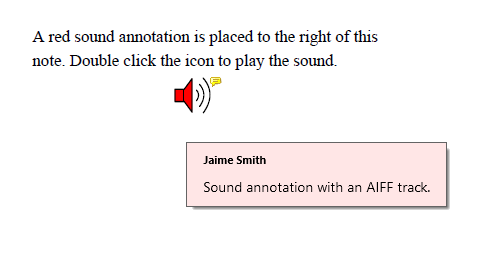
Refer to the following example code to add a sound annotation to a PDF document:
public void CreateSoundAnnotation()
{
    GcPdfDocument doc = new GcPdfDocument();
    Page page = doc.NewPage();
    RectangleF rc = new RectangleF(50, 50, 250, 50);
    page.Graphics.DrawString("A red sound annotation is placed to the right of this note. Double click " +
        "the icon to play the sound.",
        new TextFormat() { Font = StandardFonts.Times, FontSize = 11 }, rc);

    //Create an instance of SoundAnnotation class and set its relevant properties
    var aiffAnnot = new SoundAnnotation()
    {
        UserName = "Jaime Smith",
        Contents = "Sound annotation with an AIFF track.",
        PdfRect = new RectangleF(rc.Right, rc.Top, 24, 24),
        Icon = SoundAnnotationIcon.Speaker,
        Color = Color.Red,
        Sound = SoundObject.FromFile(Path.Combine("Resources", "Sounds", "ding.aiff"), AudioFormat.Aiff)
    };
    page.Annotations.Add(aiffAnnot);
    doc.Save("SoundAnnotation.pdf");
}