


- Document Solutions for PDF .NET Overview
- Key Features
- Getting Started
- Product Architecture
-
Features
- Attachment
-
Annotations
- Text Annotation
- Free Text Annotation
- Line Annotation
- Polyline Annotation
- Square Annotation
- Circle Annotation
- Polygon Annotation
- 3D Annotation
- Stamp Annotation
- Ink Annotation
- File Attachment Annotation
- RichMedia Annotation
- Sound Annotation
- Widget Annotation
- Watermark Annotation
- Redact Annotation
- Text Markup Annotation
- Caret Annotation
- Appearance Streams
- Document
- Document Optimization
- Font
- Forms
- Form XObjects
- Actions
- Graphics
- Output Intents
- Images
- Incremental Update
- Linearization
- Links
- Outline
- Pages
- Layouts
- Complex Graphic Layouts
- Tables
- Security
- Digital Signature
- Soft Mask
- Stamps
- Tagged PDF
- PDF Conformance
- Parse PDF Documents
- Layers
- Text
- Text Search, Replace and Delete
- Watermark
- AI Assistant
- Access Primitive and High-Level PDF Objects
- Render HTML to PDF
- Save PDF as Image
- Barcodes in PDF
- Best Practices
- Walkthrough
- Tutorials
- Samples
- API Reference
- Document Solutions PDF Viewer Overview
- Release Notes
Caret Annotation
Caret annotation is a visual symbol typically used to mark text for some changes or to indicate some missing text. DsPdf provides CaretAnnotation class that allows a user to add Caret annotations to the PDF file.
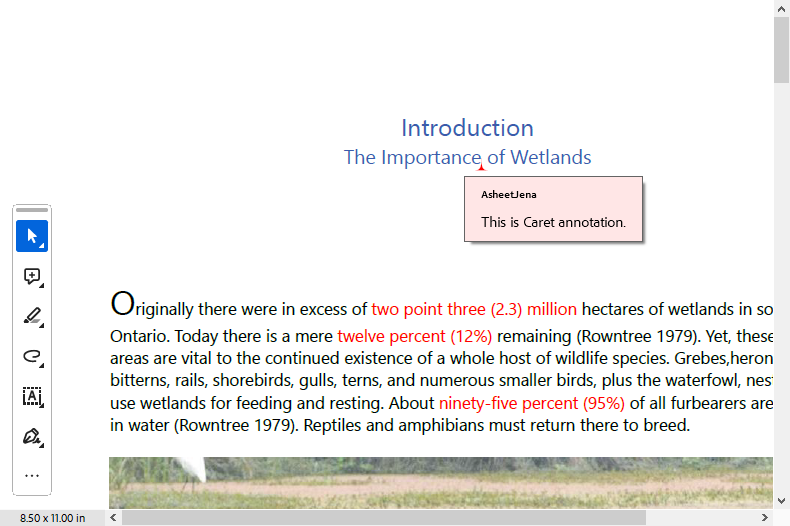
Refer to the following example code to add a caret annotation to a PDF document:
// Initialize GcPdfDocument.
GcPdfDocument doc = new GcPdfDocument();

// Create a file stream.
FileStream fs = new FileStream("Wetlands.pdf", FileMode.Open, FileAccess.Read);

// Load the file stream.
doc.Load(fs);

// Get the first page.
var page = doc.Pages[0];

// Get the text map.
var tm = page.GetTextMap();

// Insert the CaretAnnotation after "The Importance" text.
tm.FindText(new FindTextParams("The Importance", false, true), (fp_) =>
{
    // r is bounds of the found text.
    var r = fp_.Bounds[0].ToRect();
    // Create the CaretAnnotation and add it to the page.
    CaretAnnotation ca = new CaretAnnotation();
    ca.Page = page;
    // in this code annotation size is hardcoded, you can make a code
    // which will adjust size of the annotation depending on height of the found text fragment
    ca.Rect = new System.Drawing.RectangleF(r.Right - 4, r.Bottom - 8, 8, 8);
    ca.Opacity = 1f;
    ca.Color = Color.Red;
    ca.Contents = "This is Caret annotation.";
});

doc.Save("CaretAnnotation.pdf");