- Document Solutions for Excel .NET Overview
- Key Features
- Getting Started
- Features
- Templates
-
Formula Reference
- Add-in and Automation Functions
- Compatibility Functions
- Database Functions
- Date and Time Functions
- Engineering Functions
- Financial Functions
- Information Functions
- Logical Functions
-
Lookup and Reference Functions
- ADDRESS
- AREAS
- CHOOSE
- CHOOSECOLS
- CHOOSEROWS
- COLUMN
- COLUMNS
- DROP
- EXPAND
- FILTER
- FORMULATEXT
- GETPIVOTDATA
- GROUPBY
- HLOOKUP
- HSTACK
- HYPERLINK
- IMAGE
- INDEX
- INDIRECT
- LOOKUP
- MATCH
- OFFSET
- PIVOTBY
- ROW
- ROWS
- SINGLE
- SORT
- SORTBY
- TAKE
- TOCOL
- TOROW
- TRANSPOSE
- TRIMRANGE
- UNIQUE
- VLOOKUP
- VSTACK
- WRAPCOLS
- WRAPROWS
- XLOOKUP
- XMATCH
- Math and Trigonometry Functions
- Statistical Functions
- Text Functions
- Web Functions
- File Operations
- Tutorials
- Document Solutions Data Viewer
- API Reference
- Release Notes
VSTACK
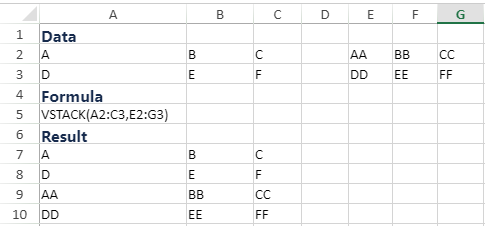
The function appends arrays vertically and in sequence to return a larger array.
Note: VSTACK is a dynamic array formula, and you need to enable the dynamic array feature in the Workbook.
Syntax
VSTACK(array1, [array2], ...)
Arguments
This function has the following arguments:
Argument | Description |
|---|---|
array1 | [Required] First array to append |
array2, ... | [Optional] Additional arrays to append |
Remarks
The VSTACK function returns the array formed by appending each of the array arguments in a row-wise fashion. The resulting array will be the following dimensions:
Rows: the combined count of all the rows from each of the array arguments.
Columns: The maximum of the column count from each of the array arguments.
Examples