- Document Solutions for Excel .NET Overview
- Key Features
- Getting Started
- Features
- Templates
-
Formula Reference
- Add-in and Automation Functions
- Compatibility Functions
- Database Functions
- Date and Time Functions
- Engineering Functions
- Financial Functions
- Information Functions
- Logical Functions
-
Lookup and Reference Functions
- ADDRESS
- AREAS
- CHOOSE
- CHOOSECOLS
- CHOOSEROWS
- COLUMN
- COLUMNS
- DROP
- EXPAND
- FILTER
- FORMULATEXT
- GETPIVOTDATA
- GROUPBY
- HLOOKUP
- HSTACK
- HYPERLINK
- IMAGE
- INDEX
- INDIRECT
- LOOKUP
- MATCH
- OFFSET
- PIVOTBY
- ROW
- ROWS
- SINGLE
- SORT
- SORTBY
- TAKE
- TOCOL
- TOROW
- TRANSPOSE
- TRIMRANGE
- UNIQUE
- VLOOKUP
- VSTACK
- WRAPCOLS
- WRAPROWS
- XLOOKUP
- XMATCH
- Math and Trigonometry Functions
- Statistical Functions
- Text Functions
- Web Functions
- File Operations
- Tutorials
- Document Solutions Data Viewer
- API Reference
- Release Notes
EXPAND
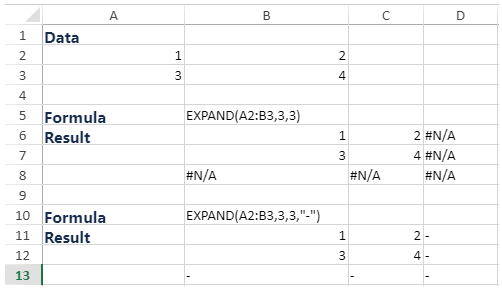
This function expands or pads an array to the specified row and column dimensions.
Note: EXPAND is a dynamic array formula, and you need to enable the dynamic array feature in the Workbook.
Syntax
EXPAND(array, rows, [columns], [pad_with])
Arguments
The function provides the following arguments.
Argument | Description |
|---|---|
array | [Required] The array to expand. |
rows | [Required] The number of rows in the expanded array. If missing, rows will not be expanded. |
columns | [Optional] The number of columns in the expanded array. If missing, columns will not be expanded. |
pad_with | [Optional] The value with which to pad. The default is #N/A. |
Remarks
If rows aren’t provided or are empty, the default value is the number of rows in the array argument.
If columns aren’t provided or are empty, the default value is the number of columns in the array argument.
Examples