


- WPF FlexChart Overview
- Getting Started with WPF Edition
- FlexChart
- FlexPie
- Sunburst Chart
- FlexRadar
- TreeMap
Range Zones
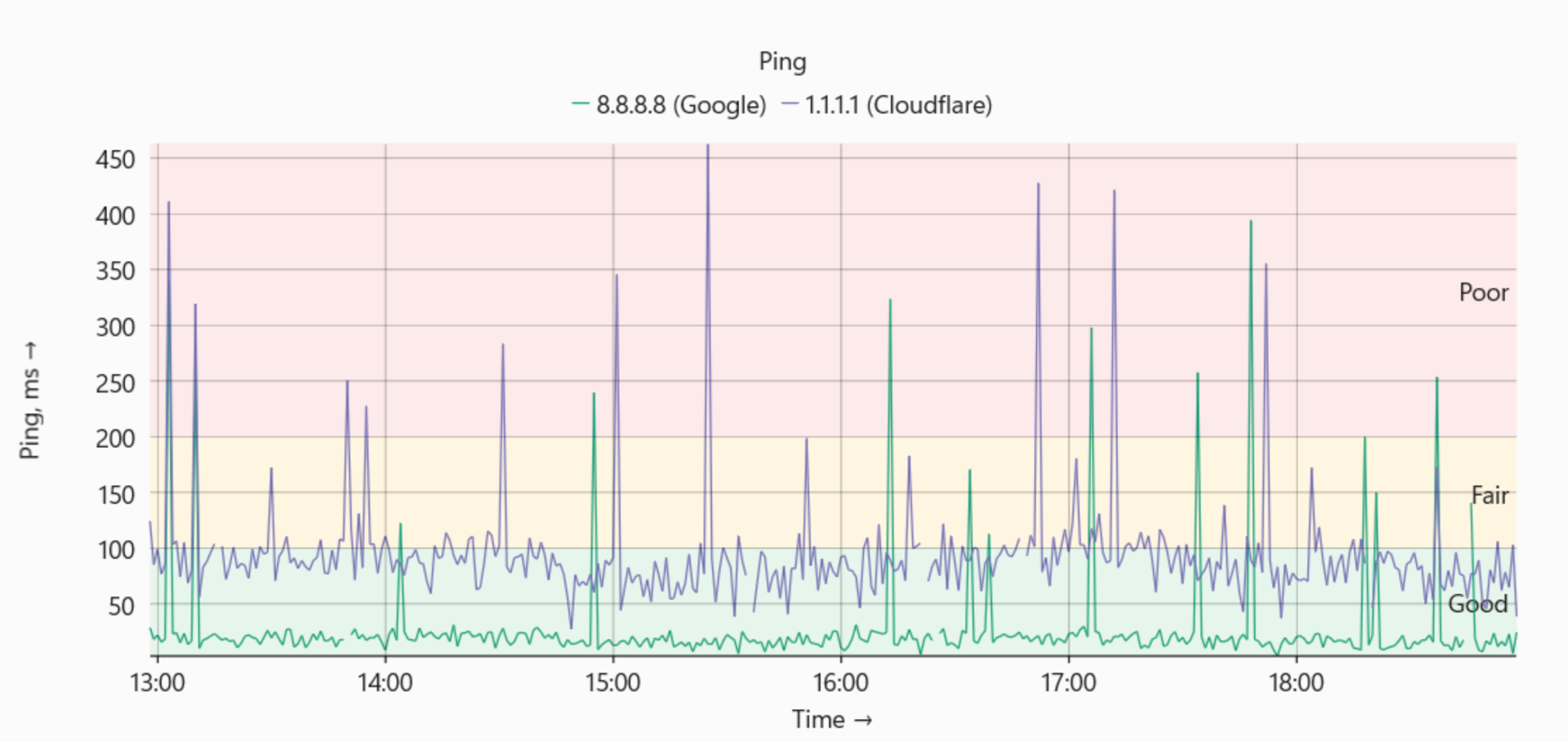
RangeZone is a FlexChart series that renders a rectangular highlighted area over a specified data range. It can identify a region of interest in the plot, such as a target band, threshold zone, valid-operating range, or quadrant. RangeZone derives from Series and is added to the chart's Series collection. It renders a rectangular fill instead of data-driven point geometry.
The following graph uses RangeZone to highlight different ranges within the chart plot.
Define the Range
The MinX, MaxX, MinY, and MaxY properties define the rectangular bounds of a RangeZone in data coordinates.
Property | Type | Default | Description |
|---|---|---|---|
double | NaN | Defines the left bound in X data coordinates. NaN extends the zone to the X-axis minimum. | |
double | NaN | Defines the right bound in X data coordinates. NaN extends the zone to the X-axis maximum. | |
double | NaN | Defines the bottom bound in Y data coordinates. NaN extends the zone to the Y-axis minimum. | |
double | NaN | Defines the top bound in Y data coordinates. NaN extends the zone to the Y-axis maximum. |
The following example creates a RangeZone for X values from 2 to 5 and Y values from 10 to 20:
var zone = new RangeZone
{
    MinX = 2,
    MaxX = 5,
    MinY = 10,
    MaxY = 20
};

flexChart.Series.Add(zone);
Configure Unbounded Edges
A bound that is not specified uses its default value of NaN and extends to the corresponding axis extent.
Setting only MinY and MaxY creates a horizontal band that spans the full plot width.
var band = new RangeZone
{
    MinY = 80,
    MaxY = 100
};

flexChart.Series.Add(band);
Similarly, setting only MinX and MaxX creates a vertical band that spans the full plot height.
Behaviors
The following behaviors define how RangeZone interacts with the chart axes, series collection, appearance, and labels.
Coordinate Space:
RangeZone bounds are expressed in data coordinates. FlexChart transforms the bounds to pixels using the same axis scales as other series. The range zone tracks the corresponding data range during pan, zoom, and axis-range changes.
Rendering Order:
RangeZone renders according to its position in the Series collection. Add the RangeZone before the data series to render the zone behind them. Add it after the data series to render the zone over them.
Axis Association:
RangeZone uses the chart's primary X and Y axes unless the series supports explicit axis assignment.
Appearance:
RangeZone inherits fill, stroke, and opacity settings from the base series style members.
Data Labels and Legend:
RangeZone displays a data label at the top of the zone by default. DataLabel.Position defaults to Top. If DataLabel.Content is not set, the series name is used as the label text. By default, Visibility is set to SeriesVisibility.Plot, so RangeZone is not displayed in the legend.
See Also
Range Zones and Quadrants samples in FlexChart Explorer.