


- Blazor Overview
- Get Started with Blazor
- Free and Open Source Software (FOSS) License
- Section 508 Compliance
- Blazor Project Types
- Adding NuGet Packages to your App
-
Controls
- Calendar
- DataFilter
- DateTime Editors
- FlexChart
-
FlexGrid
- Quick Start
- Data Binding
- Columns
- Rows
- Cells
- Data Operations
- Drag Drop
- Exporting Data
- Selection Menu
- Context Menu
- Clipboard Support
- Summary Row
- Transposed Grid
- TreeGrid
- Styling
- Mouse Hover
- FlexPie
- FlexViewer
- Gauges
- Input Controls
- Layout Controls
- ListView
- Menu
- TreeView
- ToolStrip
- Release History
Customize Cells Using CellTemplate
CellTemplate customizes the content that FlexGrid renders for the cells in a column. The template can be defined declaratively as Razor child content, or programmatically in C# by returning a RenderFragment<object> from a method. Both approaches configure the same CellTemplate property.
The template context provides the cell data for the current row. The value it provides depends on whether the column defines a binding, as described in Understand the Template Context.
Define a CellTemplate in Razor
Configure the FlexGrid
Define the grid and disable auto-generated columns.
<FlexGrid ItemsSource="customers"
          AutoGenerateColumns="false"
          SelectionMode="GridSelectionMode.Row">
Define Standard Columns
Bind columns to display data fields.
<FlexGridColumns>
    <GridColumn Binding="FirstName" Header="First Name" />
    <GridColumn Binding="LastName" Header="Last Name" />
Add a Template Column
Insert a column that contains a CellTemplate.
<GridColumn>
    <CellTemplate>
        @{
            Customer customer = (Customer)context;
        }
        <button @onclick="(() => ShowInfo(customer))">Info</button>
    </CellTemplate>
</GridColumn>
If the GridColumn.Binding property is empty, the entire row data item is passed to the template context. Otherwise, only the bound field value is provided.
Implement the Event Handler
Process the row data passed through the template context.
@code {
    List<string> info = new();

    void ShowInfo(Customer customer)
    {
        info.Add($"Customer: {customer.FirstName} {customer.LastName}");
    }
}
Complete Code Example
The following example combines the preceding steps. FlexGrid displays the bound First Name and Last Name columns and an unbound column containing an Info button for each row. When the Info button is selected, the event handler passes the associated Customer data item to the ShowInfo method.
<FlexGrid ItemsSource="customers"
          IsReadOnly="true"
          AutoGenerateColumns="false"
          SelectionMode="GridSelectionMode.Row">
    <FlexGridColumns>
        <GridColumn Binding="FirstName" Header="First Name" />
        <GridColumn Binding="LastName" Header="Last Name" />

        <!-- Custom column with CellTemplate -->
        <GridColumn>
            <CellTemplate>
                @{
                    Customer customer = (Customer)context;
                }
                <button @onclick="(() => ShowInfo(customer))">
                    Info
                </button>
            </CellTemplate>
        </GridColumn>
    </FlexGridColumns>
</FlexGrid>

@code {
    List<string> info = new();

    void ShowInfo(Customer customer)
    {
        info.Add($"Customer: {customer.FirstName} {customer.LastName}");
    }
}
Define a CellTemplate in C#
The GridColumn.CellTemplate property accepts a RenderFragment<object>. In addition to defining the template as Razor child content, an application can assign a template from C# by returning a RenderFragment<object> from a method. Both approaches configure the same CellTemplate property.
Note: A
RenderFragment<object>is a delegate that returns a render fragment for a given argument. In a stand-alone C# file, the fragment is constructed with aRenderTreeBuilder, so the template is written as two nested lambdas.
Complete C# Example
The following example displays customer data in a FlexGrid and assigns a CellTemplate to both a bound and an unbound column by returning a RenderFragment<object> from C# methods. The example uses the same Customer model as the preceding Razor example.
<FlexGrid ItemsSource="@customers" AutoGenerateColumns="false">
    <FlexGridColumns>
        <GridColumn Binding="FirstName" Header="First Name" />
        <!-- Assign a bound-column template returned from a C# method. -->
        <GridColumn Binding="LastName"
                    Header="Last Name"
                    CellTemplate="@GetLastNameTemplate()" />
        <!-- Define an unbound column that uses a C#-defined template. -->
        <GridColumn Header="Actions"
                    CellTemplate="@GetActionTemplate()" />
    </FlexGridColumns>
</FlexGrid>
@code
{
    // Returns a bound-column template. context is the bound LastName value.
    private RenderFragment<object> GetLastNameTemplate() => context => builder =>
    {
        var lastName = context as string ?? string.Empty;
        builder.OpenElement(0, "strong");
        builder.AddContent(1, lastName);
        builder.CloseElement();
    };
    // Returns an unbound-column template. context is the Customer row data item.
    private RenderFragment<object> GetActionTemplate() => context => builder =>
    {
        if (context is Customer customer)
        {
            builder.OpenElement(0, "button");
            builder.AddAttribute(1, "type", "button");
            builder.AddAttribute(2, "onclick",
                EventCallback.Factory.Create(this, () => ShowInfo(customer)));
            builder.AddContent(3, "Info");
            builder.CloseElement();
        }
    };
}
After completing this example, FlexGrid displays a bound template column that formats the Last Name value and an unbound template column that renders an Info button.
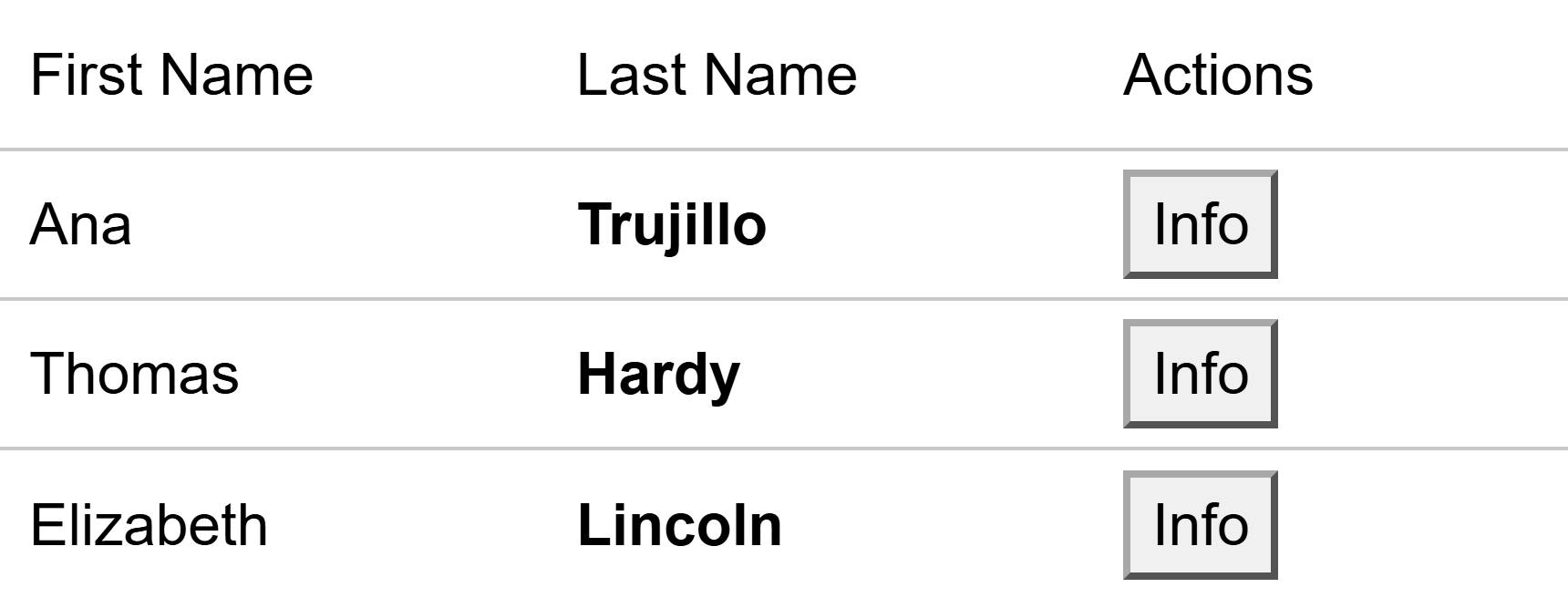
Both templates are assigned by returning a RenderFragment<object> from a C# method.
Understand the Template Context
The context parameter passed to a CellTemplate is typed as object. Its value depends on how the column obtains the cell content, and the template must convert or check the value before use.
Bound Columns
When a column defines the Binding property, context is the bound field value. Cast or convert the value to the expected type before using it. A binding to a value-type property, such as int or DateTime, passes the value boxed as object, so the cast must target the exact underlying type.
// context is the bound field value (the LastName string).
private RenderFragment<object> GetLastNameTemplate() => context => builder =>
{
    var lastName = context as string ?? string.Empty;
    builder.OpenElement(0, "strong");
    builder.AddContent(1, lastName);
    builder.CloseElement();
};
Unbound Columns
When a column does not define the Binding property, context is the current row's data item. The template converts context to the row model to access its members. Because context is typed as object and can be null for cells that have no data item, such as the new row, the template tests the value before converting it rather than applying a direct cast.
// context is the current row's Customer data item; test before converting.
private RenderFragment<object> GetActionTemplate() => context => builder =>
{
    if (context is Customer customer)
    {
        // Use the row data item, for example to pass it to an event handler.
        builder.OpenElement(0, "button");
        builder.AddAttribute(1, "type", "button");
        builder.AddAttribute(2, "onclick",
            EventCallback.Factory.Create(this, () => ShowInfo(customer)));
        builder.AddContent(3, "Info");
        builder.CloseElement();
    }
};
Choose Between Razor and C#
Both approaches configure the same CellTemplate property and produce identical results at run time. Select the approach that fits how the template is defined.
Define a template as Razor child content when the template is fixed and expressed most clearly in markup. Define a template in C# when the template must be reused across columns, selected dynamically, or generated from code. A column defines one approach or the other, not both.
Recommended Practices
Return a
RenderFragment<object>from a method when a template must be reused, selected dynamically, or generated from code.Convert
contextto the expected type before use: the bound field value for a bound column, or the row data item for an unbound column.When constructing a template with
RenderTreeBuilder, assign stable sequence numbers to each builder operation.Define either Razor child content or a C#-defined
CellTemplatefor a column. Both approaches configure the sameCellTemplateproperty.
Important:
contextcan be null for cells that have no data item, such as the new row. Test the value with pattern matching or theasoperator before converting, rather than applying a direct cast that can throw at run time.
See Also
For the property definition, see the GridColumn.CellTemplate API reference.