


- SpreadJS Overview
- Getting Started
- JavaScript Frameworks
- Best Practices
-
Features
- Workbook
- Worksheet
- Rows and Columns
- Headers
-
Cells
- Work with Cells
- Cell Types
- Cell Format
- Cell States
- Cell Range
- Get Dirty Status
- Cell Buttons
- Cell Dropdowns
- Cell Comments
- Cell Threaded Comments
- Hyperlink
- Auto Merge Cells
- AutoFit
- Auto Fill Data
- Mask Input
- Shrink to Fit
- Cell Overflow
- Ellipsis or Tips for Cell Overflow
- Cell Alignment and Indentation
- Cell Padding and Label Styles
- Cell Span
- Cell Tags
- Styles
- Cell Decoration
- Cell Colors
- Cell Background Image
- Borders, Gridlines and Diagonal Lines
- Quote Prefix
- Insert Cut or Copied Cells
- Rotate Text In Cells
- Text Direction
- Text Decoration
- Rich Text
- Image Rich Data
- Wrap Text
- Drag and Drop
- Drag and Merge
- Editing
- Watermark
- Display Zero as Blank
- IME Mode
- Pattern Fill and Gradient Fill
- Paste Options
- Data Binding
- Data Manager
- TableSheet
- GanttSheet
- ReportSheet
- Data Charts
- JSON Schema with SpreadJS
- SpreadJS File Format
- Data Validation
- Conditional Formatting
- Sort
- Group
- Formulas
- What-If Analysis
- Serialization
- Keyboard Actions
- Shapes
- Floating Objects
- Barcodes
- Charts
- Sparklines
- Tables
- Pivot Table
- Slicer
- Theme
- User Management
- Culture
- AI Assistant
- SpreadJS Designer
- SpreadJS Designer VSCode Plugin
- Tutorials
- SpreadJS Designer Component
- SpreadJS Collaboration Server
- Touch Support
- Formula Reference
- Import and Export Reference
- Events
- API Documentation
- Release Notes
Cell Threaded Comments
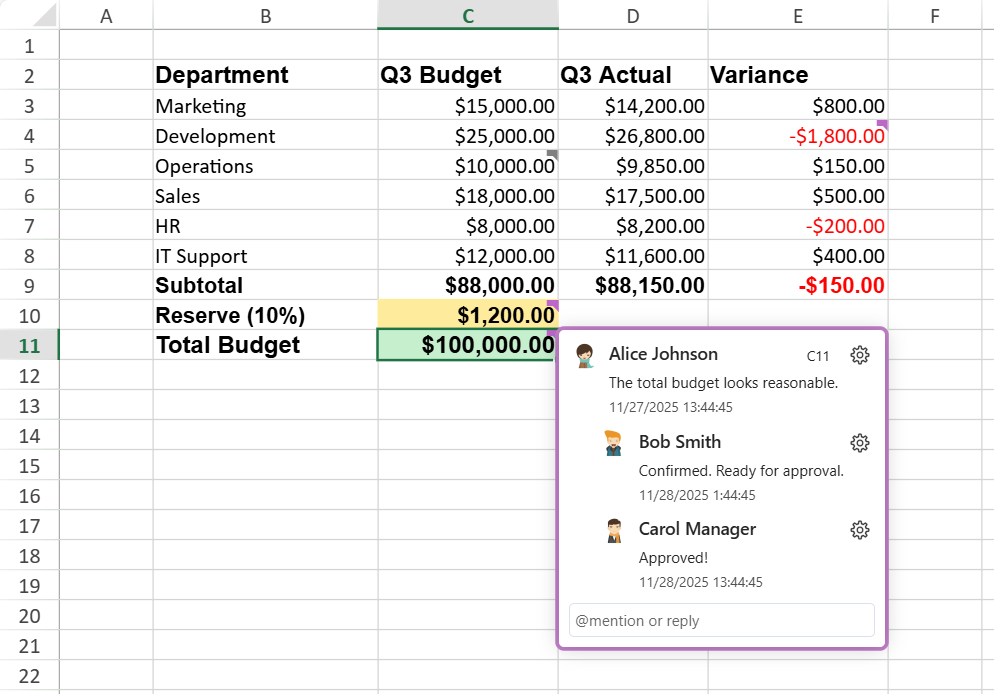
Threaded Comments enable users to add contextual discussions to specific cells and reply to comments in threads. Each thread serves as a conversation container composed of replies, helping teams discuss, review, and resolve issues efficiently.
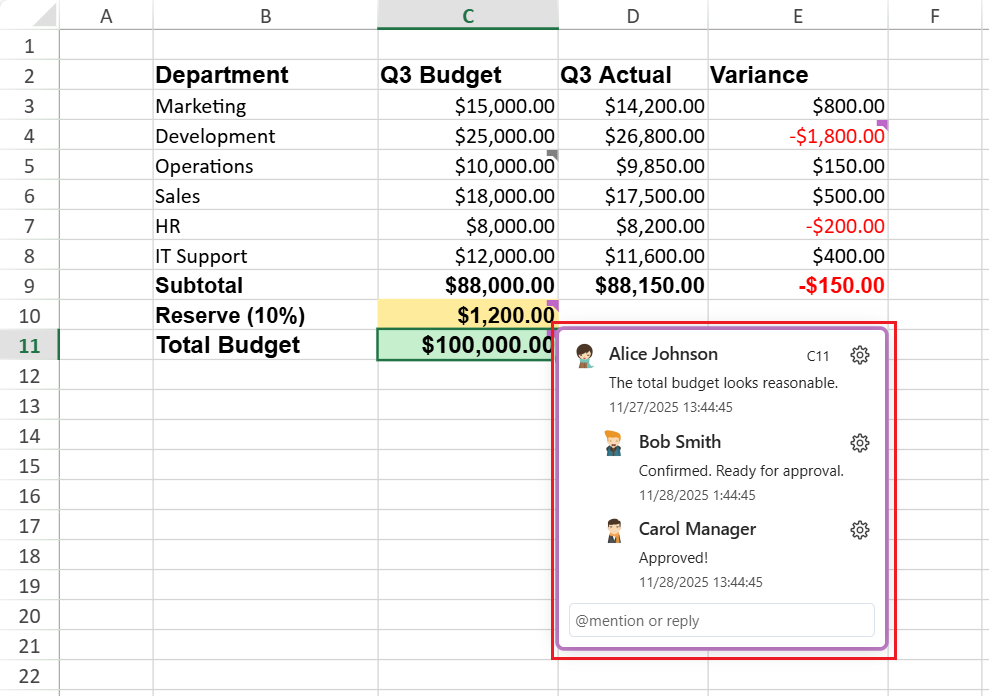
The example below shows how team members can use threaded comments to review a quarterly budget.
Key Benefits
Enables collaboration and contextual feedback.
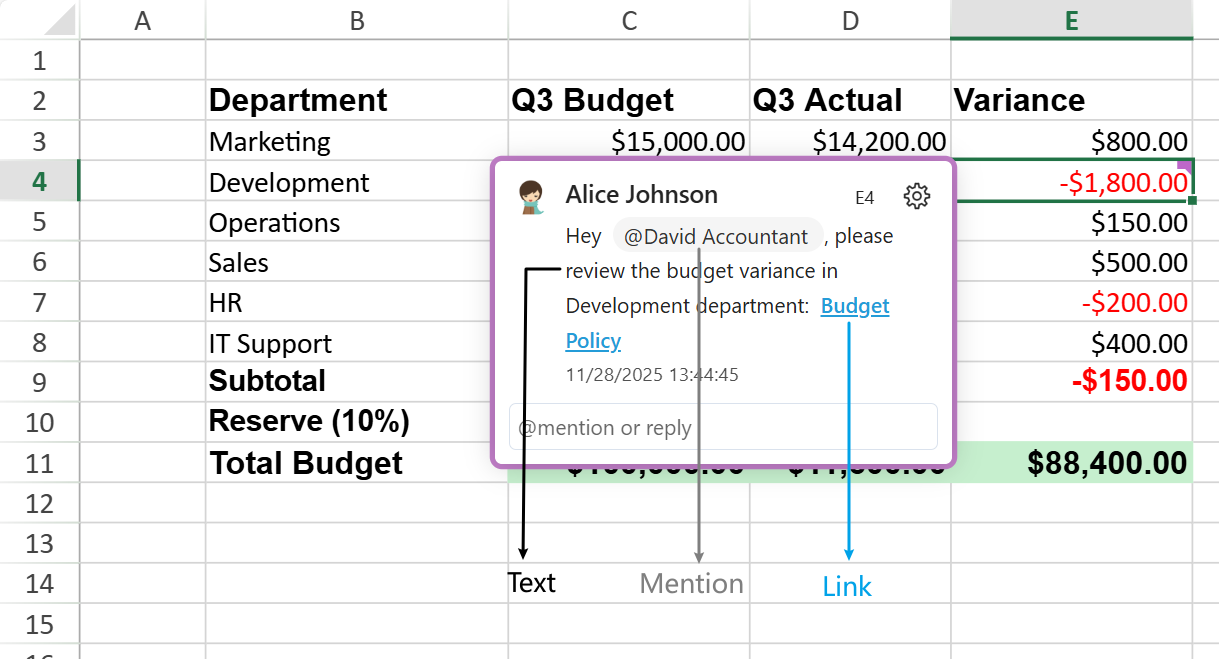
Supports user mentions and hyperlinks in replies.
Provides event-based integration and undo/redo support.
Maintains compatibility with SpreadJS APIs and Excel export.
Dependencies
You can include the Threaded Comments either by referencing the all‑in‑one bundle or by loading the required sub‑modules individually.
Option 1 – Use the full package
If you reference the complete library file, such as:
<script src="gc.spread.sheets.all.<version>.min.js"></script>Option 2 – Use modular packages
When you choose to include individual modules, make sure to load the following packages to enable the Threaded Comments feature:
<script src="gc.spread.sheets.comments.<version>.min.js"></script>
<script src="gc.spread.sheets.components.<version>.min.js"></script>
<script src="gc.spread.sheets.threadedcomments.<version>.min.js"></script>
Note:
This feature is available starting from SpreadJS v19.0 or later.
Threaded Comments rely on the GC.Spread.Common.UserManager component to identify the current user who creates or replies to a comment.
If no user is explicitly configured, a default Guest user is generated automatically.
To learn how to configure and manage users globally, see User Management Feature.
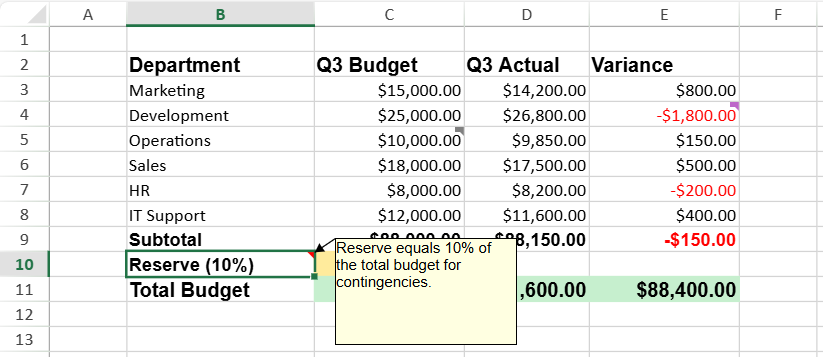
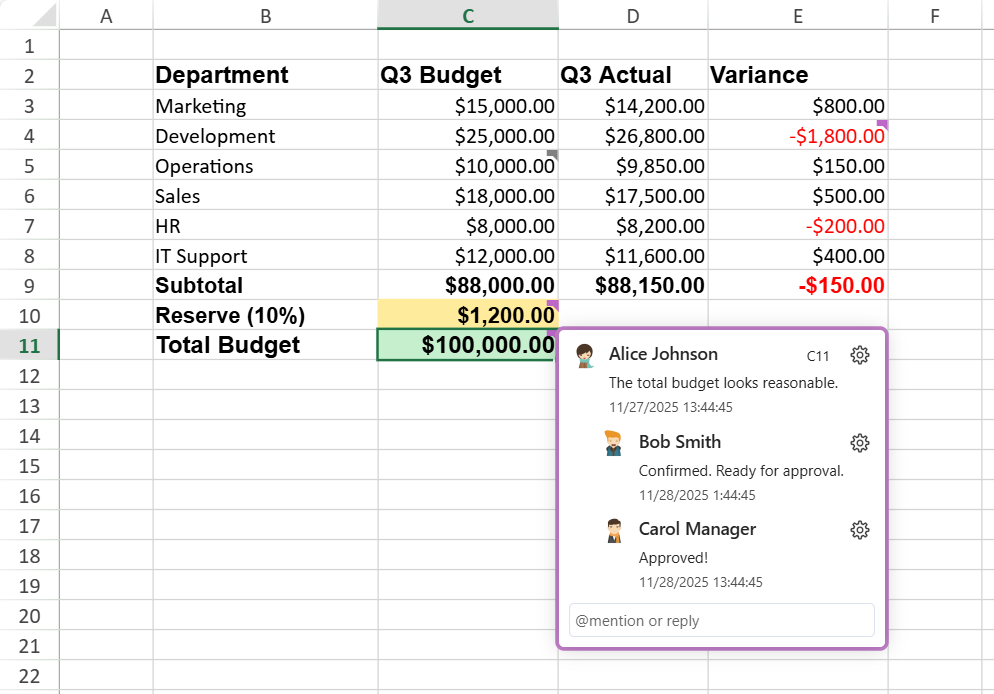
Comment vs. Threaded Comment
Before diving into the structure and APIs, let’s clarify how threaded comments differ from the traditional cell comments (notes) in SpreadJS.
Type | Description | Typical Use | Icon | Example |
|---|---|---|---|---|
Comment | A single text note attached to a cell. It does not support replies or mentions. Similar to Excel’s “Note.” | Quick annotation or developer hint |
(Icon color/size customizable via API) |
|
Threaded Comment | A discussion thread attached to a cell that supports multiple replies, mentions ( | Collaboration, review, or multi‑user discussion |
(Fixed style, auto status color) |
|



Notes:
Both Comment and Threaded Comment types can exist within the same workbook, but they are managed by different APIs and modules.
A cell can contain only one type of comment — adding one automatically replaces the other.
Architecture Overview
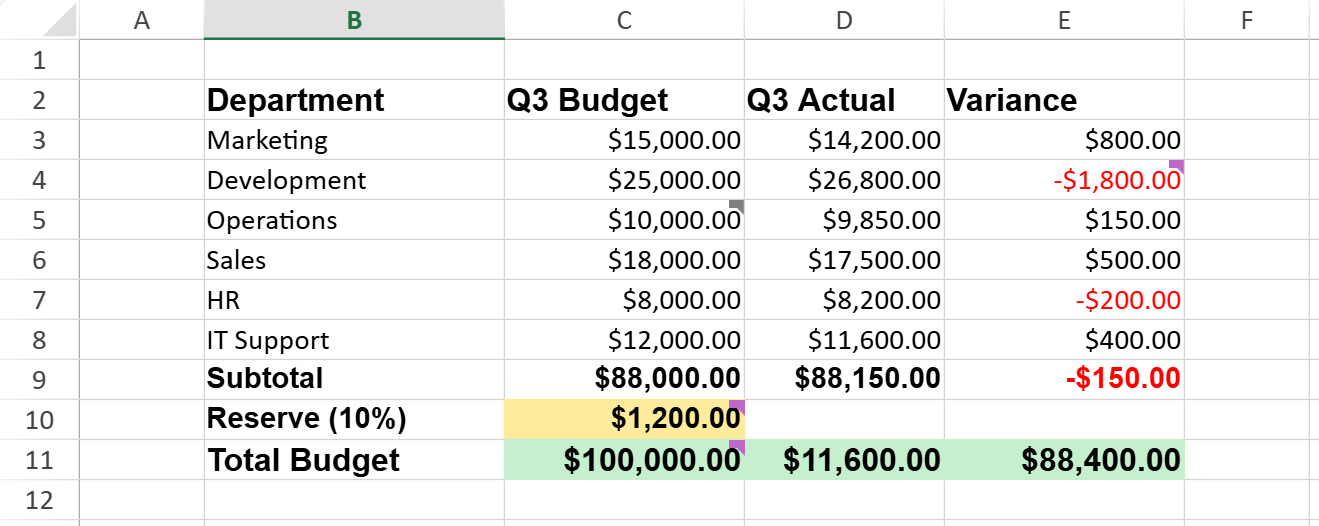
The following table summarizes the core components of the threaded comment architecture.
Component | Description | Illustration |
|---|---|---|
Comment Manager | Manages all threaded comments in a sheet. Acts as the entry point for thread creation and lookup. |
|
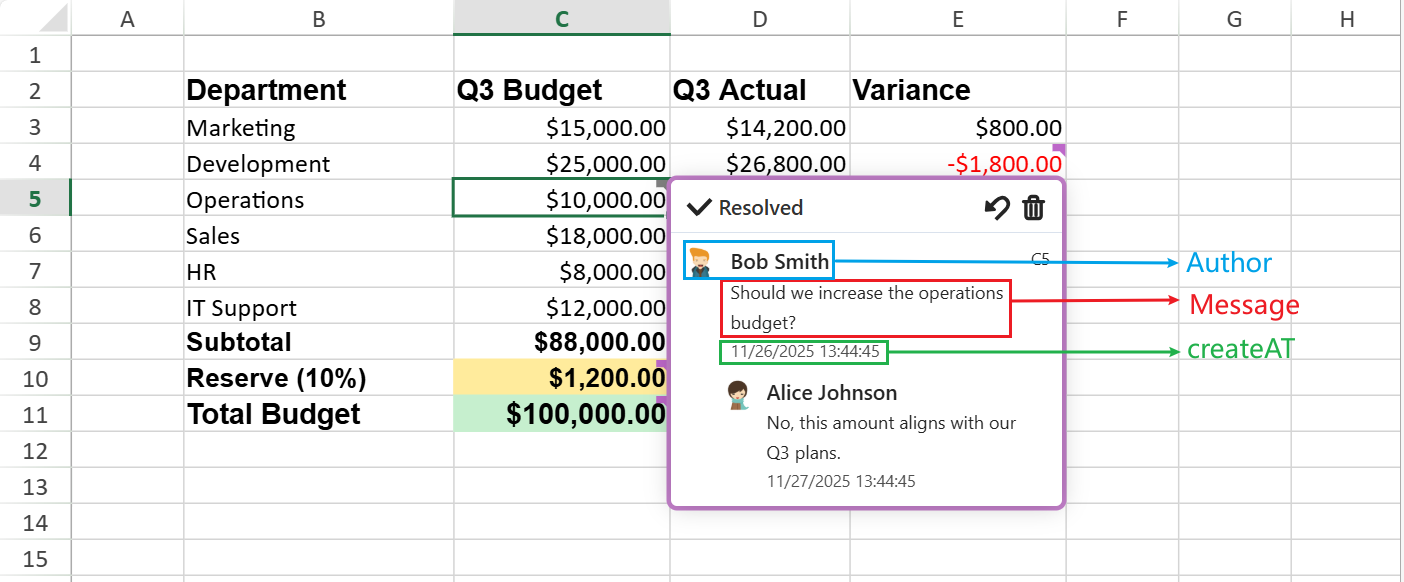
Thread | A comment thread bound to a specific cell. Holds multiple comments and tracks the resolved state. |
|
Comment | A single message within a thread, including message, createdAt, and author. The author supports id, first name, last name, email, and avatar. |
|
Content Blocks | Define the internal structure of message content: text, mention (@), and link blocks. |
|
User Interface Operations
These operations are available through the UI and are also accessible via the related APIs.
Action | Description |
|---|---|
Add Threaded Comment | Creates a new comment thread in the selected cell. The thread includes author information and timestamp. |
Reply | Adds a response inside an existing thread. Replies are appended in chronological order. |
Edit/Update | Modifies an existing comment or reply. Edited messages preserve their original timestamps. |
Delete | Removes a comment or reply. Authorized users can delete others’ entries when permitted. |
Resolve/Reopen | Marks a thread as resolved (disables new replies) or reopens it for further discussion. |
Copy/Cut/Paste | Keeps threaded comments when copying, cutting, or pasting cells. |
Undo/Redo | Reverses or reapplies the last add, edit, or delete operations. |
Detailed Functionality
Events
Event | Trigger |
|---|---|
| Fires before a thread or reply is updated. |
| Fires after a thread or reply is updated. |
| Occurs when a mention is about to be triggered. Supports cancellation. Available since v19.1.0. |
| Fires after a reply containing mentions is submitted. |
Collaboration Model
Editors can add, edit, delete, and resolve threaded comments.
Viewers have read‑only access (no operator buttons or reply editor).
Mentions (@)
Activation Requirement
The mention feature requires GC.Spread.Common.UserManager to be configured.
If
UserManageris not configured, the mention feature is disabled.Typing
@inserts the character as plain text and does not trigger the mention user‑list popup. No mention block is created, and mention‑related events will not fire.
If
UserManageris configured, the mention feature becomes available in the threaded comment editor.
Interaction Flow
Users can mention collaborators in replies by typing @ in the threaded comment editor.
When @ is typed:
The
UserMentioningevent fires synchronously before the mention user‑list popup is displayed.Developers can set
args.cancel = trueto suppress the popup and treat@as plain text.If the mention is cancelled, no mention block is created and the
UserMentionedevent will not fire.
When a reply containing one or more mentions is submitted:
The
UserMentionedevent is triggered.
The mention list displays up to 20 users.
If more matches are available, a prompt indicates additional results.
Resolved State
Threads include a resolved flag.
Purple Flag: Unresolved
Gray Flag: Resolved
Comment Behavior & Limitations
Editing Rules
Multiple threaded comments can be edited at the same time.
Unsaved edits are discarded when the comment is hidden.
No explicit editing‑state flag is maintained.
Mentions and Links
Clicking a mention (@user) does not open a user information card.
Hyperlink editing behavior varies by browser:
Safari: Automatically converts a pasted or typed URL to a hyperlink after posting.
Other browsers: Convert text to hyperlinks when Space or Enter is pressed.
Export and Compatibility Limits
When exporting to Excel, user IDs must comply with the UUID format:
{XXXXXXXX‑XXXX‑XXXX‑XXXX‑XXXXXXXXXXXX}If a user ID does not meet this format, SpreadJS adjusts it to fit Excel’s specification.
This may result in loss of edit permissions after re‑import because the user ID changes.
Structural Limitation
Threaded comments currently do not support nested structures; all replies remain at a single (flat) level.
Presence Limitation
Threaded comments do not support real‑time presence or live editing indicators.
Keyboard Shortcuts
The following keyboard shortcuts are available when working with threaded comments:
Shortcut | Function |
|---|---|
Ctrl + Alt + M | Insert a new threaded comment on the selected cell. |
Ctrl + Enter | Submit the reply being edited. |
Enter | Expand or collapse the selected comment thread. |
Esc | Cancel reply editing without saving changes. |
Note: On macOS, use Command (⌘) instead of Ctrl.
Underlying APIs
Threaded Comments rely on several key classes and events within SpreadJS.
Core Objects
Class | Purpose |
|---|---|
| Manage all comment threads linked to worksheet cells. |
| Represent a single threaded comment or reply; edit content and mark as resolved. |
| Expose comment‑related events such as |
| Configure and track the current user for comment authorship. |
Additional Support
GC.Spread.Sheets.Search and GC.Spread.Sheets classes extend common operations—search, copy, cut, clear, and used range—to include threaded‑comment data.
Using Code Examples
This section demonstrates several basic operations for threaded comments using the SpreadJS API.
Basic Example — Add a Comment
This creates a new threaded comment in cell E3 authored by the current user.
The comment indicator automatically appears on the cell.
// Initialize workbook
const spread = new GC.Spread.Sheets.Workbook("ss");
const sheet = spread.getActiveSheet();

// Define user info
var users = [
        { id: "user1", name: "Alice Johnson", email: "alice.johnson@company.com",},
        { id: "user2", name: "Bob Smith", email: "bob.smith@company.com",}
    ];
GC.Spread.Common.UserManager.configure({
    get: async (userId) => {
        if (userId === undefined) {
            return;
        }
        return new Promise((resolve) => {
            const user = users.find(u => u.id === userId);
            resolve(user);
        });
    },
    search: async (query) => {
        return new Promise((resolve) => {
            resolve(users.filter(u =>
                        u.name.toLowerCase().includes(query.toLowerCase()) ||
                        u.email.toLowerCase().includes(query.toLowerCase())
                    ));
        });
    }
});

// Set current user
GC.Spread.Common.UserManager.current("user1");

// Create a comment
const comment_1 = {
    message: [
       { type: GC.Spread.Sheets.ThreadedComments.ContentType.text, value: "Hey " },
       { type: GC.Spread.Sheets.ThreadedComments.ContentType.mention, userId: "user2" },
       { type: GC.Spread.Sheets.ThreadedComments.ContentType.text, value: ", please review the budget variance in Development department: " },
       { type: GC.Spread.Sheets.ThreadedComments.ContentType.link, href: "https://example.com/budget-policy", text: "Budget Policy" }
    ],
    authorId: "user1",
    createdAt: new Date("2025-12-10T15:44:00")
};

// Add a threaded comment to cell B4
const threadedCommentManager = sheet.threadedComments;
const threadedComment = threadedCommentManager.add(2, 4);
threadedComment.add(comment_1);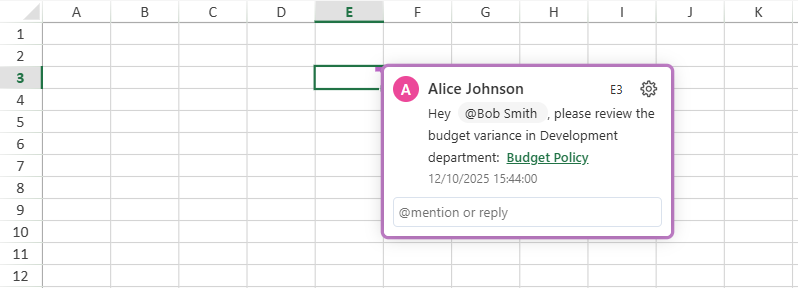
Example — Update, Reply, Change Status, or Delete a Threaded Comment
This example builds on the previous sample.
// Get a specific thread
const thread = threadedCommentManager.get(2, 4);
console.log(thread.row()); // Output: 2

// Create a reply
const reply_1 = {
    message: [
    {type: GC.Spread.Sheets.ThreadedComments.ContentType.text,
        value: "Confirmed. "
    }],
    authorId: "user2",
    createdAt: new Date("2025-12-12T11:47:00")
};

// Add a reply
thread.add(reply_1);

// Edit an existing reply
thread.set(0,{ message: [{ type: GC.Spread.Sheets.ThreadedComments.ContentType.text, value: 'Please verify this value.' }] });

// Delete a reply
thread.remove(1);

// Resolve / reopen
thread.resolved(true)
Example — Handling Threaded Comment Events
Subscribe to events to trigger custom logic.
sheet.bind(GC.Spread.Sheets.Events.ThreadedCommentChanging, function (e, info) {
    // Handle threaded comment property or reply changes
});

// UserMentioning fires when the user types @, before the popup appears.
// Set args.cancel = true to block the popup and treat @ as plain text.
sheet.bind(GC.Spread.Sheets.Events.UserMentioning, function (e, args) {
    args.cancel = true; // suppress the mention user-list popup
});

// UserMentioned fires after a reply containing mentions is submitted.
sheet.bind(GC.Spread.Sheets.Events.UserMentioned, function (e, info) {
    console.log(info.userId); // array of mentioned user IDs
});